Find Broken Links in Google Docs and Google Sheets
Have a spreadsheet full of partner links or a doc with dozens of references? Open it, click the Broken Link Checker icon, and see which links are dead. Every sheet is checked, and the results are ready in seconds.
3 free checks — no signup or card required.
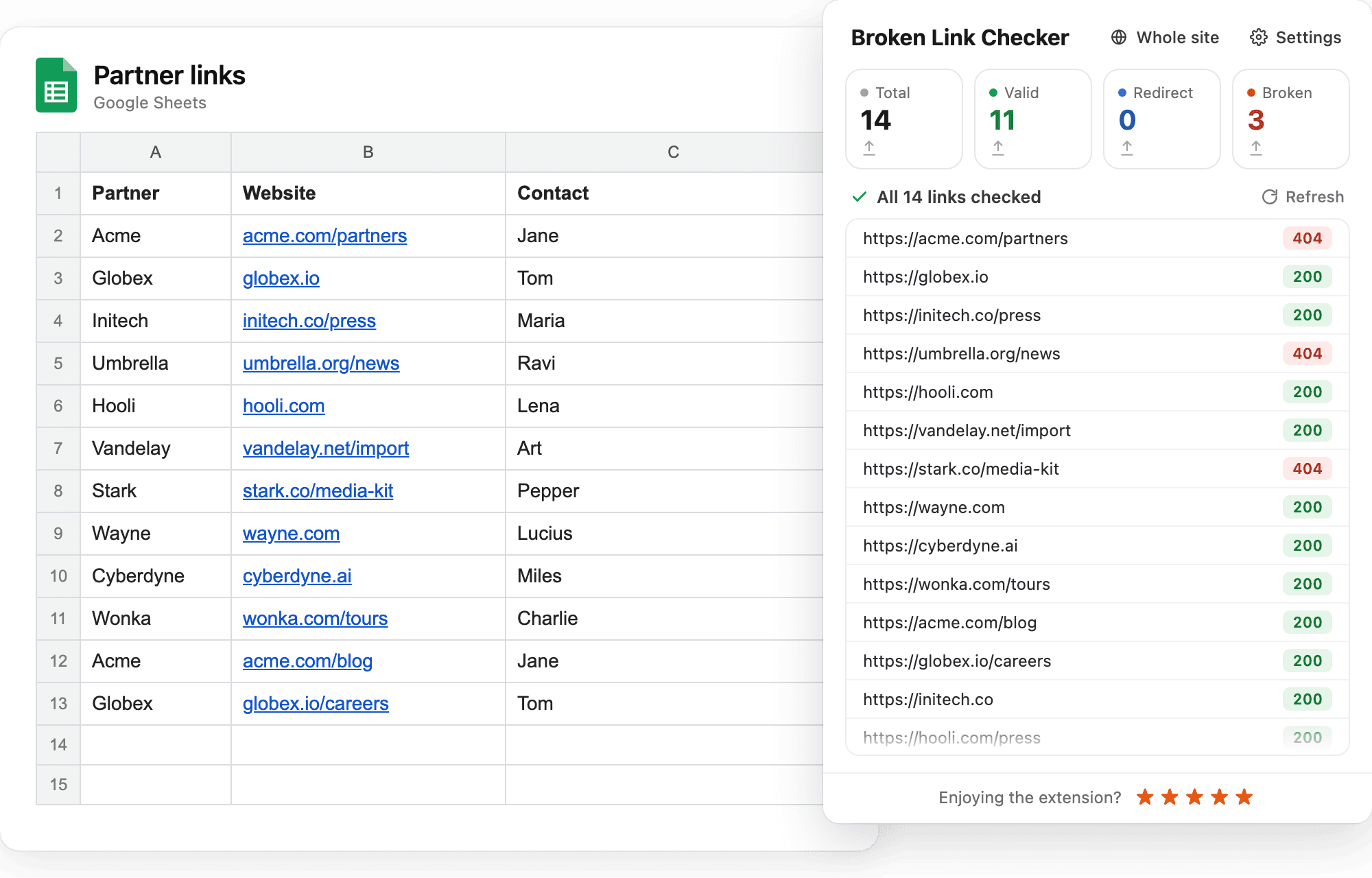
Works where your links live
Partner directories, resource lists, content calendars, backlink trackers: any spreadsheet full of links. Every sheet in the file is checked, not just the one you have open.
Reports, briefs, onboarding guides, internal wikis, and articles waiting to be published. Check every link in the document before you share it.
Download a CSV with every link, its status, and where it leads. Hand it to whoever owns the document, or keep it as a record of what was checked.
Link checks run in your browser. The contents of your documents and the results are never sent to our servers.
Why links in documents break
A spreadsheet of partner websites, a list of resources for new hires, a content calendar with source links, a report full of references: documents like these collect links for months or years. Meanwhile the websites they point to change. Pages get moved, companies rename themselves, articles are taken down. The document looks fine, but a growing share of its links lead nowhere.
Clicking through every link by hand is slow, so nobody does it. Broken Link Checker does it for you. Open the file, click the icon, and every link is tested in seconds. You see which ones are dead, which ones redirect, and which ones are fine.
What you'll see
The extension shows the total number of links found, and how many are valid, redirected, or broken. Below that is the full list with a status next to each link: green for valid, blue for redirects, red for broken. Click Broken at the top to see only the links that need attention.
Redirected links show where they end up, so you can replace an old address with the current one. Broken links show the error, such as 404 for a page that no longer exists. Everything can be exported to CSV with one click.
Common uses
- Partner and vendor lists in Google Sheets, where a dead website link means a lost contact.
- Resource libraries and reading lists shared with a team, a class, or a community.
- Content calendars and outreach trackers with links to published articles, sources, and backlinks.
- Articles and reports drafted in Google Docs, checked once before publishing or sending.
- Onboarding guides and internal wikis that new teammates rely on, where a broken link is a question in your inbox.
Good to know
- It works with Google Docs and Google Sheets, including files shared with you and files published to the web.
- In a spreadsheet, every sheet is checked. In a document, every tab is checked.
- The extension only reads links. It never edits the file.
- Link checks run in your browser. The contents of the file and the results are never sent to our servers.
- The same extension checks any web page and can scan your whole website.
How to check links in a Google Doc or Sheet
Four steps from opening the file to a list of broken links.
Open the document or spreadsheet
Open a Google Doc or Google Sheet in Chrome the way you normally would.
Click the Broken Link Checker icon
Click the extension icon in the Chrome toolbar. The extension reads the links from the file, including every sheet of a spreadsheet, and starts checking them.
Review the results
Links are listed with their status: valid, redirected, or broken. Click Broken to see only the links that fail.
Fix the links or export the list
Update the broken links in the document, or export the results to CSV and send them to the person who owns the file.
Need step-by-step instructions? See our guides to checking links in Google Docs and Google Sheets.
Frequently asked questions
- Do I need to share the document or install anything else?
- No. Open the document or spreadsheet in Chrome as usual and click the extension icon. Nothing is shared, and no add-on or script is installed in Google Docs.
- Does it check every sheet in a spreadsheet?
- Yes. Every sheet in the file is read, not only the one you have open. The result is one list of links for the whole spreadsheet.
- Does it change my document?
- No. The extension only reads the links. It doesn't edit, comment on, or save anything in the file.
- Which links does it find?
- Every link Google shows as clickable in the document or spreadsheet: links attached to text, auto-linked addresses, and links in cells.
- What if a link redirects?
- Redirected links are shown separately from broken ones, with the address they end up at, so you can decide whether to update the link.
- Does it work with documents shared with me?
- Yes, shared documents and spreadsheets are supported. However, if the owner has disabled downloading or copying, the extension may not be able to read the file and check its links.
- Is it free?
- Your first 3 checks are free, with no signup or card required. After that, every paid plan includes unlimited checks in Google Docs and Sheets, page checks, and whole-site scans.
Included in every plan
Google Docs and Sheets, page checks, whole-site scans, and CSV export. Your first 3 checks are free, no card required.
- Unlimited page checks
- Whole-site scans
- Google Docs & Sheets
- CSV export