BrokenLinkCheck.com reviewed: free limits, captcha, report and export. Compare online checkers, a Chrome extension, and desktop crawlers you download.
Read article
 Broken Link Checker for Chrome
Scan every link on the current page in one click, or check your whole website in one go. Find 404s and other broken links, spot redirects, and export a clear CSV report. Works in Google Docs and Sheets too.
3 free checks — no signup or card required.
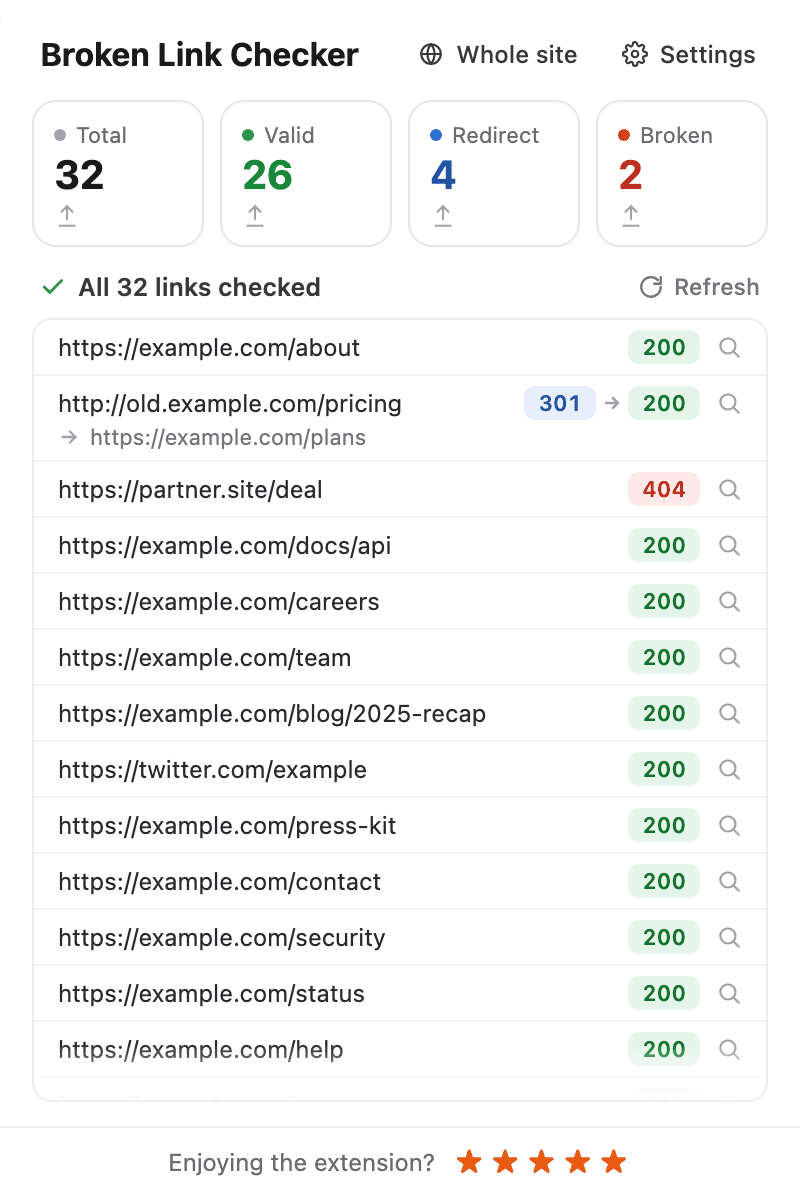
Scans every URL on the page and highlights results with color codes — green for valid, red for broken, blue for redirects.
Enter your site address and get every broken link on every page in one report, with the page where each one was found.
Open a document or spreadsheet, click the icon, and see which links are dead. Every sheet is checked.
Download a CSV report with link text, URL, HTTP status code, and status description. Ready for SEO audits and QA checklists.
Link checks run locally in your browser, and scan results are not sent to our servers.
The extension shows no ads and does not track your browsing activity or the pages you visit.
Open any webpage in Chrome, click the Broken Link Checker icon in the toolbar, and watch as each link gets highlighted with a color-coded status. Use filters to narrow down by status — valid, redirect, or broken. The extension checks anchor tags, navigation menus, meta links, and even onclick handlers.
Need more than one page? Click "Whole site", enter your site address, and click Start scan. The extension goes through your pages one by one and tests every link it finds. The report shows every broken link and the pages it's on, so you know exactly where to fix it. Stop whenever you want, come back to the report later, or learn how the whole-site scan works.
It works in Google Docs and Google Sheets, too. Open a document or a spreadsheet, click the icon, and see which links are dead — every sheet of a spreadsheet is checked. More about checking links in Docs and Sheets.
When you're done, click "Export" to download a CSV file with all results. Each row includes the link text, URL, HTTP status code, and status description — ready for SEO audits, client reports, QA checklists, or internal documentation. Whole-site reports also show the page where each link was found.
Built for SEO specialists checking pages before publishing, developers validating links during staging reviews, QA testers running pre-release checks, content editors hunting down outdated references, and marketing teams making sure every CTA actually works.
Check the page you're on in one click, or let Broken Link Checker go through your entire website and bring back every broken link in one report.
Best for a quick look at the page you're editing
Best for finding every broken link across your website
Both are included in every plan.
Find the link problems that slow down publishing, releases, and site maintenance.
Audit a landing page or a whole site and export clear CSV results for your team or clients.
Check staging and production pages for broken paths before and after a release.
Catch outdated references and broken calls to action before visitors find them.
Scan your whole site after a redesign, domain migration, or major content update.
Every plan includes every feature. Your first 3 checks are free — no card required.
All features included
$1.58 / month
All features included
Install the extension first, then choose and purchase your plan inside Broken Link Checker.
Very nice! Good for building sites!
January 28, 2026
Great extension. Thank you!
December 12, 2025
I had a page with a bunch of links on it and this extension helped me quickly visually see which ones were bad without checking every one of them. Thank you for building it!
November 19, 2025
Super convenient and easy to use.
November 11, 2025
Very helpful! Just saved me loads of time — after moving the site to a new domain, I managed to find and fix all the broken links in a couple of hours, not days.
September 12, 2025
Amazing!
August 25, 2025
It just works!
August 4, 2025
For version 1.0 — it looks great and runs smoothly. Delivers 100% on its task. Thanks a lot!
June 24, 2025
Simple and effective. I use it every time before publishing a page — catches broken links I would have missed.
June 25, 2025
What to expect before you install, scan, or choose a plan.
Both. Click the icon to check the page you're on, or click Whole site to check every page of your website in one go. The report shows which pages each broken link is on.
Internal and external links on the page, including navigation menus and calls to action. With Whole site, the same check runs on every page of your website. Color-coded results help you spot broken links and redirects at a glance.
Yes. Open a document or spreadsheet, click the icon, and see which links are broken. In a spreadsheet, every sheet is checked.
About 10–15 minutes per 1,000 pages. You can stop at any time, keep what's already checked, and continue later.
Yes. Export a CSV report with each link's text, URL, HTTP status code, and status description. Share it with your developer or content team so they know which links to fix.
Yes. Your first 3 link checks are free, with no signup or card required.
Every paid plan includes unlimited page checks, whole-site scans, Google Docs and Sheets, and CSV export. Only the billing period changes.
Install Broken Link Checker from the Chrome Web Store, then choose and purchase your plan inside the extension. There is no separate checkout on this website.
No. The extension does not track the pages you visit or add advertising to your browser.
No. Link checks run locally in your browser, and scan results are not sent to our servers. The same is true for whole-site scans and for Google Docs and Sheets.
Choose Monthly for flexibility, Yearly for the lowest recurring price, or Lifetime if you prefer a single payment.
Practical guides on finding, fixing, and preventing broken links — written for SEOs, developers, and content teams.
See all articles →BrokenLinkCheck.com reviewed: free limits, captcha, report and export. Compare online checkers, a Chrome extension, and desktop crawlers you download.
Check My Links checks the page you have open in Chrome for free. See what it does in 2026, where it stops, and when a whole-site link checker is the better fit.
Google has no broken link checker for site owners. See what Search Console, Google Cloud, Analytics, DevTools, and Lighthouse can find, and how to check every link.
Find broken links inside Google Docs using a Chrome extension or Google Apps Script. Check sources before sharing, understand errors, and review results.
Check links in Google Sheets with a Chrome extension or a ready-to-use Apps Script. Find errors, review redirects, and create a URL status report.
Compare Broken Link Checker and Screaming Frog for finding broken links: browser workflow, source pages, exports, pricing, crawl limits, and SEO features.
Contact us about the extension, pricing, payments, or anything else you need help with.
[email protected]Install the Chrome extension and start scanning any page, or your whole website, in seconds. Your first 3 checks are free — no signup or card required.