How to Check All Links in a Google Doc
To check links inside a Google Doc, open the file in Chrome and run Broken Link Checker. It lists the links and their results so you can review failures without opening every source manually. If you prefer a script, the Apps Script example below extracts HTTP(S) text hyperlinks from document tab bodies and logs their response codes.
This guide is for links inside a document: citations, resources, partner pages, and references. If somebody cannot open the Google Doc itself, first check that file's sharing permissions and the account they are using.
Method 1: Check the Document with a Chrome Extension
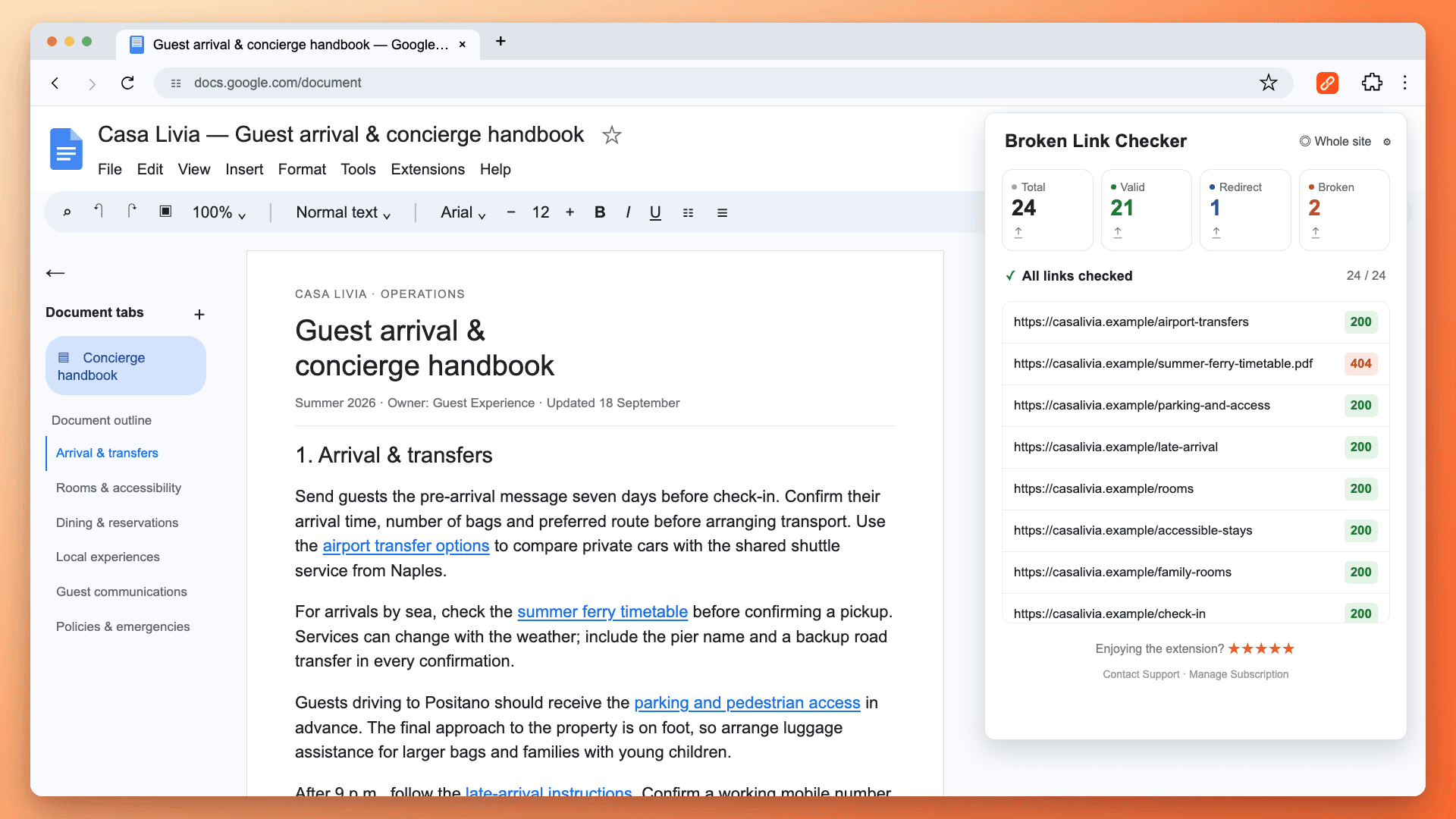
Suppose you are sharing a guest-arrival handbook. It links to airport transfers, a ferry timetable, and parking instructions. Checking these destinations before sending the document helps recipients reach the material you intended.
- Install Broken Link Checker and open your document in Chrome.
- Click the extension icon. Pin it from Chrome's Extensions menu if needed.
- Let the check finish. Select Broken to review failed links and Redirect to review moved destinations.
- Open suspicious destinations manually. Edit the links in the document or export the results to CSV for its author.
- Run another check after the edits.
The extension can read links attached to text, such as “resource page,” as well as clickable addresses. You do not have to rewrite your document as a URL list. It reads Google's exported representation of the file; owner restrictions on copying or downloading can prevent that access.
The check does not edit the document, add comments, or automatically replace broken references. CSV export gives you a separate report. Your first 3 checks are free; continued use requires a paid plan. Read more about checking Google Docs and Sheets.
From a Failed Result to a Corrected Reference
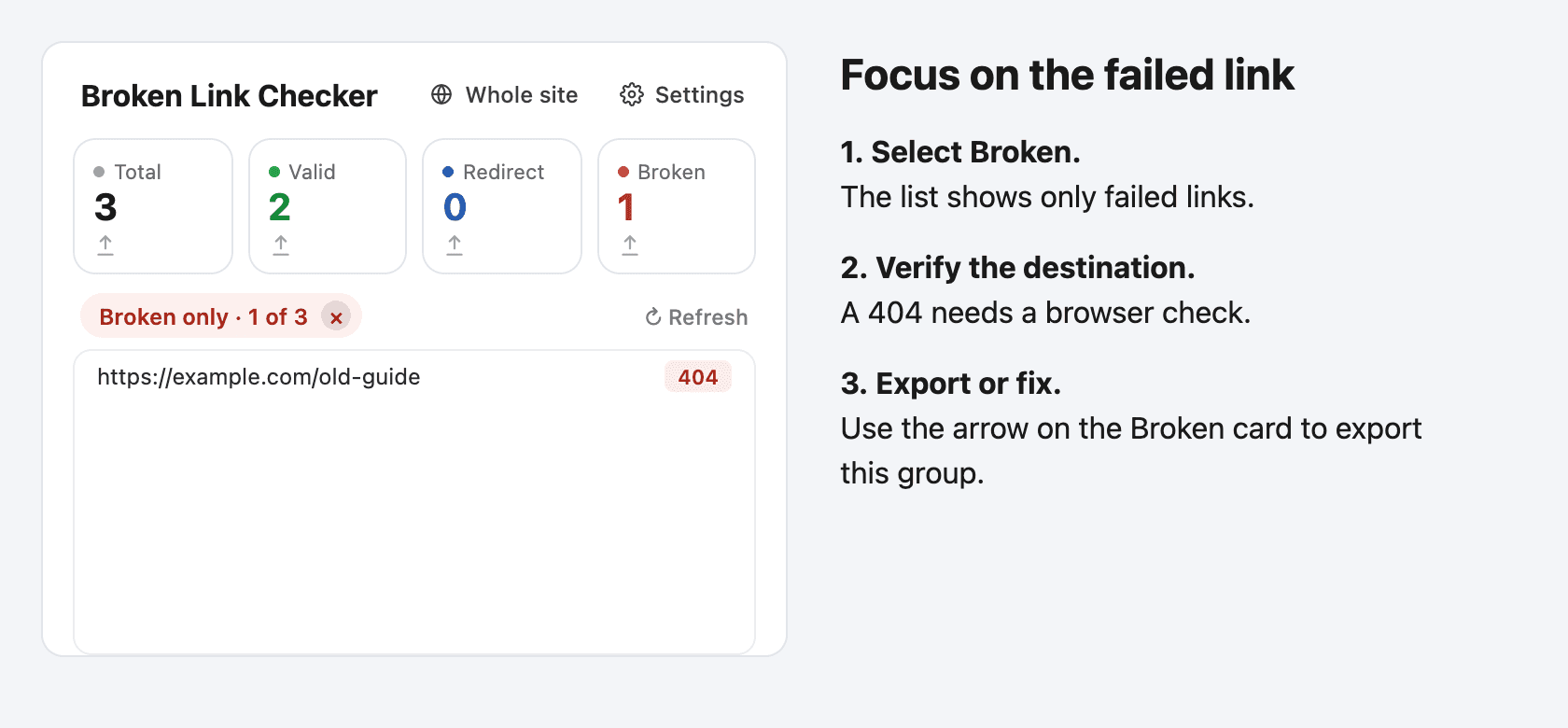
For a reference labeled “old guide,” use the failed address to identify the link that needs attention. Open that destination first to confirm it is missing. Then return to the document, select the linked text, and edit its destination to the current guide. Check that the new guide actually supports the surrounding instructions before saving the change.
Run the extension again after editing. If the replacement responds successfully, it should no longer appear as the old failed destination. You still need to review access permissions for private resources: a successful response alone cannot tell you whether a teammate can read the guide.
Do I Have to Make the Document Public?
No. Open it under an account that already has access. The extension processes the check in your browser and does not send document contents or results to our servers. It still requests the file from Google and tests destinations by contacting linked websites.
A successful link check does not establish that every reader can access a private file. Before sharing an onboarding guide, review permissions on its linked resources as well.
Method 2: Check Document Links with Google Apps Script
Use this approach if you want to inspect or adapt the code yourself. It creates a report in the Apps Script Execution log and does not modify the source document.
The sample reads text hyperlinks in the body of each document tab, including nested tabs and ordinary text inside tables. It checks each unique URL once and reports which tab paths contain it. Google's document tabs guide explains why reading only one body is insufficient for a document with several tabs.
It does not inspect comments, headers, footers, footnotes, linked images, drawings, smart chips, internal bookmarks, or plain addresses that have not been turned into hyperlinks. These need a separate review. It also does not test whether a heading fragment exists on a destination page.
Install and Run the Script
- Open a Google Doc you can edit. Start with a short document containing a few linked references.
- Choose Extensions → Apps Script to create a document-bound script.
- In a new project, replace the default stub with all the code below. Preserve existing project code by adding a new script file if necessary.
- Save, select checkDocumentLinks, and click Run. You do not need to deploy a web app.
- Review the authorization request for document access and external URL requests. The code reads document content and sends requests to linked destinations. Only authorize code you have reviewed; organization policies may block scripts.
- Open Execution log in the editor. Each result contains the URL, response status, a short explanation, and the document tabs where it occurs.
function checkDocumentLinks() {
  const doc = DocumentApp.getActiveDocument();
  const links = new Map();
  function collect(element, tabName) {
    if (element.getType() === DocumentApp.ElementType.TEXT) {
      const text = element.asText();
      for (const offset of text.getTextAttributeIndices()) {
        const url = text.getLinkUrl(offset);
        if (url && /^https?:\/\//i.test(url)) {
          if (!links.has(url)) links.set(url, new Set());
          links.get(url).add(tabName);
        }
      }
    } else if (typeof element.getNumChildren === 'function') {
      for (let i = 0; i < element.getNumChildren(); i++) {
        collect(element.getChild(i), tabName);
      }
    }
  }
  function visit(tab, parent) {
    const name = parent ? parent + ' / ' + tab.getTitle() : tab.getTitle();
    collect(tab.asDocumentTab().getBody(), name);
    for (const child of tab.getChildTabs()) visit(child, name);
  }
  for (const tab of doc.getTabs()) visit(tab, '');
  if (links.size > 50) {
    throw new Error('This sample supports up to 50 unique URLs. Use a smaller document copy.');
  }
  console.log('Unique HTTP(S) text links found: ' + links.size);
  for (const [url, tabs] of links) {
    const [status, meaning] = checkUrl(url);
    console.log(JSON.stringify({url, status, meaning, tabs: [...tabs]}));
  }
  console.log('Check complete. Review redirects and errors manually.');
}

function checkUrl(url) {
  if (!/^https?:\/\/[^\s]+$/i.test(url)) {
    return ['Skipped', 'Use a complete http:// or https:// URL'];
  }
  try {
    const code = UrlFetchApp.fetch(url, {
      muteHttpExceptions: true,
      followRedirects: false
    }).getResponseCode();
    let note = 'Review response';
    if (code >= 200 && code < 300) note = 'Responded; verify the content';
    else if (code >= 300 && code < 400) note = 'Redirect; check destination';
    else if (code === 404 || code === 410) note = 'Missing; verify in browser';
    else if (code === 401 || code === 403) note = 'Access denied; review manually';
    else if (code === 429) note = 'Rate limited; retry later';
    else if (code >= 500) note = 'Server error; retry later';
    return [code, note];
  } catch (error) {
    return ['Fetch failed', 'Network, quota, or URL issue; retry manually'];
  }
}
Read the Output
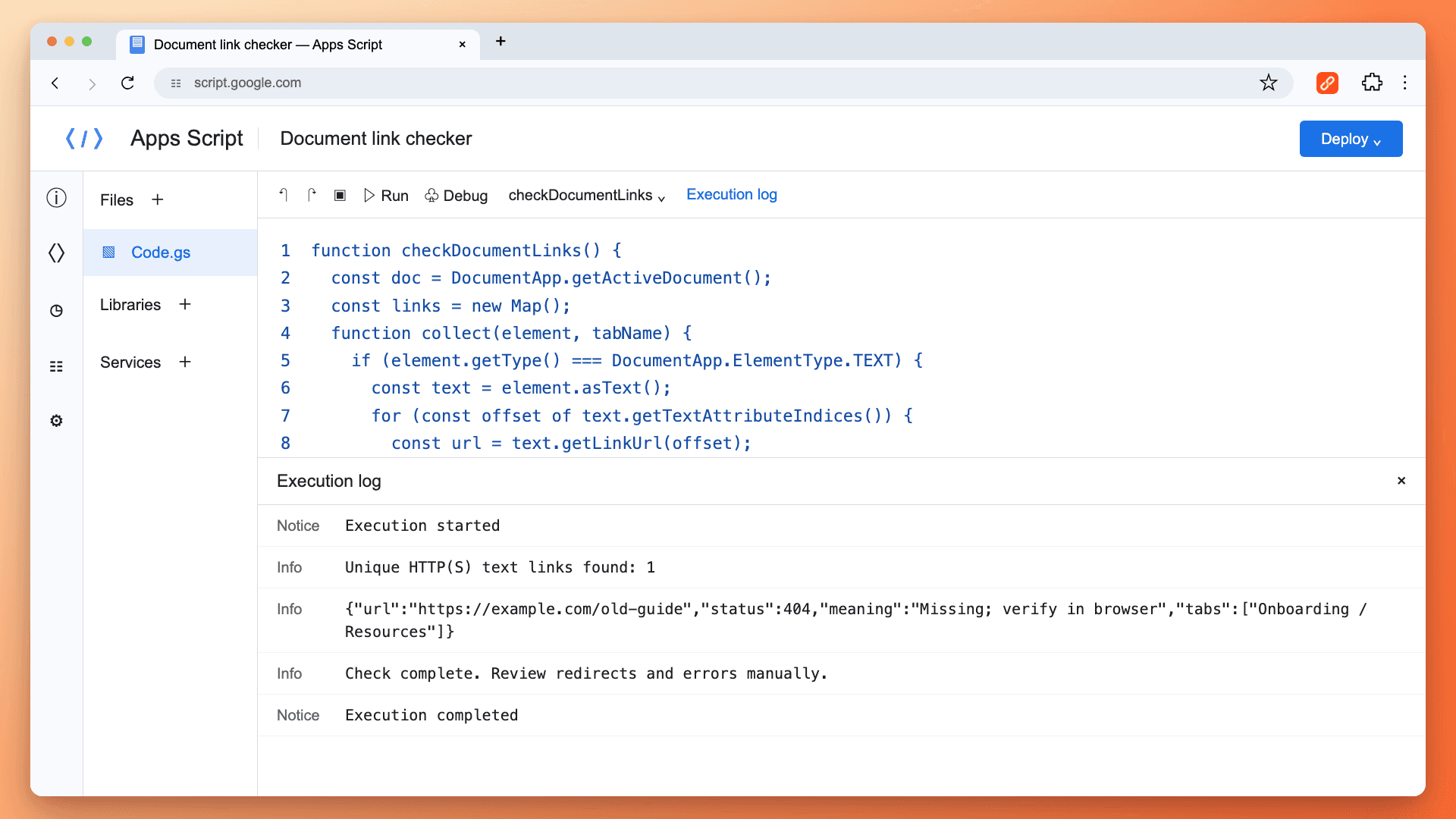
The first Info line tells you how many unique HTTP(S) text links the script found. Each JSON result then identifies url, status, meaning, and tabs. In this example, the address returned 404 and appears under Onboarding → Resources. The final Check complete line confirms that the loop finished; it does not mean every link is healthy.
Find the affected reference in the named tab and open its target to confirm the result. The report identifies tab paths, not exact character positions. Several occurrences in the same tab appear as one tab entry for that URL.
The extractor reads link attributes on text runs rather than searching for URL-looking words. That is what lets it find a destination behind a label such as “old guide.” The relevant methods are documented in Google's Text reference.
If the Script Does Not Run as Expected
The function is missing from the dropdown. Save the complete code in the editor and check for syntax errors. Select checkDocumentLinks as the entry point. The separate checkUrl helper needs an argument and should not be run on its own from the editor.
Google requests authorization or your organization blocks execution. Review the permissions and code in your own project. This workflow needs access to the document and permission to request external URLs. An administrator may need to approve script use; changing the document's public sharing setting is not a fix.
The log says zero links were found. The sample reads HTTP(S) hyperlink attributes on body text. A printed address that is not clickable, a smart chip, or a link inside a comment is outside its extraction scope. Try an ordinary text hyperlink in the body to check that you are running the script from the intended document.
The script reports more than 50 unique URLs. It stops before requesting them. Use a smaller document copy containing the section you want to inspect, or use the extension for the file. The limit applies to distinct addresses, so repeated references to the same URL count once.
The log stops before “Check complete.” Treat the results as partial. Check the execution status, then try a smaller document copy if the run timed out. Do not interpret URLs missing from the partial log as healthy.
What the Script Can and Cannot Tell You
The checker records the initial HTTP response. Redirects are left visible; it does not follow the redirect chain to evaluate its final destination. The request behavior is documented in Google's URL Fetch reference.
| Result | What to do |
|---|---|
| 200–299 | Verify the page still contains the intended source material |
| 300–399 | Open the link and check the final destination |
| 404 or 410 | Confirm it is missing, then replace or remove the reference |
| 401 or 403 | Check access permissions or automated-request blocking |
| 429 | Retry later after the rate limit has cleared |
| 5xx or Fetch failed | Retry and investigate; do not assume permanent deletion |
Requests run through Google, not through your signed-in browser session. A private resource may reject the script even though you can open it. Conversely, a login screen can return 200 without granting your reader access to the content.
The sample stops before checking documents with more than 50 unique HTTP(S) text links. For a larger document, use a smaller copy or the extension. Ordinary Apps Script runs have a six-minute execution limit and daily request quotas; even fewer than 50 slow destinations can exceed the runtime. Results already logged remain partial if execution stops. Only a final Check complete message indicates that the loop finished. Consult Google's quota documentation for current limits.
Fix the Reference, Then Check Again
For a missing external source, look for its current page on the original publisher's website. Replace the old address if the replacement supports the same claim. If the evidence is gone, revise the surrounding statement or remove the reference. A working but irrelevant URL is not a useful repair.
For internal resources, ask the owner to restore access or supply the correct replacement. Do not make a private resource public simply to make a checker return a successful status.
After editing, repeat the link check and manually review any unresolved redirects or access errors. See what broken links are for more context on different failure types.
Frequently Asked Questions
Does Checking a Link Verify the Source Is Accurate?
No. It checks a response, not the truth or relevance of the content. An accessible source can be outdated, replaced, or unrelated to the sentence citing it.
Can I Check a View-Only Document?
The extension can work with shared documents when Google's file access permits reading them. The bound-script workflow requires editing access. Downloading or copying restrictions can also prevent the extension from reading a file.
Will the Extension Fix My Links Automatically?
No. You review the results and decide which references to update. It does not change the document.
Can I Check a Spreadsheet or a Whole Website?
Yes. Use the separate Google Sheets guide for spreadsheet links. For pages on a public site, use whole-site scanning; that discovers website pages rather than reading a document.

Pavel Molyanov
Creator of Broken Link Checker
Content marketer with 10+ years of experience. Founder of a content marketing agency. Writing about SEO, content workflows, and website maintenance.

Check Your Links in One Click
Broken Link Checker finds broken links and redirects on any page or across your whole website, and works in Google Docs and Sheets. Try 3 checks free, with no signup or card required.