Check Your Whole Website for Broken Links
Find broken links across your website and see which pages need fixing. Enter your site address, choose a page limit, and start the scan — right in Chrome.
3 free checks — no signup or card required.
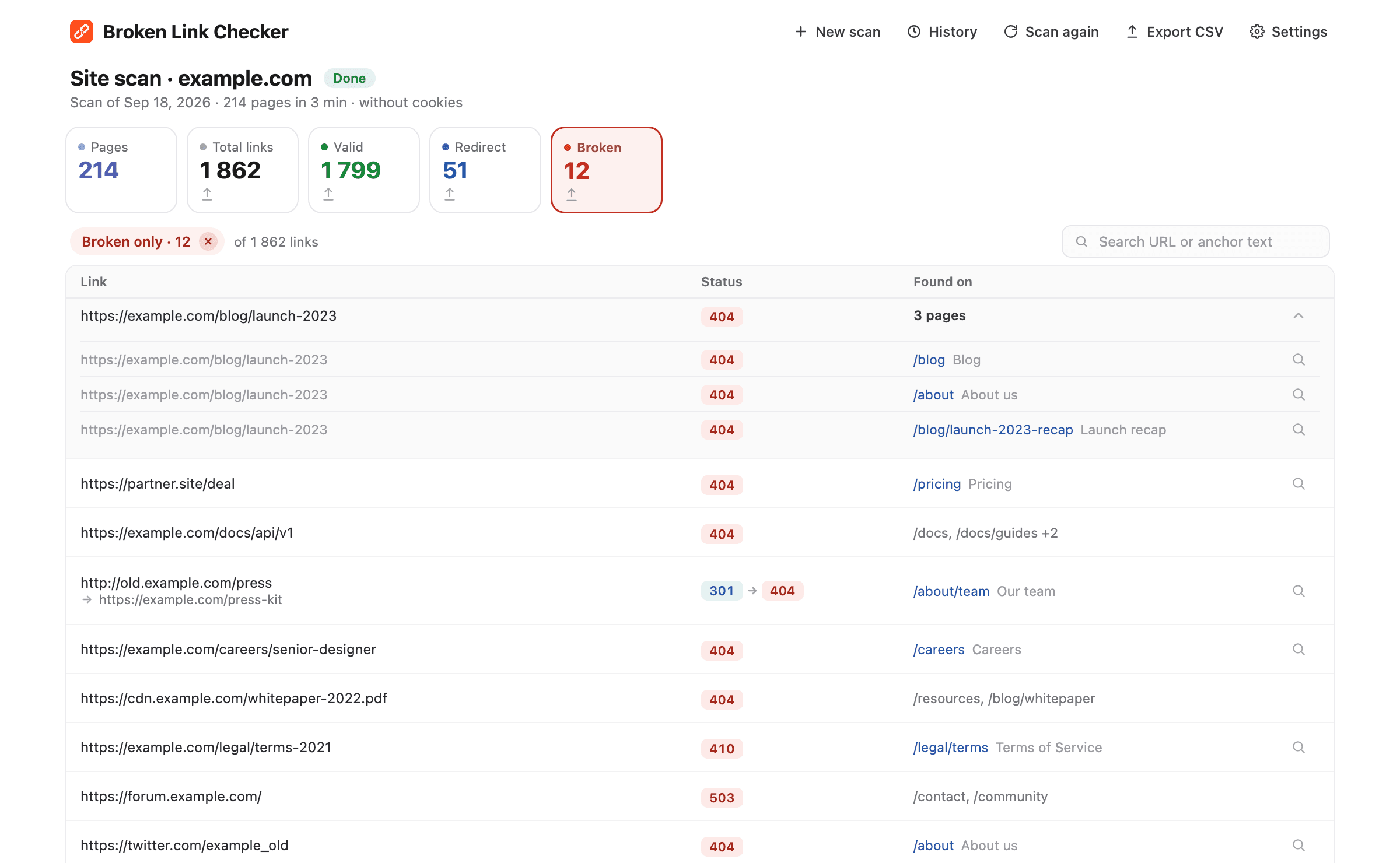
What you get
Enter your site address and the extension goes through your pages one by one, testing every link it finds: menus, buttons, footer links, links inside articles, and links to other websites.
Every broken link comes with the pages it was found on. Click a page and it opens with the link highlighted, so you can fix it right away instead of searching for it.
The report stays in your browser. Stop a scan whenever you want, keep what's already checked, and continue later. The last ten scans of each site are kept.
Export all links or only the broken ones. Each row includes the link, its status, and the page it was found on, so a developer or content editor knows what to fix.
Why check the whole site, not just one page
Broken links rarely live where you expect them. A product you removed last year is still linked from three old blog posts. A partner changed their domain and every mention of them on your site now leads to an error page. A PDF was moved and the link in your footer has been dead for months. Visitors hit these dead ends, leave, and rarely tell you about it.
Checking pages one at a time works for the page you're editing right now. It doesn't tell you what's broken on the other two hundred pages. The whole-site scan does: it starts from the address you enter, follows every internal link, reads your sitemap, and tests every link it finds along the way. When it's done, you have one list of everything that's broken and where it lives.
What the report shows
The report opens in its own tab, so it doesn't get in the way of your work. At the top you see how many pages were checked and how many links were found, split into valid, redirected, and broken. Click any of these to filter the list, or type part of a URL or link text into the search box to find a specific link.
Each broken link shows the pages it was found on. A link that appears on one page opens that page with the link highlighted in red. A link that appears on many pages expands into a list of those pages, each one a click away. Redirected links show the redirect and the final address, so you can point the link straight to the right place.
Everything you see can be exported to CSV: all links, only the broken ones, or whatever is on screen after filtering. Each row includes the link, its status, and the page it was found on, so you can hand the file to a developer or editor and they know exactly what to do.
Who uses the whole-site scan
- Website owners checking their site after a redesign, a move to a new domain, or a big content cleanup.
- Online stores where discontinued products, expired promotions, and old category pages leave dead links behind.
- Content and marketing teams keeping blogs, resource libraries, and landing pages free of outdated references.
- Agencies and freelancers running a quick link audit before handing a site over to a client, with a CSV to show for it.
- Anyone who has been asked "why does this link on our site not work?" one too many times.
Good to know
- The scan discovers pages through links and your sitemap. Pages outside that discovery path, behind a login, or beyond your chosen limit may not be checked.
- The scan sees your site the way a visitor who isn't signed in sees it. Your logins and cookies stay private.
- Links to other websites are tested and reported, but the scan stays within your site and doesn't go through other sites' pages.
- The default limit is 1,000 pages, which is enough for most websites. You can raise it to 10,000 before each scan.
- Keep the scan tab open until the scan finishes. If pages start loading in the panel on the right, stay on this tab while they load.
- You can stop at any time and keep what's already checked, then continue later from the same place.
- Pages that are built with scripts are opened in a browser view so their links are found too.
One page or the whole site?
Both are part of the same extension, and both are included in every plan. Click the icon to check the page you're on, or click Whole site to check everything. Most people use the page check while editing and the whole-site scan once a month or after big changes. Read more about how often to check for broken links and auditing links before a redesign.
How to scan your whole website for broken links
Four steps from installing the extension to a list of broken links with the pages they're on.
Open your website and click the extension icon
Open any page of the website you want to check and click the Broken Link Checker icon in the Chrome toolbar.
Click Whole site
The Whole site button in the extension header opens a new tab with your site address already filled in. Set a page limit if you like, then click Start scan.
Watch the results come in
The extension goes through your pages one by one and tests every link it finds. Results show up as it goes. You can stop at any time and keep what's already checked.
Fix the broken links
Click Broken to see only the links that fail. Every broken link shows the pages it was found on. Click a page to open it with the link highlighted, or export the report to CSV for your team.
Frequently asked questions
- Do I need to install anything besides the Chrome extension?
- No. The whole-site scan is part of Broken Link Checker. Install the extension from the Chrome Web Store, open your website, and click Whole site.
- Does it work on any website?
- Yes. It works with WordPress, Shopify, Wix, Webflow, Squarespace, custom-built sites, documentation portals, and online stores. If the site is reachable without signing in, it can be scanned.
- How long does a whole-site scan take?
- About 10–15 minutes per 1,000 pages. Small sites finish in a few minutes. You can work in other tabs during most scans. If the panel on the right starts opening pages, keep the scan tab active until it finishes loading them.
- How many pages can it check?
- Up to 10,000 pages per scan. The default limit is 1,000 pages, which is enough for most websites, and you can change it before each scan.
- Will it slow down my website?
- No. The scan sends only a few requests per second to your site, about as much as a couple of visitors browsing at the same time.
- Does it check links to other websites?
- Yes. Links to other websites are tested and reported, but the scan stays within your site and doesn't go through other sites' pages.
- What counts as a broken link?
- A link that returns an error such as 404 (page not found), 410 (page removed), 5xx (server error), or doesn't respond at all. Redirects are reported separately, so you can see which links go through an extra hop before reaching their destination.
- Are the results private?
- Yes. Link checks run in your browser, and the pages you scan and their results are never sent to our servers. The report is stored in your browser only.
- Is the whole-site scan free?
- Your first 3 checks are free, with no signup or card required. A check is one page scan or one whole-site scan. After that, every paid plan includes unlimited page checks and whole-site scans.
Included in every plan
Page checks, whole-site scans, Google Docs and Sheets, and CSV export. Your first 3 checks are free, no card required.
- Unlimited page checks
- Whole-site scans
- Google Docs & Sheets
- CSV export