How Often Should You Check for Broken Links?
· Updated
You fixed every broken link on your site last month. You ran a full audit, updated dead URLs, set up redirects, marked the task as done. Three weeks later, a dozen new ones appeared — and you didn't change a single page.
This is the reality of link maintenance. Links break on their own. External sites go offline, pages get reorganized, domains expire, APIs change endpoints. The question isn't whether to check for broken links — it's how often, and the answer depends entirely on what kind of site you're running.
How Fast Do Links Actually Break?
Before deciding on a checking schedule, it helps to understand the rate at which links decay. The data is worse than most people expect.
A 2024 study by Ahrefs analyzed the link profiles of over two million domains and found that 66.5% of all links built since 2013 were dead. That's not a typo — two-thirds of backlinks accumulated over roughly a decade had rotted away.
The Pew Research Center published a separate study in 2024 examining web content across multiple categories. Their findings: a quarter of all webpages that existed between 2013 and 2023 are no longer accessible. For pages from 2013 specifically, the figure jumped to 38%. Even content from 2023 — less than a year old at the time of the study — had an 8% inaccessibility rate.
Harvard researchers Jonathan Zittrain, Kendra Albert, and Lawrence Lessig found that 49% of hyperlinks in U.S. Supreme Court opinions no longer worked. A Harvard Law School study examining The New York Times archive found that 25% of all deep links published in NYT articles were broken — with older links faring far worse, reaching a 72% failure rate for URLs from 1998.
The pattern is consistent across every study: links decay at roughly 5-10% per year. A page with 20 outbound links will likely have 1-2 broken ones within 12 months, even if you don't touch the page.
This means any "set it and forget it" approach to link maintenance guarantees a growing pile of dead links. The only variable is how fast the pile grows — and how much damage you're willing to tolerate before you clean it up.
Checking Schedules by Site Type
There's no universal answer because sites vary dramatically in size, update frequency, and how many external resources they link to. Here's what works for each category.
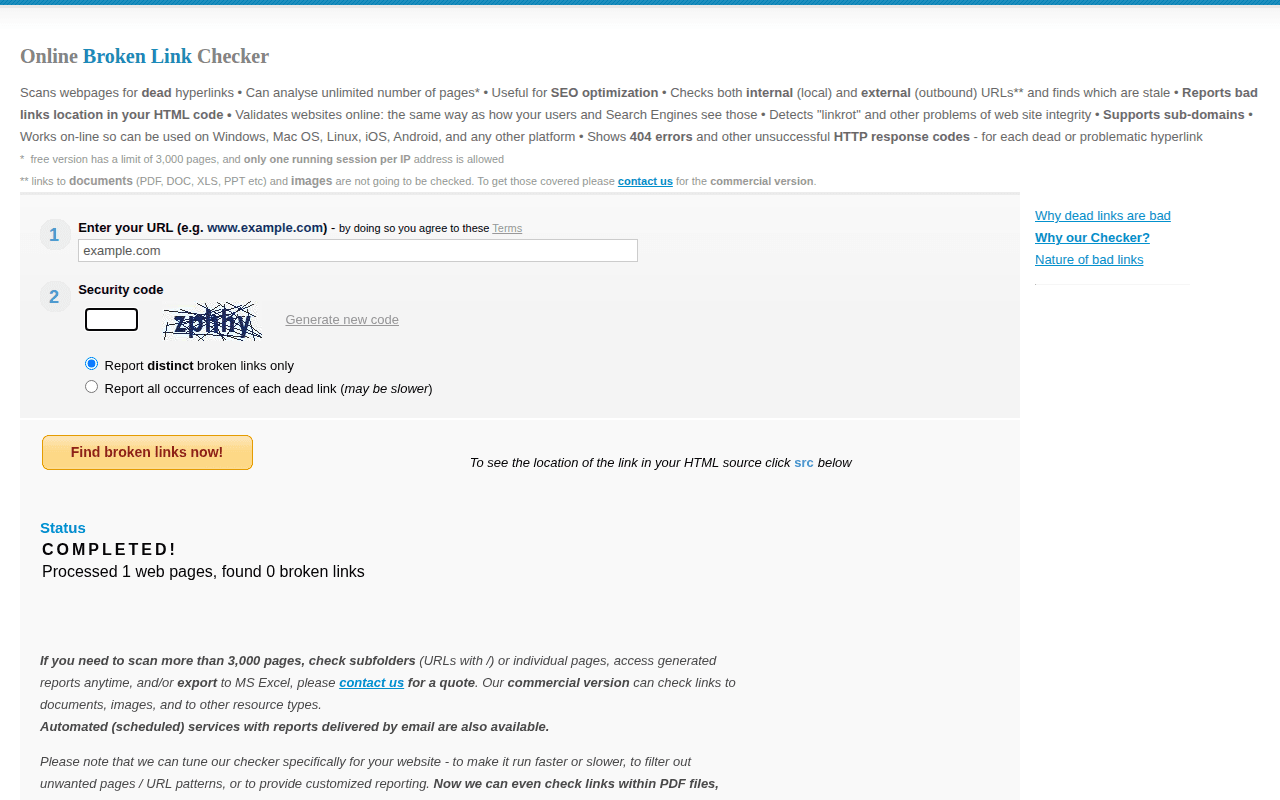
BrokenLinkCheck.com's free limits and alternatives are covered in our BrokenLinkCheck.com review.
Small Business Sites (5-50 Pages)
Recommended frequency: Monthly
A brochure-style business site with a homepage, services pages, an about page, and a contact form doesn't accumulate broken links quickly. The content is mostly static, and most links are internal or point to well-established external sites (Google Maps, social media profiles, industry associations).
Monthly checks are sufficient. Pick a day — the first Monday of each month works well — and run a whole-site scan with the Broken Link Checker Chrome extension. Open Whole site, enter the site address, choose a page limit from 1 to 10,000, and select Start scan. The scan must be started manually; the extension does not run on a schedule.
What to watch for: links to partner companies that rebrand or shut down, embedded Google Maps that change, and social media profiles that get deleted or change URLs.
Blogs and Content Sites (100+ Posts)
Recommended frequency: Every two weeks
Content sites are link-heavy by nature. Every blog post cites sources, references tools, links to related articles, and embeds media. The more outbound links per page, the higher the probability that something breaks between checks.
A blog with 200 posts averaging 10 outbound links each has 2,000 external dependencies. At a 5-10% annual decay rate, that's 100-200 links breaking every year — roughly 2-4 per week.
Bi-weekly checks catch problems before they stack up. Run a whole-site scan, then use the Broken and Redirect cards to filter the report. Search by URL or anchor text, and expand Found on when the same destination appears on several source pages. Our guide on how to find broken links covers other methods and verification steps.
What to watch for: links to startup tools and SaaS products (these have the highest churn rate), statistics and study citations (academic URLs reorganize frequently), and links in older evergreen posts that nobody has reviewed in months.
E-Commerce Sites (Changing Inventory)
Recommended frequency: Weekly
E-commerce sites are a different beast. Products get discontinued. Seasonal collections rotate. Supplier pages disappear. Category structures change with every sale and restocking cycle.
Beyond external links, e-commerce sites generate internal broken links at scale. Remove 50 seasonal product pages after the holidays, and every category page, blog post, and cross-sell widget that linked to those products now has dead links. Multiply that by a few product lifecycle cycles per year, and the broken link count climbs fast.
Weekly scans are the minimum. Ideally, integrate link checking into your deployment pipeline — every time a batch of products is removed or URLs change, trigger a crawl immediately after.
What to watch for: product pages removed without redirects, affiliate and partner links that expire, manufacturer pages that restructure, and internal links from blog content to discontinued products.
Enterprise and Large-Scale Sites (1,000+ Pages)
Recommended frequency: Daily automated scans
At enterprise scale, manual checking is not realistic. A site with thousands of pages, multiple content contributors, frequent deployments, and integrations with external systems needs automated monitoring that runs daily.
Set up a scheduled crawl using tools like Screaming Frog (which supports command-line scheduling), Ahrefs Site Audit, or Semrush Site Audit. Configure alerts so your team gets notified when new broken links appear — rather than discovering them during a monthly review when the count has already ballooned.
Daily scans don't mean daily fixing. The goal is continuous detection so you can batch fixes efficiently. A weekly fix cycle based on daily detection data is a reasonable workflow for most enterprise teams.
What to watch for: broken links introduced by deployments (especially after CMS updates or template changes), links to third-party APIs and integrations, links across subdomains that fall out of sync, and content published by different teams without cross-checking link targets.
When to Run Extra Checks
Beyond your regular schedule, certain events should trigger an immediate link audit. These are the moments when broken links appear in bulk — and waiting for your next scheduled check means living with the damage for days or weeks.
After a Site Redesign or Migration
Website migrations are the single biggest generator of broken links. Changing your CMS, switching domain names, restructuring your URL hierarchy, or overhauling your site template — any of these can break hundreds of links overnight.
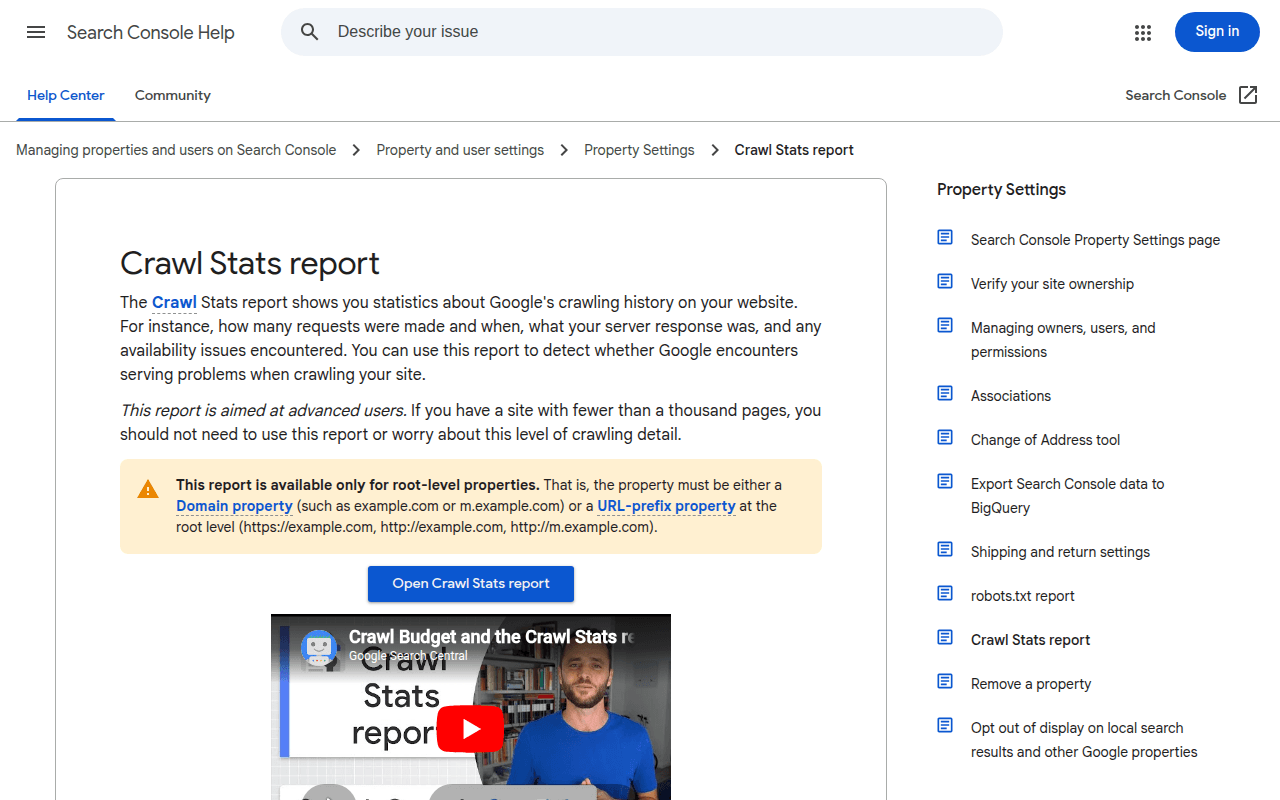
Run a full crawl immediately after going live. Then run another one a week later, because some issues only surface once search engines recrawl your site and external services update their caches. Check Google Search Console daily for the first two weeks to catch 404 spikes early.
For a detailed pre-migration approach, read our guide on running a link audit before a website redesign.
After CMS or Plugin Updates
WordPress core updates, plugin updates, and theme changes can all modify URL structures or break functionality that generates links dynamically. A WooCommerce update might change product URL patterns. A new SEO plugin might alter permalink structures.
Run a targeted scan after any significant update. This doesn't need to be a full-site crawl — focus on the areas affected by the update. If you updated your e-commerce plugin, scan your product and category pages. If you changed your blog theme, check your blog post templates.
After Content Migration or Import
Importing content from another platform, merging two blogs, or migrating from a staging environment to production — these operations frequently produce broken internal links because relative paths, media URLs, or internal references don't survive the transfer cleanly.
After Bulk Content Changes
Did your team just delete 30 outdated blog posts? Remove a product line? Archive an entire section of your site? Any bulk content operation should be followed by a link check to catch the internal links that now point to removed pages.
Manual vs. Automated Checking
Both have a place. The question is which approach fits your resources and site complexity.
Manual Checking
Manual checking means opening a tool, running a scan, reviewing the results, and fixing issues — all driven by a human on a schedule.
Best for: Small sites, solo bloggers, and anyone who wants to understand exactly what's happening on their site. The Broken Link Checker extension makes manual checking fast — install it, navigate to a page, click the icon, and every link gets tested in seconds.
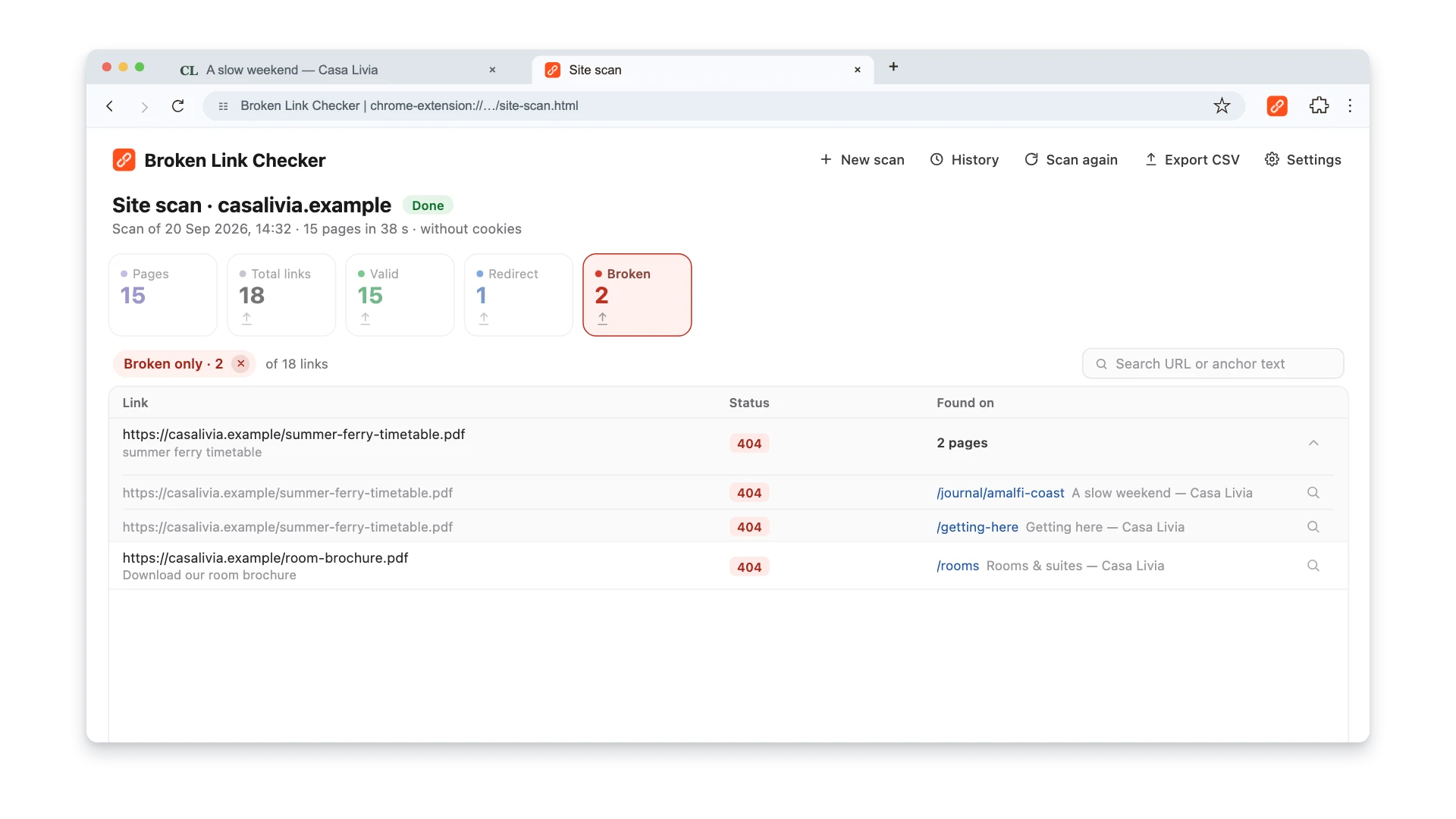
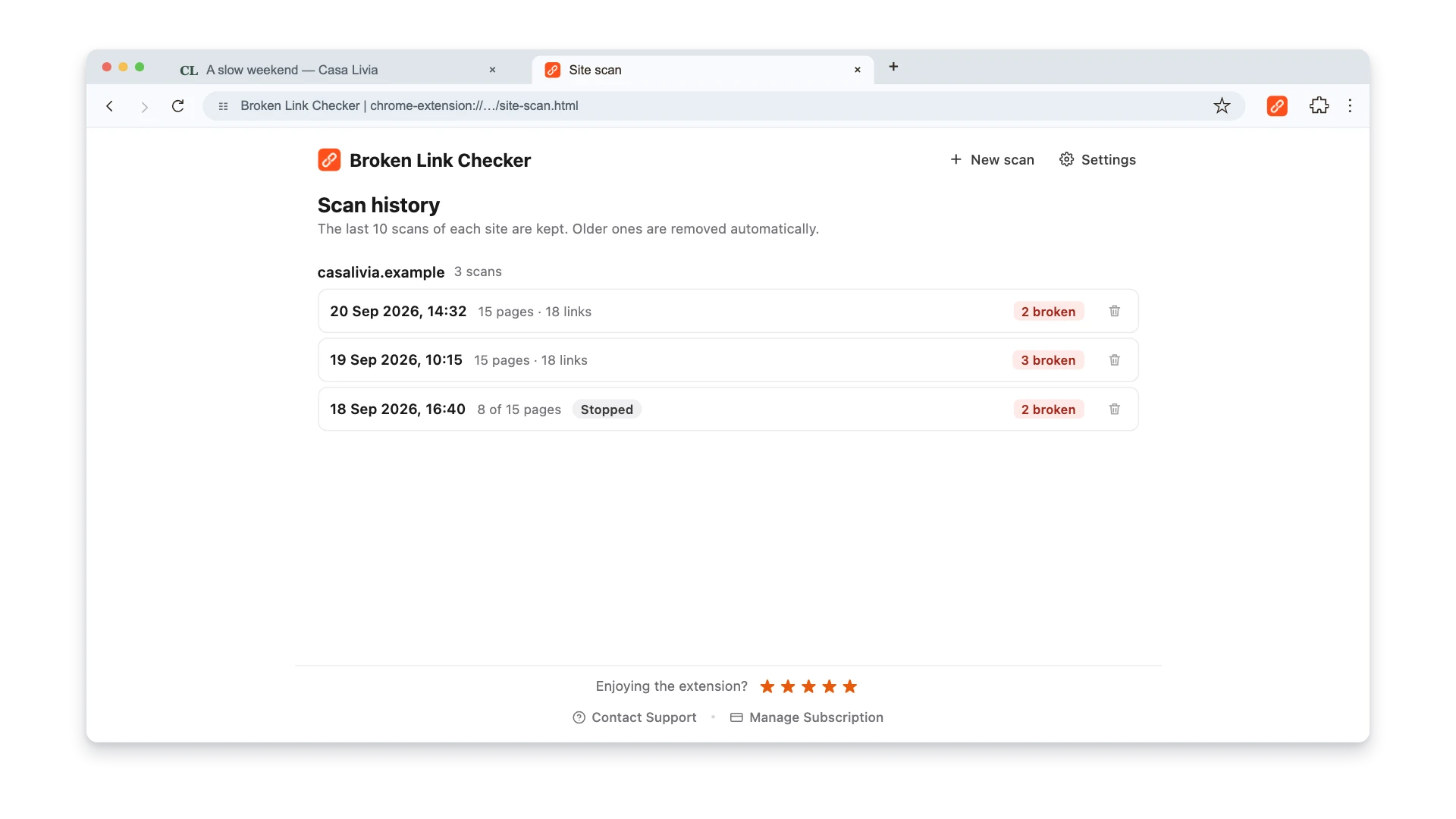
Limitation: It depends on someone remembering to start it. The extension stores the last 10 scans for each site locally, but it does not schedule scans, compare runs automatically, or calculate a trend.
Automated Checking
Automated checking means configuring a tool to run scans on a schedule and send you alerts when problems appear. You don't initiate anything — the system watches for you.
Best for: Sites with 100+ pages, teams with multiple content contributors, and anyone who knows they won't remember to check manually every two weeks.
Tools for automation:
- Screaming Frog — schedule crawls via command line on your own server
- Ahrefs / Semrush Site Audit — cloud-based scheduled crawls with email alerts
- WordPress Broken Link Checker plugin — scans your WordPress site continuously in the background (see our WordPress broken links guide for setup)
- Google Search Console — sends email alerts for new 404 errors on your site (free, essential for every site)
The ideal setup combines both: automated monitoring catches problems as they appear, and periodic manual checks with a browser extension catch issues that crawlers miss — like links behind login walls, JavaScript-rendered links, or links in embedded content.
The Real Cost of Not Checking
Skipping link checks doesn't save time. It borrows time from your future self — with interest. Broken links don't exist in isolation. Each one has a small but measurable impact on your site's performance:
- Wasted crawl budget. If a meaningful share of your internal links return 404, that share of your crawl budget is wasted on dead ends. On large sites, that means important pages get crawled and indexed less frequently.
- Lost link equity. Every broken internal link is a leak in your site's PageRank distribution. The authority that should flow through your internal linking structure drains into 404 pages instead.
- Increased bounce rate. Each 404 error a visitor hits increases bounce rate. Multiple dead ends on a single page signal to search engines that the content is outdated and unreliable.
These effects compound over time — and so does the cleanup work. Check monthly and you might find 5-10 broken links, which is 15 minutes of work. Skip six months and you're facing 50-100 broken links — now it's a project, not a task. Skip a year and you're looking at a full content audit that takes days. Regular checking is maintenance. Irregular checking is disaster recovery.
For a deeper look at how broken links damage SEO performance, read our guide on what broken links are and why they hurt your website.
Building Your Checking Routine
A schedule only works if it's specific and attached to existing workflows. Here's how to set one up.
Step 1: Pick Your Tools
At minimum, you need:
- A browser extension for manual page and whole-site checks — the Broken Link Checker supports both in Chrome
- A scheduled crawler when you need unattended runs and alerts — for example, Screaming Frog, Ahrefs, or Semrush
- Google Search Console for ongoing 404 monitoring — free and essential
Step 2: Set Calendar Reminders
Don't rely on memory. Create recurring calendar events for your checking schedule. Include the specific steps in the calendar event description so you (or a team member) can follow the process without thinking about it.
Step 3: Document Your Process
Write down: which tools you use, what pages to check first, how to fix common issues (update the link, set up a redirect, or remove the link entirely). This turns link maintenance from a skill into a checklist — delegatable and consistent.
Step 4: Track Results
Keep a simple log: date of check, number of broken links found, number fixed. The extension keeps the last 10 scans for each site locally, so you can reopen a recent report; it does not compare those reports or calculate a trend for you. Export the report to CSV when you need a durable record. The export writes one row per link and source page, with eight fields including the final URL and redirect chain.
Frequently Asked Questions
Is monthly checking enough for most websites?
For small, mostly static sites with under 50 pages, monthly is fine. For content-heavy blogs, e-commerce sites, or any site with frequent updates, monthly isn't enough — you'll accumulate too many broken links between checks. Bi-weekly or weekly is more realistic for active sites.
Can Google Search Console replace dedicated link checking?
Google Search Console catches 404 errors that Googlebot encounters while crawling your site, but it doesn't check every link on every page. It's a valuable safety net, not a replacement. You still need a dedicated tool to systematically scan all your pages and check every outbound link — including external ones that Search Console doesn't monitor. See what Google's own tools can find for the full picture.
Do broken external links hurt SEO as much as broken internal links?
Broken internal links typically cause more SEO damage because they waste your site's crawl budget and leak link equity into dead pages. Broken external links primarily hurt user experience and credibility. Both matter, but if you have to prioritize, fix internal broken links first.
What's the fastest way to check a single page for broken links?
Install the Broken Link Checker Chrome extension. Navigate to any page, click the icon, and every link on that page gets checked and color-coded in seconds. It's the quickest method for spot-checking individual pages.
Should I fix broken links or remove them?
It depends on the link's purpose. If the linked resource still exists at a different URL, update the link. If the resource is gone but a similar alternative exists, link to that instead. If the link added no meaningful value, remove it. For internal broken links, always set up a 301 redirect from the old URL to the most relevant existing page — this preserves any link equity from external backlinks pointing to that URL. Our guide on preventing link rot covers long-term strategies for keeping links alive.

Pavel Molyanov
Creator of Broken Link Checker
Content marketer with 10+ years of experience. Founder of a content marketing agency. Writing about SEO, content workflows, and website maintenance.
Check Your Links in One Click
Broken Link Checker finds broken links and redirects on any page or across your whole website, and works in Google Docs and Sheets. Try 3 checks free, with no signup or card required.