Broken Link Building: How to Earn Quality Backlinks in 2026
· Updated
Most link building feels like spam. Cold outreach emails asking strangers to link to your content rarely work — and for good reason. Nobody wants another "Hey, I wrote an article, would you link to it?" email clogging their inbox.
Broken link building is different. Instead of asking for a favor, you're offering one: helping a webmaster fix a problem on their site. You find a broken outbound link on someone's page, offer a working replacement, and if your content is genuinely useful — you earn a backlink.
This is one of the few link building strategies that creates real value for everyone involved. The webmaster fixes a broken link on their site. Their readers get a working resource instead of a 404 page. And you get a contextually relevant backlink from a real, established page.
This guide gives you a repeatable workflow: qualify a target page, verify the dead resource, judge whether your replacement is genuinely equivalent, contact the right editor, and measure the result. The worked Chrome-extension example shows how to apply the process without pretending that every dead link is an opportunity.
Broken Link Building in 60 Seconds
Use this quick filter before adding a prospect to your outreach list:
| Check | Continue when… | Skip when… |
|---|---|---|
| The link is truly broken | It fails in a normal browser on a second check | It only failed in an automated scan or during a temporary outage |
| The old resource is understood | An archive or surrounding copy shows what readers expected | You cannot tell what the link was meant to provide |
| Your replacement matches | It serves the same audience, purpose, and level of depth | It is merely about the same broad topic |
| The page is worth fixing | It is maintained, relevant, and has a real editorial owner | It is abandoned, scraped, or exists mainly to sell links |
| You can be specific | You can name the page, anchor, dead URL, and suitable replacement | The message would still read like a generic link request |
If any of the first three checks fail, do not send the pitch. If you are reclaiming links to a page that disappeared from your own site, use the broken backlink reclamation workflow instead; that usually starts with restoring or redirecting your URL rather than contacting every publisher.
What Is Broken Link Building?
Broken link building is a link building strategy where you find pages in your niche that link to dead resources, then reach out to the site owner with a working replacement.
The concept is simple:
- You find a page that links to something that no longer exists (a 404, a shut-down tool, a deleted article).
- You contact the person who controls that page.
- You point out the broken link and suggest your own content or tool as a replacement.
- The webmaster updates the link — and you earn a backlink.
It's not a loophole or a trick. It's a genuine service. Broken links are bad for user experience and bad for SEO. When you help someone fix one, you're solving a real problem — not just asking for a handout.
The key difference from other outreach methods: you're leading with value. Every other link building email starts with "I want something from you." This one starts with "I found a problem on your site, and here's the fix."
Why This Strategy Still Works
Some link building tactics fade over time. Broken link building has been effective for over a decade, and it still works in 2026. Here's why:
Webmasters don't like broken links on their sites. A broken outbound link is a bad look. It hurts user experience and can signal to search engines that the page isn't well-maintained. Most site owners want to fix these — they just don't know about them.
It's not spam. You're providing specific, verifiable information. "Hey, this exact link on this exact page is broken" is useful. It's the opposite of a generic mass email.
The replacement link has context. You're not asking someone to shoehorn a random link into their content. The link already existed. There's already an anchor text, already a sentence around it, already a reason it was there. Your replacement slots into an existing gap — not a forced insertion.
The resulting link can be editorial and contextually relevant. The publisher decides whether the replacement helps the page's readers. That is a stronger reason to link than a paid or unrelated insertion, but the tactic does not guarantee rankings.
How does it compare to other strategies?
- Guest posting works but is time-intensive. You're writing entire articles for someone else's site, and the quality bar keeps rising.
- HARO / journalist queries used to be great but have become extremely competitive. Response rates have dropped significantly.
- Buying links is directly against Google's guidelines and carries real risk of penalties.
- Broken link building is selective and labor-intensive, but it starts from a real maintenance problem rather than an invented reason to contact a publisher.
The Complete Process
Here is the complete workflow. The verification and replacement-fit steps are the gates that prevent useful outreach from turning into spam.
Step 1: Find Target Pages
You're looking for pages that are likely to contain broken outbound links. The best candidates are resource pages, tool roundups, and "best of" lists — especially older ones.
Use Google search operators to find them:
intitle:"broken link" + "tools"— finds articles specifically about broken link tools"best free tools" + [your niche]— roundup posts comparing tools in your space"useful resources" + [your topic]— curated resource lists"recommended tools" + [your niche]— similar to above, different phrasingintitle:"top" + "[your niche] tools" + "2024"— older articles are more likely to have dead links
What to look for:
- Resource pages with lots of outbound links. More links = higher chance some are dead.
- Older articles (2-3+ years old). Tools shut down, domains expire, companies pivot. Time is your friend here.
- Roundup posts and curated lists. These typically link to 10-20+ external resources — plenty of opportunities.
- University or .edu resource pages. High authority domains that often maintain large link collections.
Build a spreadsheet as you go. Track the page URL, the topic, the domain authority (if you care about that), and the date it was published. You'll need this organized list for the next steps.
Step 2: Scan Pages for Broken Links
This is where a broken link checker tool becomes essential. You could manually click every link on a page and wait for each one to load — but that's painfully slow, especially on resource pages with 20-30+ outbound links.
With the Broken Link Checker Chrome extension, the process takes seconds: navigate to the target page, click the extension icon, and every link on the page gets color-coded instantly. Red means broken (404 or 5xx error), green means working, and blue means redirect. You can see exactly which links are dead and what URLs they were pointing to.
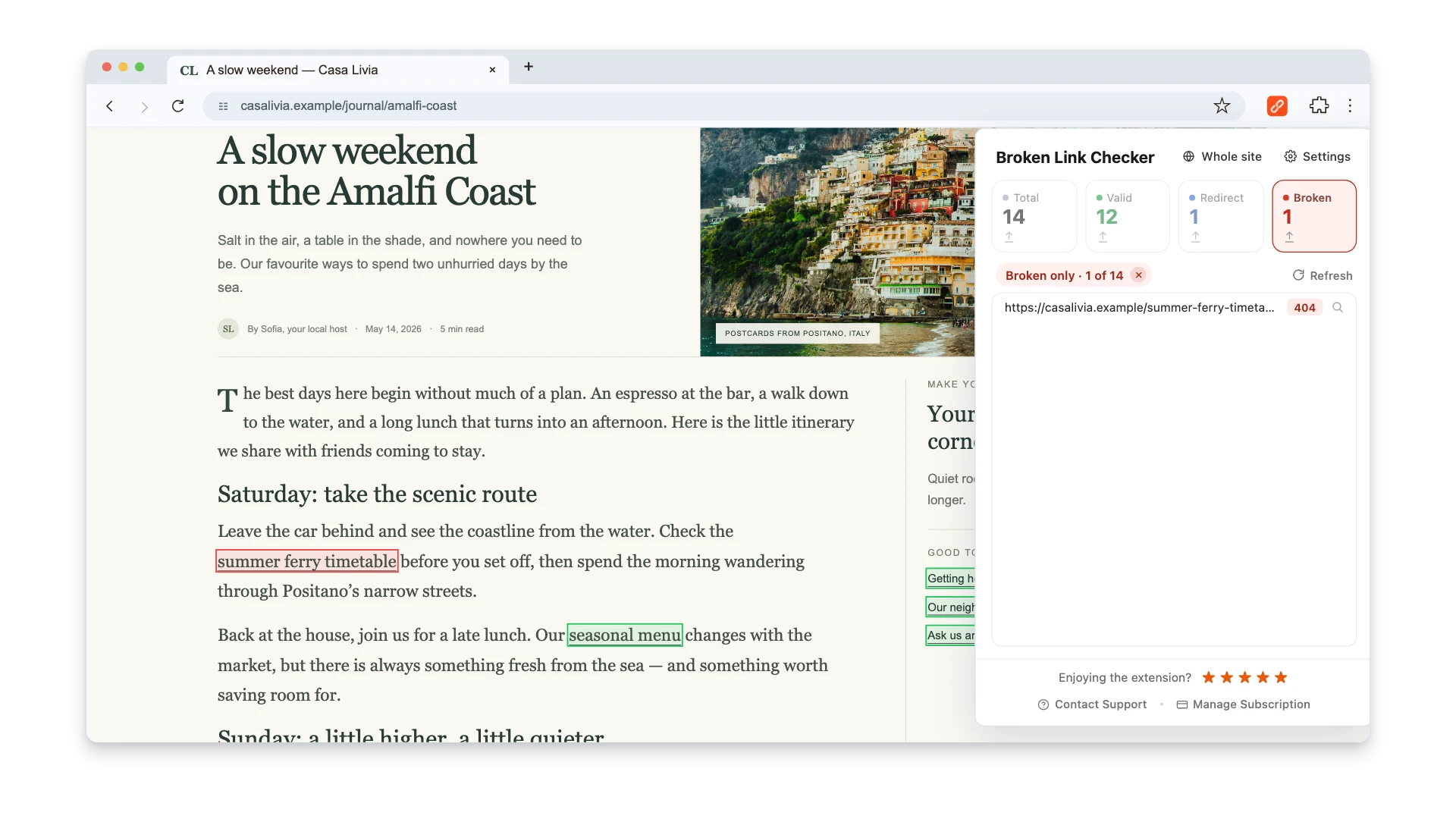
This step is critical — you need to be 100% certain the link is actually broken before you email anyone. Nothing kills credibility faster than reporting a link that works fine. A few things to watch for:
- Temporary outages. A server might be down for maintenance. Check the link again a day later.
- Geo-blocking. Some sites block traffic from certain regions. Try accessing the URL through a different method.
- Rate limiting. If you're scanning quickly, some servers return errors that aren't real 404s.
When you find a broken link, note down: the URL of the page it's on, the anchor text of the broken link, the dead URL, and what the link was supposed to be (you'll research this next).
Step 3: Research the Dead Link
Before reaching out, you need to understand what used to live at that dead URL. This is what separates effective outreach from lazy outreach.
Go to the Wayback Machine and paste in the dead URL. The Internet Archive captures snapshots of web pages over time, so you can see exactly what was there before it died. This tells you:
- What kind of content or tool was there. Was it a free tool? A paid service? A blog post? A documentation page?
- Whether your content is a genuine replacement. Your replacement needs to serve the same purpose — not just be vaguely related.
- What the original context was. The anchor text and surrounding sentence on the linking page should make sense with your replacement too.
If your content doesn't match what was originally there, don't pitch it. A webmaster who linked to a free Python library doesn't want a suggestion for a Chrome extension. A page that linked to a comprehensive research study won't accept a 500-word blog post as a replacement.
Be honest with yourself here. Forcing a bad fit wastes everyone's time and burns bridges.
Step 4: Prepare Your Asset
Before you write a single outreach email, make sure what you're offering is genuinely worth linking to.
Ask yourself:
- Is it live, working, and maintained? Don't pitch something half-built or buggy. The webmaster might actually check.
- Does it serve the same purpose as the dead resource? This is non-negotiable. The replacement must fill the same gap.
- Is it free or accessible? For tool replacements especially, paywalled content is a harder sell. If you have a free tier, lead with that.
- Does it have social proof? Reviews, ratings, user counts, press mentions — anything that signals "this is legitimate" helps your pitch.
If you're offering a tool: prepare a screenshot showing it in action, write a brief one-sentence description, and have the direct link ready. If you're offering content: make sure it's comprehensive, current, and better than whatever died.
The replacement must be good enough to preserve the purpose of the original citation. Polished outreach cannot compensate for a resource that is thinner, less accessible, or aimed at a different audience.
Step 5: Find the Right Contact
You need to email the person who can actually edit the page. A generic info@ address gets ignored. Here's how to find the right person:
- Check the article for an author name. Most blog posts list the author. Google their name + the site name to find their email or social profiles.
- Look for a "Contact" or "About" page on the site. Sometimes editors list their direct email.
- Use email finder tools. Hunter.io lets you search for email addresses associated with a domain. Snov.io is another option.
- Check WHOIS data. Domain registration records sometimes include contact information, though privacy protection has made this less reliable.
- LinkedIn as a last resort. InMail messages for link building have low response rates, but it's better than nothing if you can't find an email.
Target the author of the article or the content manager. These are the people who can actually make the edit. Don't email the CEO of a large company about a broken link in a blog post — it'll never reach the right person.
Step 6: Write the Outreach Email
This is where most people mess up. They write long, self-promotional emails that bury the useful information. Keep it short, specific, and focused on helping.
Your email should:
- Reference the specific article — by name and URL. This proves you actually visited their site.
- Point out the exact broken link — the anchor text, the dead URL, and the error it returns.
- Briefly describe your replacement — one sentence about what it is and why it fits.
- Include social proof if relevant — ratings, user count, anything that builds trust quickly.
- Make it easy to say yes — provide the URL, a short description, even a suggested replacement sentence if appropriate.
Here's what NOT to do:
- Don't write a novel. Three to five short paragraphs max.
- Don't make it about yourself. Lead with the problem, not your product.
- Don't attach files. Attachments trigger spam filters and feel heavy.
- Don't use clickbait subject lines. Be straightforward.
A complete template and worked example follow later in this article.
Step 7: Follow Up (Once)
If you don't hear back within 5-7 business days, send one follow-up email. Keep it even shorter than the original — two or three sentences max.
Something like: "Hi [Name], just following up on my note about the broken link in your [topic] article. Happy to provide any additional info if helpful. No worries either way."
After that, move on. Nobody likes being pestered, and a second follow-up crosses the line from helpful to annoying. If they didn't respond to two emails, they're either not interested or don't manage that email anymore.
Track your follow-ups in your spreadsheet so you don't accidentally email the same person three times.
Worked Example: A Chrome Extension Replacement
The following example shows how the workflow applies to Broken Link Checker, a Chrome extension for current-page and manually started whole-site link checks. Treat it as a model for evaluating fit, not as proof that the same pitch will earn a link on every tools roundup.
Finding Targets
A relevant prospect list would start with articles that compare broken-link checking tools, because those pages already serve the extension's intended audience. Useful searches include:
- "best broken link checker tools"
- "top free link checkers"
- "broken link checking software comparison"
- "how to check for broken links" + "tools"
- "best tools for finding dead links"
The candidate list can include tool roundups, comparison posts, and older "best of" lists. Age alone is not enough: retain only pages that are still indexed, maintained, and relevant.
Scanning for Dead Links
Open each candidate page and scan it, then verify every reported failure in a normal browser. If you have already chosen one relevant domain, an optional Whole site scan can find the same dead destination across discovered pages on that host; search the report by URL or anchor and expand Found on to collect the source pages. This is a crawl of the chosen site, not a backlink index or a way to discover prospects across the web.
A discontinued checker is only a viable opportunity if the extension covers the same function. Broken Link Checker now supports both current-page checks and a manually started whole-site crawl, but it is not a scheduled monitor, WordPress plugin, API, or backlink database. Compare the dead tool's actual job rather than its category label.
The Pitch
For a confirmed match, the message can stay short and specific:
Hi [Name],
I was reading your article "[Best Broken Link Checker Tools for 2023]" and noticed that the link to [Dead Tool Name] appears to be broken — it returns a 404. It looks like that tool may have been discontinued.
A possible replacement is Broken Link Checker, a Chrome extension that checks links on the current page and can also run a manual whole-site scan across discovered pages on the same host. It shows broken links, redirects, and the source pages where each link was found.
Here's the extension: [Chrome Web Store link]
If you'd like to update that reference in your article, feel free to use any of this info. Either way, wanted to give you a heads up about the broken link.
Best, [Your name]
The pitch is short, specific, and easy to verify. It does not bury the broken-link report under a product story or pressure the editor to accept the replacement.
Why This Pitch Is Credible
The message gives an editor enough information to verify the issue without overstating the replacement. Its strongest elements are:
- The report is genuinely useful. The sender verifies the failure before contacting the editor and does not manufacture a problem.
- The replacement is evaluated by function. Compare the required coverage, scheduling, and integrations before proposing a replacement.
- The close is low-pressure. "Feel free to use this if you think it'd be a good fit" is more useful than demanding an edit.
- The details are verifiable. The article, anchor, dead URL, and replacement can all be checked before the editor decides.
No specific link outcome is guaranteed. Track whether the editor replied, fixed the dead link, chose your replacement, or selected another source; all four outcomes tell you something about target quality and replacement fit.
The Outreach Email Template
Here's a clean, adaptable template you can use for your own broken link building campaigns. Customize it for each outreach — never send it as-is.
Subject: Broken link in your [topic] article
Hi [Name],
I came across your article "[Article Title]" ([URL]) and noticed a broken link.
The link to [dead resource name] in the [section name / context] section returns a [404 / timeout / connection refused]. It looks like [the tool was discontinued / the site moved / the page was removed].
I have a [similar resource / tool / guide] that covers the same topic: [Your Resource Name] — [brief one-sentence description]. [Optional: social proof like ratings, user count, awards, etc.]
Link: [URL]
Feel free to use this if you think it'd be a good replacement. Either way, just wanted to flag the dead link for you.
Best, [Your Name]
Why Each Element Matters
- Specific article reference (title + URL): Proves you actually visited their site. Generic emails get deleted.
- Exact broken link details: The webmaster can immediately verify what you're saying. This builds trust instantly.
- Brief replacement description: Don't oversell. One sentence that explains what it is and why it's relevant.
- Social proof: Numbers build credibility quickly. "5.0 rating with 2,000+ users" is more convincing than "it's really good."
- Low-pressure close: "Feel free to use this" gives them permission without pressure. People respond better when they don't feel obligated.
What NOT to Do in Your Email
- Don't attach files. Attachments trigger spam filters and feel heavy. If you want to share a screenshot, link to it or host it online.
- Don't write more than 150 words. Webmasters are busy. If your email requires scrolling, it won't get read.
- Don't make it about you. Lead with the problem (broken link), not your product. Your replacement is the solution, not the topic.
- Don't use fake urgency. "This is hurting your SEO!" is manipulative. Just state the facts.
- Don't send identical emails to multiple contacts at the same site. If the author and editor both get the same email, it looks automated.
Common Mistakes That Kill Your Results
When broken link building produces poor results, one of these targeting or verification mistakes is often involved.
Sending Mass Generic Emails
If your email doesn't reference the specific article and the specific broken link, it's spam. Templates are fine as a starting point, but every email must include details that only someone who visited that specific page would know.
The entire strategy is built on personalization. Remove that, and you're just doing cold outreach with extra steps.
Pitching Irrelevant Replacements
If the dead link pointed to a Python library and you're offering a Chrome extension — that's not a match. If the dead link was to a comprehensive industry report and you're offering a 500-word blog post — that's not a match either.
Only pitch when your content genuinely serves the same purpose as whatever died. Webmasters can spot a forced fit immediately, and it destroys your credibility for any future outreach to that site.
Not Verifying the Link Is Actually Broken
Check twice. Some links are temporarily down due to server issues. Some return different responses depending on headers or location. Some sites have aggressive bot protection that returns errors to automated checkers but works fine in a browser.
If you tell a webmaster their link is broken and it's not, you've wasted everyone's time and torpedoed your credibility. Always verify by actually clicking the link in a browser before sending your email.
Targeting Low-Quality Sites
Not all backlinks are created equal. A link from a spammy, low-authority site can actually hurt your SEO profile. Focus your efforts on sites with:
- Real, original content (not scraped or AI-generated filler)
- Actual traffic (you can estimate this with tools like Ahrefs or Semrush)
- Editorial standards (the site clearly reviews and curates its content)
Third-party authority scores can be a quick comparison signal, but do not use a fixed cutoff. A highly relevant industry resource with a small audience can be more useful than a high-scoring site with no topical fit. Check whether the page is indexed, maintained, editorially credible, and capable of sending relevant readers.
Being Pushy in Follow-ups
One follow-up is fine. Two is borderline. Three is spam.
If someone doesn't respond to two emails, they're either not interested, not managing that inbox, or the email went to spam. In none of those cases will a third email help. Move on to the next target.
Ignoring the Content Gap
Don't just find broken links — verify that your replacement actually fills the gap the dead resource left behind. The best outreach email in the world won't convert if your content isn't a genuine fit for what was originally linked.
Spend time on the Wayback Machine. Understand what the dead resource was. Then honestly assess whether your alternative serves the same audience and purpose.
Tools You'll Need
You don't need expensive software to run a broken link building campaign. Here are the essential tools:
| Tool | Purpose | Cost |
|---|---|---|
| Broken Link Checker | Scan pages for broken links instantly | 3 checks free; paid plans from $2.90/mo |
| Wayback Machine | See what dead links used to point to | Free |
| Hunter.io | Find email addresses for outreach | Free tier available |
| Google Search | Find target pages using search operators | Free |
| Google Sheets | Track your outreach campaigns and results | Free |
That is the complete toolkit. Four options are free or offer a free tier; Broken Link Checker includes 3 free checks, with paid plans for continued use. The main investment is still your time and effort.
For the broken link scanning step specifically, you want something fast and accurate. The Broken Link Checker extension lets you scan an entire page in seconds without leaving your browser — just click the icon and every link gets color-coded. No need to paste URLs into a separate tool or wait for a full site crawl.
How to Scale This
Start small. Send 5-10 personalized outreach emails per week. Track everything in a spreadsheet with these columns:
- Target URL — the page with the broken link
- Broken link URL — the dead resource
- Anchor text — what the link said
- Contact email — who you're reaching out to
- Date sent — when you sent the initial email
- Follow-up sent — date of follow-up (if any)
- Response — what they said (or no response)
- Result — link updated, declined, or no response
Do not plan around a universal success-rate benchmark. Record replies and link updates for your own prospect type, then compare cohorts: resource pages versus tool roundups, exact replacements versus partial matches, and author contacts versus generic inboxes. Increase volume only after the data shows that the targeting remains relevant.
Evaluate earned links by topical fit, editorial context, referral traffic, and the visibility of the linking page. A third-party authority score can help compare prospects, but it is not the outcome by itself.
Need to find broken links quickly? Compare seven ways to find broken links, from page-level checks to full-site crawls.
Final Thoughts
Broken link building works because it flips the usual dynamic of link building outreach. You're not asking for something — you're offering something. A fixed link, a better resource, a cleaner page.
The process is straightforward: find pages with dead links, verify the links are broken, research what used to be there, make sure your replacement is a genuine fit, find the right contact, send a short helpful email. That's it.
It takes more effort per prospect than mass outreach because every dead resource and replacement must be checked. The benefit is a credible reason for an editor to review the link in its existing context.
Start with a small, tightly qualified batch. Scan the pages, verify every failure, send only the pitches with an exact replacement, and use the results to decide whether the process deserves a larger campaign.

Pavel Molyanov
Creator of Broken Link Checker
Content marketer with 10+ years of experience. Founder of a content marketing agency. Writing about SEO, content workflows, and website maintenance.

Check Your Links in One Click
Broken Link Checker finds broken links and redirects on any page or across your whole website, and works in Google Docs and Sheets. Try 3 checks free, with no signup or card required.