BrokenLinkCheck.com Alternative: Do You Need to Download a Broken Link Checker?
BrokenLinkCheck.com is a free online broken link checker: enter a domain, type a security code, and it crawls up to 3,000 pages from its own servers, listing each dead link with the page where it was found. Nothing to download or install. The free version cannot export the report, check a subfolder, or test links to PDFs and images, and its terms limit free use to personal, non-commercial sites.
If those limits are a problem, you have two other kinds of tool: a browser extension such as Broken Link Checker for Chrome, installed from the Chrome Web Store in one click, or a desktop crawler such as Screaming Frog, which you download and install as an application. Which one fits depends on how often you check, whether you need a file to hand over, and how much of a technical audit you want.
Quick Answer: Which Type of Link Checker Do You Need?
| Your situation | Good fit |
|---|---|
| One-off check of a personal site or blog, no report needed | BrokenLinkCheck.com (online, free) |
| You're not on a desktop computer | An online checker; it runs in any browser |
| A business site, and you need a CSV to hand to an editor or developer | Browser extension or desktop crawler |
| You check the site after every update and want past results kept | Broken Link Checker extension (history of the last 10 scans) |
| You also need links in Google Docs or Sheets checked | Broken Link Checker extension |
| A full technical SEO audit: metadata, canonicals, indexability | Desktop crawler such as Screaming Frog |
| A WordPress site and you want checks to run inside it on their own | The WordPress plugin that is also called Broken Link Checker |
The rest of this guide explains where each option wins and where it falls short. Facts about third-party tools were checked on their official sites on September 30, 2026.
What BrokenLinkCheck.com Does Today
BrokenLinkCheck.com has been around since at least 2010 (the date on its copyright notice) and still works the same simple way: a single form, results streamed onto the same page, and a commercial version sold by quote. Here is what the current checker page and terms say.
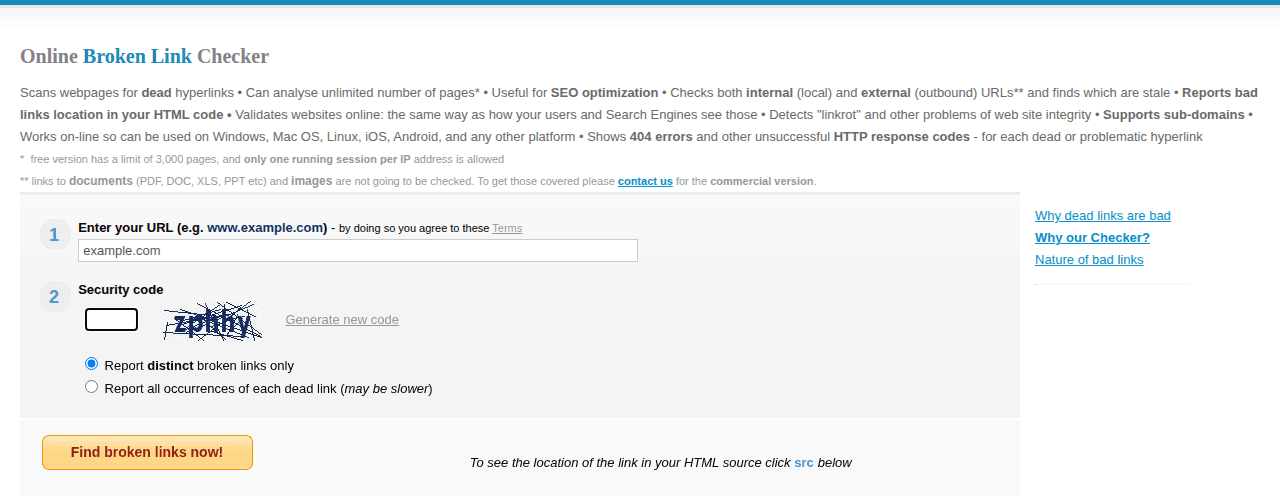
What you get for free:
- A crawl of up to 3,000 pages per scan, with no limit on the number of links on those pages.
- Both internal and external (outbound) links, with the HTTP response for each broken one: 404, 500, and so on.
- A results table with the broken link, its link text, the page where it was found, and the server response.
- A src link for each result that opens the page's HTML source with the broken tag highlighted.
- A choice between Report distinct broken links only (each dead URL once) and Report all occurrences of each dead link, which is slower but lists every page that contains it.
- No sign-up and no installation. It works in any browser, including on a phone.
What the free version leaves out:
- Security code on every run. You type a captcha before each scan, and only one scan per IP address can run at a time.
- Domain only. The form rejects URLs with a slash, so you can't check
example.com/blog/or a single deep page on its own. Subdomains are accepted. - No PDFs, documents, or images. Per the site, links to PDF, DOC, XLS, and PPT files and images are not checked in the free version.
- No export or saved reports. Excel export, reports you can reopen later, more than 3,000 pages, and subfolder scans belong to the commercial version, which is priced by quote. There is no public price list.
- Personal, non-commercial use. Section 9 of the terms says the free service is for personal, non-commercial use, and that using it for business purposes requires a license.
For a hobby blog that needs a quick sweep, that is a reasonable deal. The limits start to matter when the site belongs to a business, when someone else has to fix the links, or when a broken link to a PDF is exactly the kind of thing you're looking for.
Other Free Online Checkers
BrokenLinkCheck.com isn't the only checker that runs in a web form. Three others, as described on their own sites:
| Tool | Free limit | Export in the free version | Shows the page with the broken link |
|---|---|---|---|
| Dr. Link Check | 1,500 links per website, 2 websites, one-time checks only | No; CSV and PDF export are on paid plans | Yes, in a "Linked from" column |
| Dead Link Checker | 2,000 links per scan, up to 10 levels deep | No; CSV download comes with the paid Auto-Check service | Yes, one page per link: where it was first found |
| W3C Link Checker | 150 documents per recursive check online | No; results stay on the page | Yes, results are grouped under each page checked |
Online Checker vs Browser Extension vs Desktop Crawler
"Broken link checker download" can mean three different things, and only one of them is a download in the classic sense.
| Online checker (BrokenLinkCheck.com) | Chrome extension (Broken Link Checker) | Desktop crawler (Screaming Frog SEO Spider) | |
|---|---|---|---|
| What you install | Nothing, open the website | Add to Chrome from the Chrome Web Store | Download and install an application |
| Where it runs | The service's servers | Your Chrome browser on a desktop computer | Your computer (Windows, macOS, Linux) |
| Account | None | None for the 3 free checks | None for the free version; license key for paid |
| Free limit | 3,000 pages per scan, personal non-commercial use | 3 checks, then a paid plan | 500 URLs per crawl |
| Paid price | Commercial version by quote | $2.90/month, $19/year, or $29 lifetime | £199 / $279 / €245 per year |
| Shows where each broken link is | Page where found, plus HTML source view | Source pages, and opens the page with the link highlighted | Inlinks report per broken URL |
| Export | Commercial version only | CSV of all links or only broken ones | Crawl and bulk exports |
| Saved results | Not in the free version | Last 10 scans of each site kept in your browser | Saving crawls requires a license |
| Beyond links | Links only | Links on pages, whole sites, Google Docs and Sheets | Full technical SEO audit |
| Best for | Occasional checks of a small personal site | Regular link checks with a report to hand over | Large audits where links are one item on the list |
Screaming Frog prices and limits are from its pricing page and product page. For a deeper comparison of those two, see Screaming Frog alternative for broken link checking.
What "Download" Means for Each Option
Online checker: nothing to download. You paste a URL into a web form and the check runs on someone else's server. The trade-off is that you work within that service's limits, and the results live on its page rather than in a file you keep.
Chrome extension: installed, not downloaded. Open the Chrome Web Store listing and click Add to Chrome. There is no installer file, and Chrome keeps the extension up to date. Don't download extension files from mirror sites that offer "CRX downloads"; the Web Store is the only place to get the real one. The extension is built for Chrome on a desktop computer.
Desktop crawler: a real download. Screaming Frog, and older freeware such as Xenu's Link Sleuth, are programs you download and install. Xenu is still free, but its official page lists version 1.3.8 from 2010 as the latest, and it officially supports only Windows.
Command-line tool: for developers. The npm package broken-link-checker installs a blc command that crawls a site from the terminal. It needs Node.js, and its latest npm release, 0.7.8, dates from 2018.
Searches for "brokenlinkchecker" or "broken link checker download" also run into a name clash: BrokenLinkCheck.com, this Chrome extension, and the Broken Link Checker plugin for WordPress by WPMU DEV are three unrelated products. The WordPress plugin installs from the WordPress plugin directory and only checks WordPress sites; the WordPress guide covers that route. Several Chrome extensions are also called "Broken Link Checker". The one covered here is Broken Link Checker in the Chrome Web Store; install it from that listing to get the right one.
Broken Link Checker as a BrokenLinkCheck.com Alternative
Broken Link Checker for Chrome is an extension with two website modes: a page scan of the page you have open, and Whole site, which goes through the pages of a website and tests every link it finds. It fixes the specific gaps of the free online checker, though it isn't a free tool in the long run.
Where it helps compared with BrokenLinkCheck.com:
- Every source page, by default. Each broken link lists all the pages it was found on. Click a page, and it opens with the broken link highlighted, so you don't have to look for it in the HTML source.
- Links to PDFs and other files are tested. A link to a missing catalog PDF is reported like any other broken link.
- CSV export. Export every link or only the broken ones. Each row has the URL, anchor text, status code and text, redirect chain, final URL, the page it was found on, and that page's title.
- Reports stay available. The last 10 scans of each site are kept in your browser. You can stop a scan and continue it later, or run Scan again after fixing things.
- No captcha, and single pages work. You start a scan with a button, and checking just the open page is the default.
- Private results. Checks run in your browser, and the pages you scan and the results are not sent to the extension's servers.
Where BrokenLinkCheck.com is the better choice:
- Price for occasional use. The online checker is free every time you use it. Broken Link Checker gives you 3 free checks (one page scan or one whole-site scan counts as one check), then asks for a paid plan: $2.90 a month, $19 a year, or $29 once for lifetime access. All plans have the same features.
- Any device. The online checker works on a phone or a locked-down work computer where you can't add extensions.
- Nothing to leave open. An online scan runs on a server. The extension scans in a browser tab that has to stay open until the scan finishes.
Neither tool runs on a schedule by itself. BrokenLinkCheck.com offers scheduled reports only in its commercial version, and the extension's scans are started by hand. If you need unattended monitoring, see automatic broken link monitoring.
How to Scan a Whole Site with the Extension
The whole-site scan starts from the page you have open. It follows internal links, reads the site's sitemap, and tests each link it finds, including links to other websites (without crawling those websites).
How to check a whole website for broken links in Chrome
Run a whole-site scan with the Broken Link Checker extension and get a list of broken links with the pages they appear on.
Install the extension
Open the Broken Link Checker listing in the Chrome Web Store and click Add to Chrome. Pin the icon to the toolbar so it is easy to reach.
Open your site and click Whole site
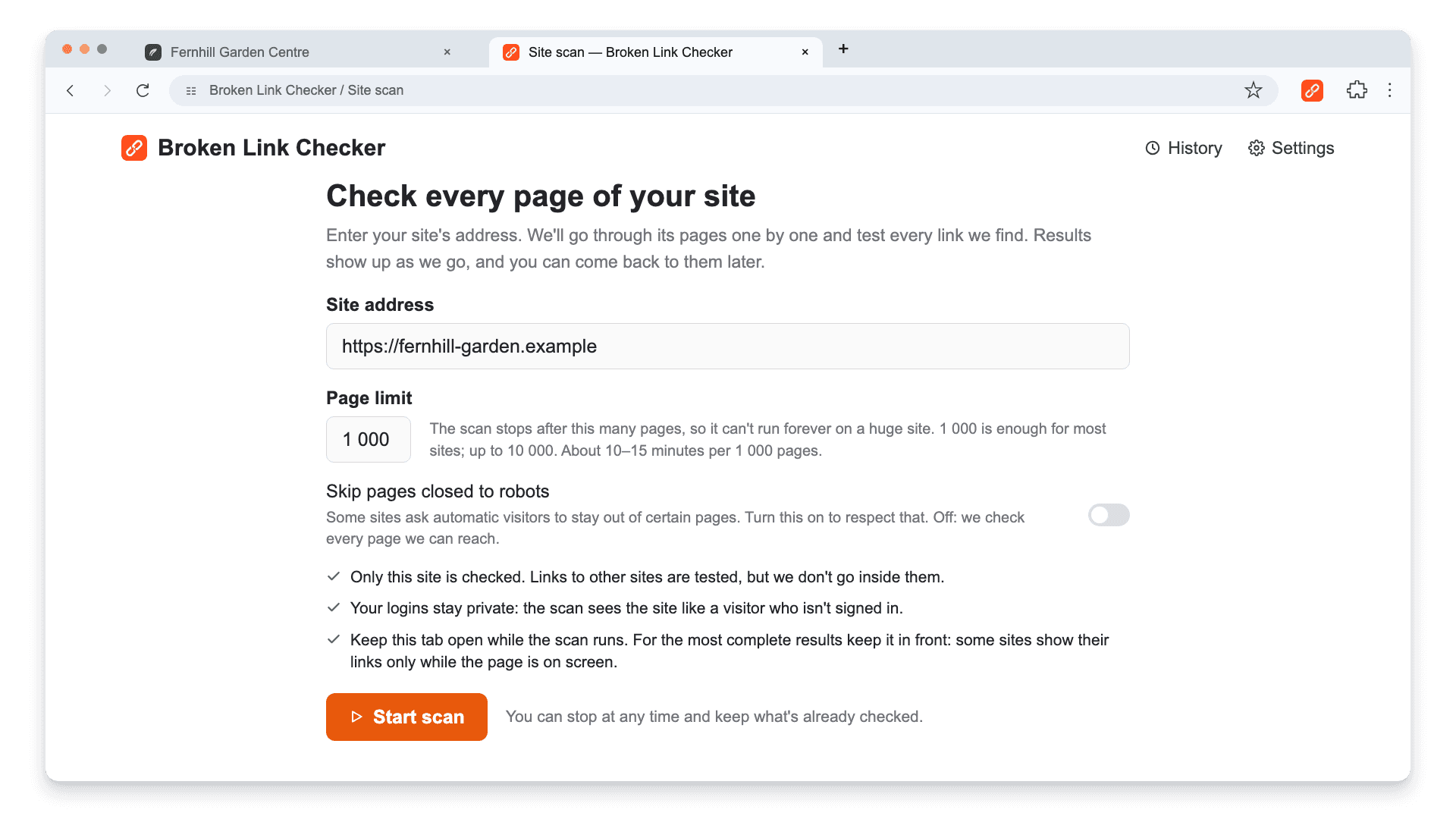
Open any page of the website you want to check, click the extension icon, and click Whole site. A new tab opens with the site address already filled in.
Set the page limit and start
Keep the default limit of 1,000 pages or enter a number up to 10,000, then click Start scan. Expect about 10 to 15 minutes per 1,000 pages.
Keep the scan tab open
Results appear as the scan runs. Closing the tab stops the scan. If the scan starts loading pages in a panel on the right (it does this for sites built with JavaScript), keep that tab in front so their links are found.
Filter to Broken and open source pages
Click the Broken card. Expand a broken link to see every page it was found on, then click a page to open it with the link highlighted.
Export and recheck
Click Export CSV to save the filtered list for whoever will fix the links. After the fixes, click Scan again to confirm the errors are gone.
A few settings are worth knowing before the first run:
- Skip pages closed to robots is off by default. Turn it on if you want the scan to respect the site's
robots.txtrules. - The scan sees the site as a signed-out visitor. Pages behind a login aren't checked.
- Subdomains count as other sites: their links are tested, but their pages aren't crawled. Scan a subdomain separately by starting from it.
- Some sites build their pages with JavaScript; the extension loads those in a slower panel on the right. More in broken links in JavaScript sites.
The whole-site scan page has the current workflow and limits.
Reading the Report
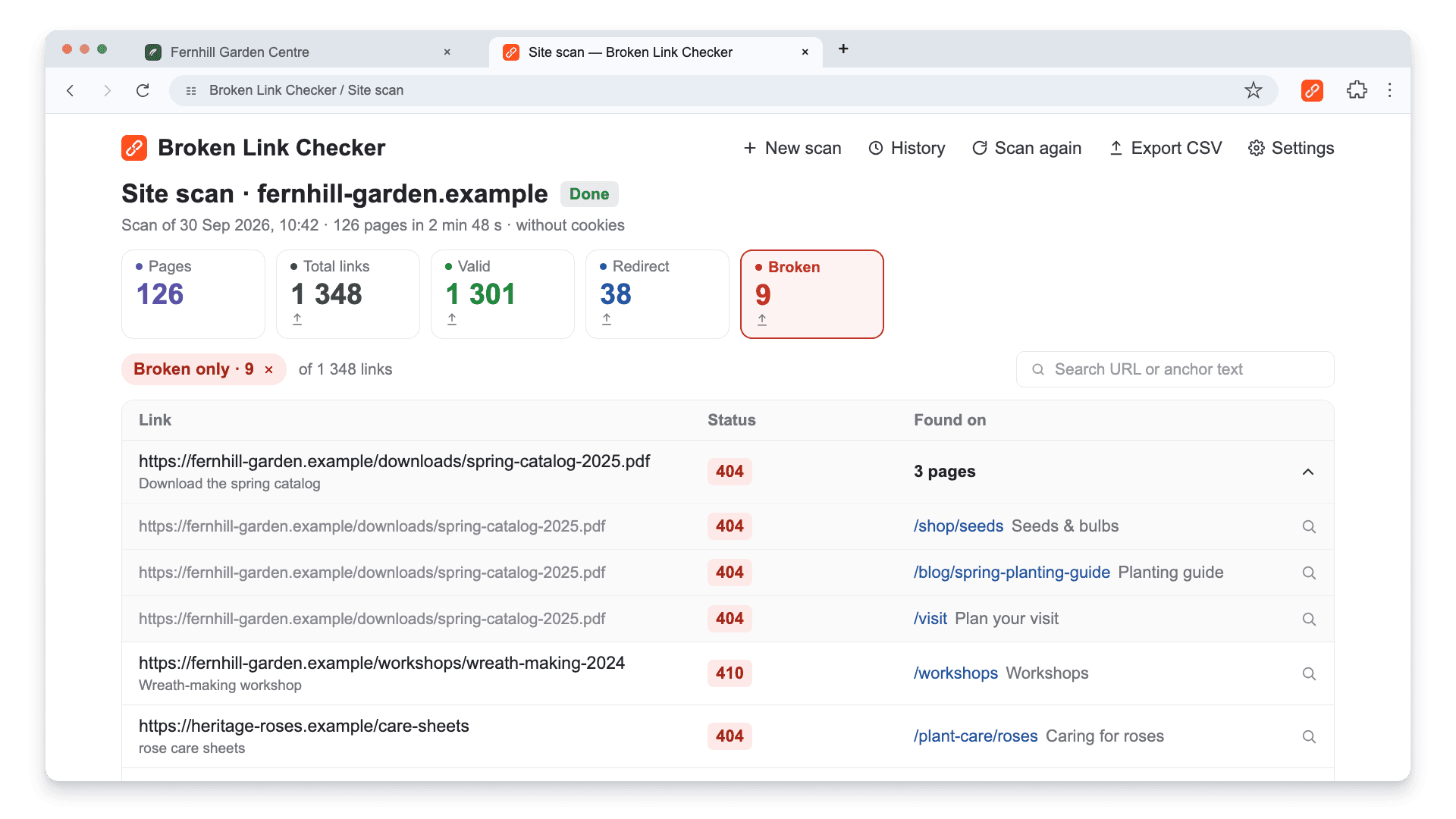
When the scan finishes, the report shows how many pages were checked and how many links are valid, redirected, or broken. Click Broken to see only the failures.
The Found on column is what turns a list of dead URLs into a to-do list. In the screenshot above, one missing PDF is linked from three different pages. Fixing it means either restoring the file at the old address, redirecting it to the new catalog, or editing all three links.
Before editing anything, check the status:
- 404 and 410 mean the page is gone. A 410 says it was removed on purpose.
- Timeout and network errors can be temporary. The extension rechecks them once at the end of the scan; if they still fail, open the link yourself before deleting it.
- 403 and 429 can mean the other site blocks automated requests or asked the checker to slow down. The link may work fine for a visitor.
- A 301 → 404 chain means a redirect leads to a missing page. Point the link to a working address instead.
For the full method of confirming an error before you change a link, see how to find broken links on a website.
Exporting a Report to Share
Click Export CSV in the report header to save what's currently on screen, for example only broken links, or use the export icon on a card (Total links, Valid, Redirect, or Broken) to save that group. The file is named after the site and the date, and it opens in Google Sheets or Excel.
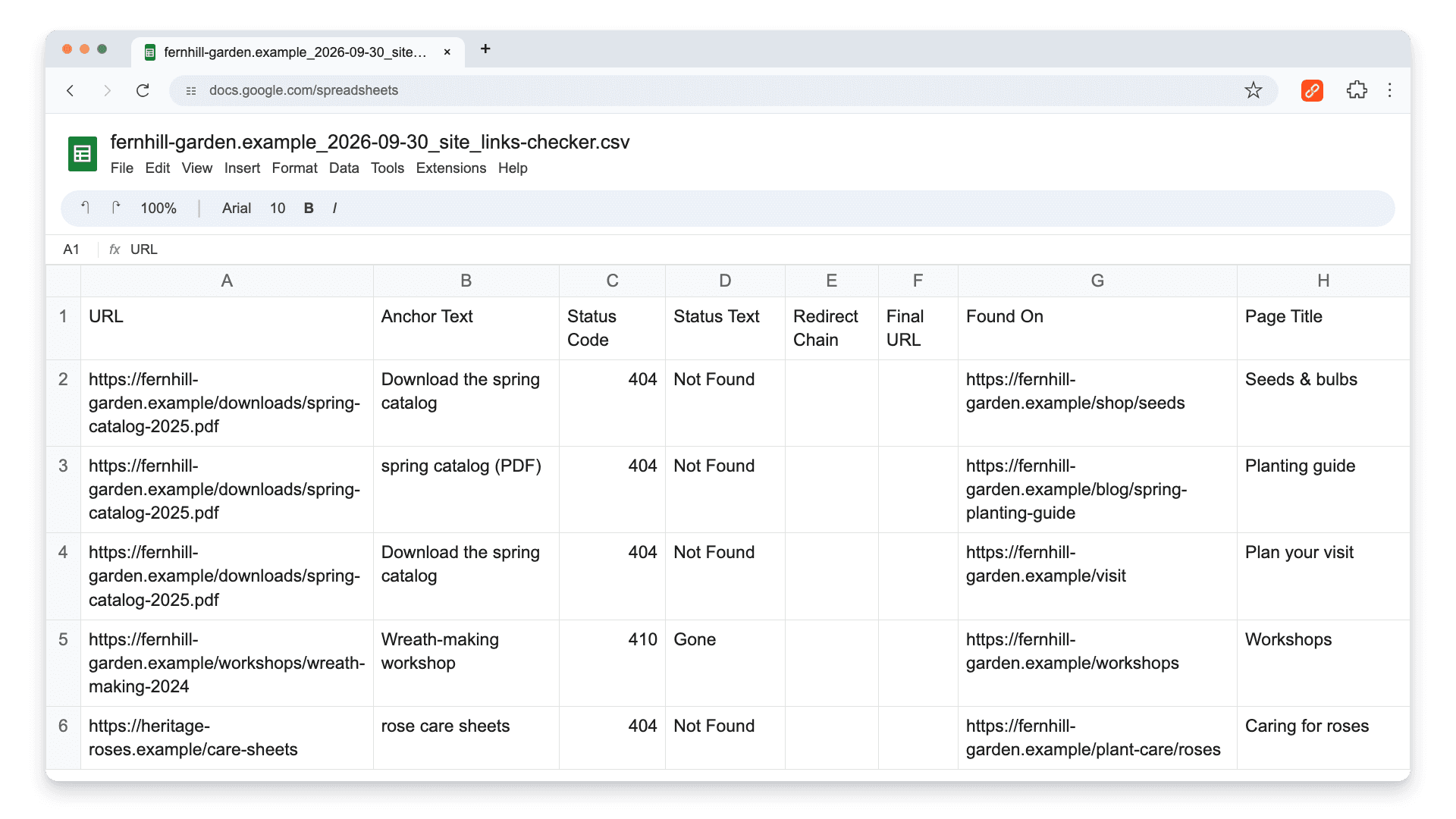
Each broken link gets one row per page it appears on. An editor can sort by Found On and fix one page at a time.
When to Choose a Desktop Crawler Instead
A downloaded crawler is the right call when broken links are only one line in a larger audit. Screaming Frog also checks titles, meta descriptions, canonicals, indexability, and response codes across the whole crawl, and its paid license adds scheduling, saved crawls, and JavaScript rendering. The free version is limited to 500 URLs per crawl, counted in URLs, not pages: images, CSS, and script files it crawls count too, so 500 URLs can cover far fewer than 500 pages.
The trade-off is setup: you install an application and choose crawl settings. For a site owner who needs "the list of broken links and where they are," that is often more tool than the job requires. For an SEO specialist running a migration audit, it's the standard choice. Our Screaming Frog comparison goes through both workflows step by step.
Other Ways to Check Without Downloading Anything
- Google Search Console reports URLs on your site that Google couldn't fetch, including 404s. It doesn't list broken outbound links. See does Google have a broken link checker for what Google's tools do and don't cover.
- Single-page extensions such as Check My Links check the page you're on. For the differences from a whole-site scan, see Check My Links alternative.
- Link checks in documents. Broken Link Checker also checks links in Google Docs and Sheets, which neither online checkers nor website crawlers are built for.
How often to run any of these depends on the size of the site and how often it changes. The link checking schedule guide has recommendations by site type.
Frequently asked questions
- Is BrokenLinkCheck.com free?
- Yes, for personal, non-commercial use. The free version checks up to 3,000 pages per scan, requires a security code for each run, and allows one running scan per IP address. Its terms say business use requires a license. Export, subfolder scans, larger sites, and scheduled reports are part of a commercial version sold by quote.
- Is BrokenLinkCheck.com safe to use?
- It only needs your site's public address; there is no account and no software to install. It crawls pages the same way any visitor or search engine can see them, so it doesn't access anything private. As with any online crawler, the scan runs on the service's servers, and the results are shown on its site.
- Do I need to download a broken link checker?
- No. An online checker needs nothing, and a Chrome extension is added from the Chrome Web Store without an installer. A download only makes sense if you want a desktop crawler such as Screaming Frog for larger technical SEO audits.
- Is the Broken Link Checker Chrome extension the same as the WordPress plugin?
- No. They are separate products that share a name. The WordPress plugin by WPMU DEV is installed on a WordPress site and checks that site's content. The Chrome extension runs in your browser and checks any public website, as well as Google Docs and Sheets.
- Can I check a single page or a subfolder instead of the whole site?
- BrokenLinkCheck.com's free version accepts only a domain or subdomain, not a URL with a path. Broken Link Checker checks the page you have open by default. Its whole-site scan starts from the page you're on but covers the whole site; it doesn't limit the scan to one subfolder.
- Does BrokenLinkCheck.com check links to PDFs and images?
- Not in the free version. The site states that links to documents such as PDF, DOC, XLS, and PPT files and images are only checked in the commercial version. The Broken Link Checker extension tests links to files such as PDFs like any other link, but it doesn't check image files embedded in a page.
- Can I check my website for broken links for free?
- Yes, with limits. BrokenLinkCheck.com is free for personal sites up to 3,000 pages. Screaming Frog's free version crawls up to 500 URLs. Broken Link Checker gives 3 free checks, and one whole-site scan counts as one check. Google Search Console is free and reports 404s Google has found on your site.

Pavel Molyanov
Creator of Broken Link Checker
Content marketer with 10+ years of experience. Founder of a content marketing agency. Writing about SEO, content workflows, and website maintenance.
Check Your Links in One Click
Broken Link Checker finds broken links and redirects on any page or across your whole website, and works in Google Docs and Sheets. Try 3 checks free, with no signup or card required.