Check My Links Chrome Extension: What It Does and When to Switch
Check My Links is a free Chrome extension that checks every link on the page you have open. Click its icon, and it marks valid, redirected, and broken links directly on the page, then lets you view or download a report. If you edit one page at a time and only need a quick visual check, it does the job, and you don't need to pay for anything.
It is not built to audit a whole website. When you need every broken link across a site, the pages that contain each one, and a report you can hand to someone else, use a tool that crawls the site. Broken Link Checker is a Chrome extension that does both: a check of the current page and a Whole site scan with source pages.
This guide covers what Check My Links does today, how to use it, how it compares with Broken Link Checker, and when switching is worth it.
Check My Links at a Glance
All figures come from the extension's Chrome Web Store listing and the developer's product page, checked on September 30, 2026.
| Detail | Check My Links |
|---|---|
| Publisher | SelectorsHub Tech Private Limited |
| Chrome Web Store users | 90,000 |
| Store rating | 4.5 out of 5 from 101 ratings |
| Latest version | 8.1.6, updated September 25, 2026 (actively maintained) |
| Price | Free; an optional Advanced key costs $29 one-time |
| What it checks | Links on the page you have open, including Google Docs and Sheets |
| Other browsers | Also published for Firefox and Edge |
Which "Check My Links" Is This?
The name has a history, which can make search results confusing. The original open-source Check My Links repository on GitHub, published by PageModified, links to a different Chrome Web Store ID. That item page now shows as unavailable. The repository's last code change dates from 2020, and it uses Manifest V2, an extension format that Chrome has phased out.
The extension named Check My Links that you can install from the store today is published by SelectorsHub. Its listing opens with the same one-line description as the original, but neither the listing nor the product page explains how the two are related. If an old tutorial's screenshots don't match what you see, this is why. Everything below describes the current SelectorsHub version.
How to Install and Use Check My Links in Chrome
- Open Check My Links in the Chrome Web Store and click Add to Chrome.
- Pin it: open Chrome's Extensions menu (the puzzle icon) and click the pin next to Check My Links.
- Open the web page you want to check. The developer notes that extensions don't run on a blank new tab or on the Chrome Web Store itself.
- Click the Check My Links icon. The extension collects the links on the page, checks each one, and shows counts for valid links, redirects, warnings, and invalid links.
- Look at the colored links on the page, then view the report or download it as a CSV file.
To check a Google Doc or Sheet, open the file and click the icon the same way.
Free vs. Advanced Features
The free version fetches every link on the page with its HTTP status code. It works inside iframes and shadow DOM. It can exclude links to specific domains, control scan speed, include or skip empty links, and download or view a CSV report. By default, it excludes doubleclick.net and appliedsemantics.com links, and you can remove those exclusions in its settings.
The product page lists these features under the paid Advanced key ($29 one-time, checked September 30, 2026):
- excluding page sections such as the header or footer;
- rechecking all invalid links at once;
- filtering reports by link type or status code;
- custom highlight colors and a draggable window;
- export to Excel as well as CSV.
The store listing places section exclusion and custom colors in its general feature list, so the free/paid split may change. Check the product page before buying. The listing also says the extension may show product tips a few days after installation, and that the Advanced key hides them.
Where a Single-Page Checker Stops
Check My Links answers one question well: which links on this page fail? Its listing and product page describe checking the page you have open. Neither describes crawling an entire website. That leads to a few practical limits:
- One page per check. To audit a 200-page site, you would open and check 200 pages, then merge 200 reports yourself.
- No map of where a broken URL appears. A broken link in the footer or a page template shows up on every page you check. A single-page tool can't tell you that one fix in that template clears all of them.
- Pages you don't open are never checked. Old blog posts, landing pages, and help articles are exactly where links decay, and they are the pages nobody visits during routine edits.
- No saved history. Neither the listing nor the product page mentions saved scans; to compare months, you keep the CSVs yourself.
None of this is a flaw for the job Check My Links was designed for. It matters when the job becomes "find every broken link on our website."
Check My Links or Another Extension: What to Compare
Many link checker extensions have similar store descriptions. Five questions separate them:
- Scope. Does it check only the open page, or can it scan a whole site? What is the page limit?
- Source pages. For a site-wide result, does it show every page that contains the broken link?
- Redirect handling. Does it show the final status of a redirect, or only that a redirect happened? A
301that ends in404is broken. - Export. Does the CSV include the source page and anchor text, or only the URL and status code?
- Pricing. Is it free for your use, a free trial, or a subscription? Which features are paid?
Check My Links vs. Broken Link Checker
| Capability | Check My Links | Broken Link Checker |
|---|---|---|
| Check the page you have open | Yes | Yes |
| Highlight results on the page | Valid, redirected, and broken links | Green, blue, and red outlines; the magnifier scrolls to one link and highlights it |
| Check a whole website | No (checks the open page only) | Whole site scan, 1,000 pages by default, up to 10,000 per scan |
| Show which pages contain a broken link | Only the page you checked | Found on list for every result, with a click-through to the page and link |
| Redirect details | Counts and highlights redirected links | First and final status (for example 301 → 404) plus the final URL |
| Google Docs and Sheets | Yes | Yes: every tab of a document and every sheet of a spreadsheet |
| Export | CSV (Excel with the Advanced key) | CSV by status category, including redirect chain, final URL, and source page |
| Saved results | None mentioned in its listing | Last 10 whole-site scans per site, kept in your browser |
| Skip parts of a page | Domain exclusions; section exclusion listed with the Advanced key | Ignore Elements setting with CSS selectors |
| Price | Free; Advanced key $29 one-time | First 3 checks free, then $2.90/month, $19/year, or $29 lifetime |
| Browsers | Chrome, Edge, Firefox | Chrome |
Both extensions run the checks from your browser. The Chrome Web Store listing for Check My Links says the developer has disclosed that it will not collect or use your data. For Broken Link Checker, the pages you check and the results are not sent to our servers, and whole-site reports are stored in your browser only.
The pricing difference is real. Check My Links is free for indefinite single-page use, while Broken Link Checker's free access is a three-check trial. Every paid plan unlocks the same features, including whole-site scans. You don't need a higher tier for them.
When Check My Links Is Enough
Stay with Check My Links if these describe your work:
- You check a page right after editing it, before or after publishing.
- Your site has a handful of pages you can open one by one.
- You review links in a single Google Doc or Sheet before sharing it.
- You want a free tool and don't need a record of past checks.
- You work in Firefox or Edge as well as Chrome.
For these tasks, paying for a site crawler adds nothing you will use.
When to Switch to a Whole-Site Checker
Switch when the question changes from "is this page OK?" to "what is broken across the site, and where?" Typical triggers:
- You inherited a site or are preparing a redesign. You need a complete inventory before anything moves. See the pre-redesign link audit.
- Someone else fixes the links. A content editor needs a list of the pages to edit, not just broken URLs.
- The same broken link appears everywhere. Source pages show whether it lives in a menu, footer, or template.
- You need to prove progress. Keeping scan history lets you see whether the broken count is going down.
- Redirects matter to you. A link that redirects and then ends in an error is broken. A link that works through a redirect is still worth updating to avoid redirect chains.
What Switching Looks Like in Broken Link Checker
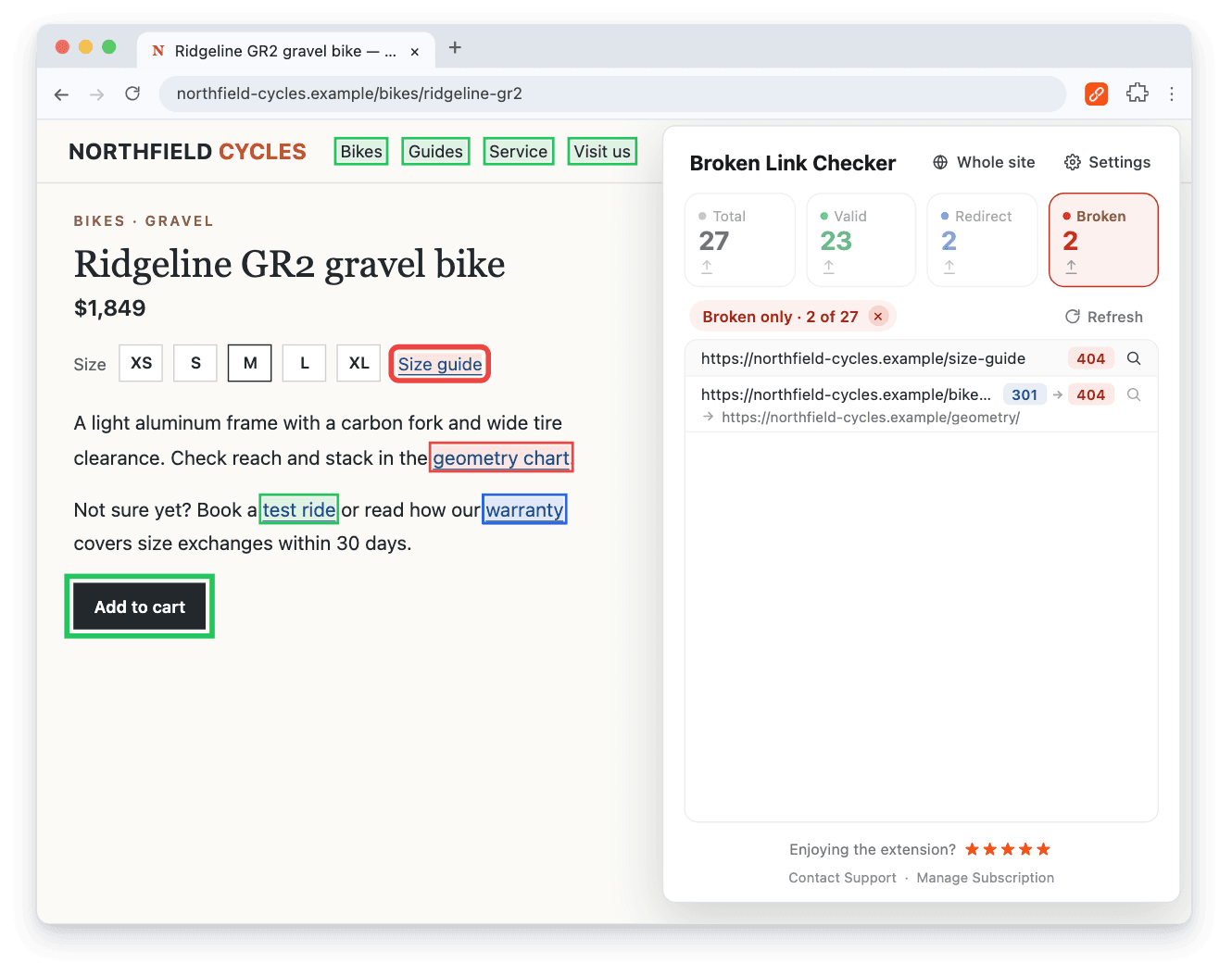
The page check works like Check My Links: open the page and click the Broken Link Checker for Chrome icon. Links on the page are outlined in green (valid), blue (redirect), or red (broken), and the magnifier next to a result scrolls to that link. Here, the Size guide link returns 404, and the geometry chart link returns 301 and then 404, so its redirect leads to a page that no longer exists.
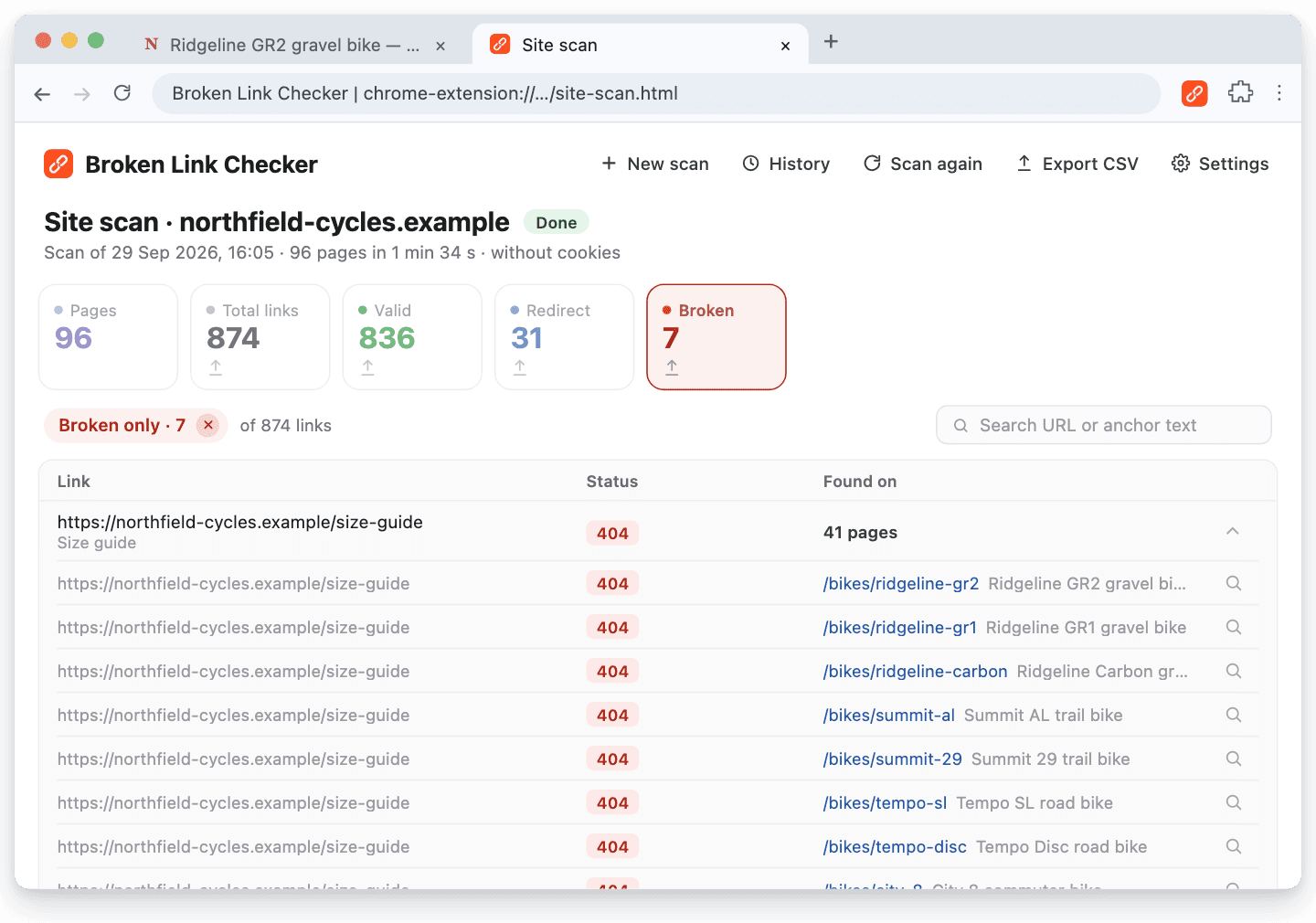
To cover the whole site, click Whole site in the popup and start the scan in the tab that opens (1,000 pages by default, up to 10,000). If the scan starts loading pages in a panel on the right (it does this for sites built with JavaScript), keep that tab in front so their links are found. In the report, expand a broken link to see every page that contains it.
A single-page tool would show this Size guide link as broken on whichever product page you happened to open. The report shows it on 41 pages. It sits in the product page template, so one fix there clears all 41. Export CSV gives whoever fixes it the link, anchor text, status, redirect chain, final URL, and source page, one row per source page.
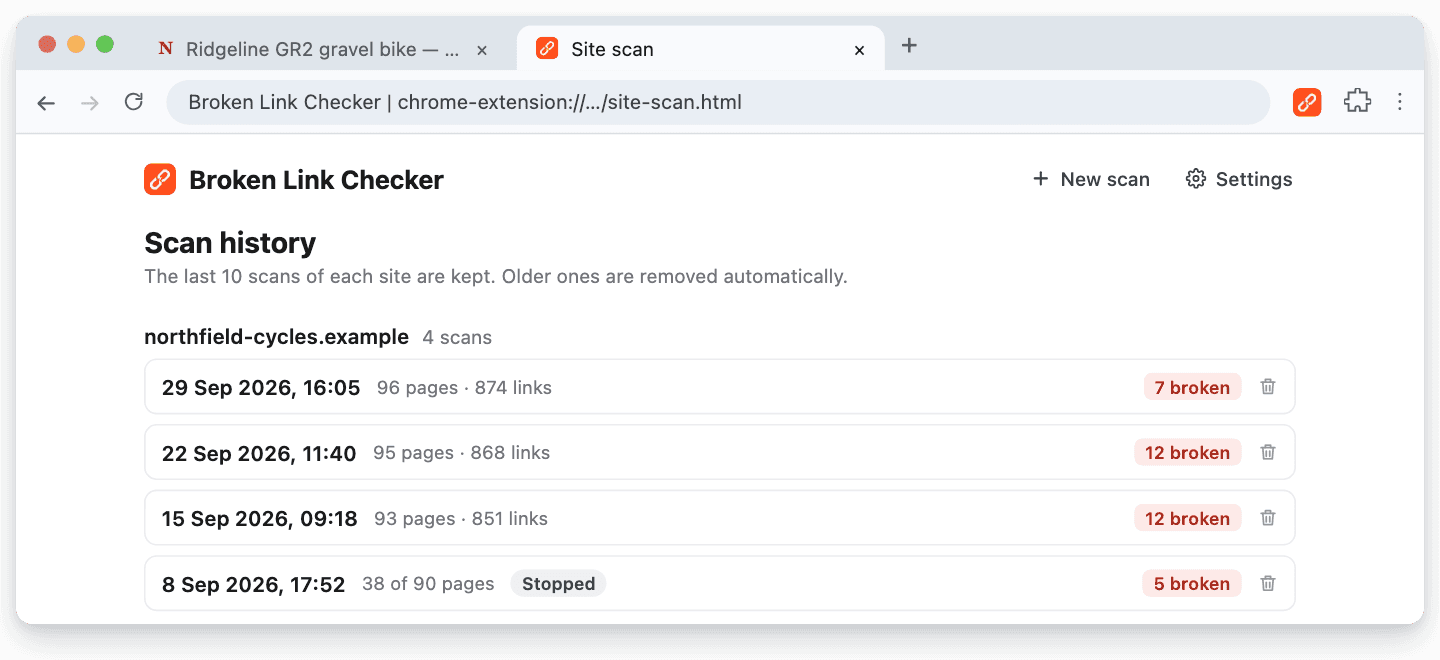
The last 10 scans of each site stay under History, so you can compare broken counts after a round of fixes. For how often to rerun them, see how often to check for broken links.
If a site you know works shows an error, check Settings: keep Request Method on GET, and turn on Cookies for pages that need a login (this can trigger action links).
The whole-site scan page describes the feature, and the BrokenLinkCheck.com alternative guide walks through every step, from the scan to the export.
Other Alternatives Worth Knowing
- A desktop crawler. Screaming Frog checks links as part of a broader technical SEO audit, with a free tier limited to 500 URLs. See the Screaming Frog comparison.
- An online checker. Web-based tools need no installation and scan public sites from a server. See the BrokenLinkCheck.com alternative guide for when that approach works.
- Google Search Console. It reports URLs that Google couldn't fetch, but it isn't a complete outbound-link audit. See whether Google has a broken link checker.
- Google Workspace files. For link checks inside documents, follow the guides for Google Sheets and Google Docs.
For a side-by-side of seven methods, see how to find broken links on a website.
Frequently Asked Questions
Is Check My Links Free?
Yes. The core features are free with no usage limit, according to the developer's product page. An optional Advanced key ($29 one-time, checked September 30, 2026) adds features such as bulk rechecking, report filtering, and Excel export, and it hides the product tips the extension may display.
Can Check My Links Check an Entire Website?
Its listing and product page describe checking the page you have open, not crawling a website. To check a site, you would open each page separately. Use a whole-site scanner when you need every page covered along with the pages that contain each broken link.
Does Check My Links Work in Google Docs and Sheets?
Yes. The current listing says it detects and checks links in Google Docs and spreadsheets. Broken Link Checker also checks Google Docs (all tabs) and Google Sheets (all sheets). The Google Docs and Sheets page explains how.
Is Check My Links the Best Link Checker for Chrome?
For checking the page you have open, it's a strong free choice: it's actively maintained, rated 4.5 out of 5, and also works in Google Docs and Sheets. It's not the right fit when you need the whole site. It doesn't crawl, doesn't list the pages that contain each broken link, and its listing mentions no saved results. For that job, use a whole-site checker such as Broken Link Checker.
Does Broken Link Checker Have a Free Version?
It has a free trial: the first 3 checks are free, with no signup or card. A page check and a whole-site scan each count as one check. After that, choose Monthly ($2.90/month), Yearly ($19/year), or Lifetime ($29 one-time). Every plan includes the same features.
Can I Use Both Extensions?
Yes. They are separate extensions and can be installed side by side. Some people keep a free page checker for quick edits and run a whole-site scan before a redesign, after a migration, or on a regular maintenance schedule.

Pavel Molyanov
Creator of Broken Link Checker
Content marketer with 10+ years of experience. Founder of a content marketing agency. Writing about SEO, content workflows, and website maintenance.

Check Your Links in One Click
Broken Link Checker finds broken links and redirects on any page or across your whole website, and works in Google Docs and Sheets. Try 3 checks free, with no signup or card required.