How to Find Broken Links in JavaScript SPAs
· Updated
You run a broken link check on your React app. Everything comes back clean — zero errors, all links working. Then you open Google Search Console and find dozens of pages flagged as soft 404s, URLs returning empty content, and routes that Google can't even reach.
The problem isn't your link checker. It's that traditional crawlers don't understand how single-page applications work. They request a URL, read the HTML response, and move on. But in an SPA, the HTML response for every route is the same empty shell — a <div id="root"></div> and a bundle of JavaScript. The actual content, navigation, and links only exist after that JavaScript executes in a browser.
This creates a fundamental mismatch between how SPAs serve content and how most tools (and search engines) consume it. And it means broken links in SPAs are harder to find, harder to diagnose, and more damaging than on traditional websites.
Why Traditional Crawlers Fail on SPAs
A conventional link checker works by making HTTP requests and reading the response HTML. It finds <a href="..."> tags, follows them, and checks the status code. Simple, fast, and effective — for server-rendered sites.
SPAs break this model in three ways.
1. No Real HTML to Parse
When a crawler requests /products/widget-pro on a React app, the server doesn't return a page about Widget Pro. It returns the same index.html shell it returns for every URL — a minimal HTML document that loads your JavaScript bundle. The actual product page content is rendered client-side after React hydrates.
A traditional crawler sees this:
<!DOCTYPE html>
<html>
  <head><title>My App</title></head>
  <body>
    <div id="root"></div>
    <script src="/static/js/bundle.js"></script>
  </body>
</html>
No links. No content. No way to determine if the page is broken or working.
2. Client-Side Routing Hides Errors
In a traditional website, navigating to a nonexistent URL returns a 404 status code from the server. The crawler sees the 404 and flags the link as broken. Clear signal.
In an SPA, the server is typically configured to return index.html (with a 200 status code) for every URL. The client-side router — React Router, Vue Router, or Angular Router — then determines what to render. If the route doesn't match anything, the SPA might show a "Not Found" component, but the HTTP response was still 200 OK.
This means:
- Every URL returns 200, whether the route exists or not
- Broken internal links silently fail — users see a blank page or a fallback, but no HTTP error
- Crawlers can't distinguish valid pages from dead ends
3. Dynamic Links Are Invisible
SPAs frequently generate links dynamically. A navigation menu might be populated from an API call. Product links might be generated from a database query. Category pages might build their link lists at runtime.
None of these links exist in the initial HTML. A crawler that doesn't execute JavaScript never sees them — and therefore can never check them.
How Google Handles JavaScript SPAs
Google's Web Rendering Service (WRS) uses a headless Chromium browser to render JavaScript pages. In theory, this means Google can see your SPA content. In practice, it's more complicated.
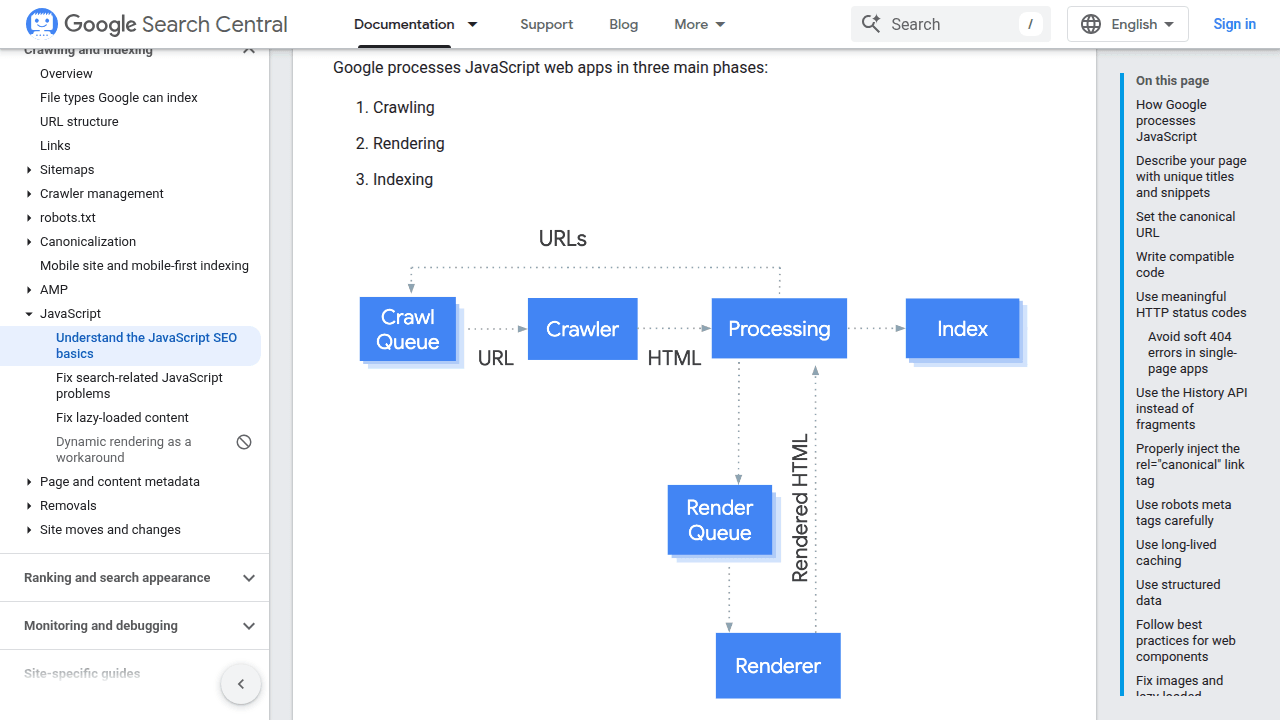
Rendering Happens in a Queue
Google's older "two waves of indexing" model — where Googlebot would index raw HTML first and render JavaScript later — is a simplified picture. Google's Martin Splitt said back in 2019 that two-wave indexing plays less and less of a role, and Google now describes crawling, rendering, and indexing as a more continuous pipeline. Still, the practical problem for SPAs remains: rendering is not instant.
When Googlebot fetches an SPA URL, it receives the empty HTML shell — no meaningful content, no links to follow. The page enters a rendering queue, where the Web Rendering Service (WRS) executes the JavaScript and extracts the real content. That queue can process the page within seconds on fast sites, but under load it can stretch to hours or longer.
The delay matters most for discovery. If your SPA adds a new route with links to other pages, Google might not find those linked pages until the rendering queue processes the parent page. For content-heavy SPAs, this delay can slow down indexing of new content and make it harder for internal link equity to flow through freshly added routes.
Where Google's Renderer Fails
WRS is powerful but not perfect. According to Google's own JavaScript SEO documentation, several things can break rendering:
- Timeouts: WRS has a limited rendering budget per page. If your JavaScript takes too long to execute (heavy computation, slow API calls, large bundles), Google may give up before the content loads.
- Stateless execution: WRS doesn't maintain cookies or session state between pages. If your routing or content depends on authentication, user state, or cookies, Google sees nothing.
- Blocked resources: If
robots.txtblocks JavaScript files, CSS, or API endpoints that the page needs, rendering fails silently. - Error handling: If a JavaScript error occurs during rendering — a failed API call, a missing dependency, an unhandled exception — Google sees whatever was rendered before the error, which might be an empty page or a loading spinner.
When rendering fails, Google either indexes the empty shell (resulting in thin content or soft 404 errors) or skips the page entirely.
Hash Routing vs. History API: The SEO Impact
The routing strategy your SPA uses has a direct impact on how search engines discover and index your links.
Hash Routing (/#/page)
Hash-based URLs use the fragment identifier (#) to handle routing:
https://example.com/#/products
https://example.com/#/products/widget-pro
https://example.com/#/about
The part after # is never sent to the server — it's a browser-only mechanism. This has two critical consequences:
-
Google ignores fragments: Google's crawler strips everything after
#and treats all these URLs as the same page (https://example.com/). Your entire SPA resolves to a single URL in Google's index. -
No deep linking for crawlers: External links pointing to
https://example.com/#/products/widget-proare treated as links tohttps://example.com/. All link equity flows to your homepage, not to the specific page.
Hash routing is still the default in some configurations — Vue Router uses it unless you explicitly enable history mode, and older React apps may still use HashRouter.
History API Routing (/page)
The History API (pushState/replaceState) creates clean URLs:
https://example.com/products
https://example.com/products/widget-pro
https://example.com/about
These look like regular URLs to crawlers. Google can index each route separately, follow links between them, and assign link equity to individual pages. This is the recommended approach for any SPA that needs to be indexed.
The trade-off: History API routing requires server configuration. The server must return your index.html for all routes, not just the root. Without this catch-all configuration, refreshing or directly accessing a deep link returns a real 404 from the server.
If you're using hash routing and care about SEO, switch to History API routing. This single change will do more for your SPA's discoverability than almost any other optimization.
Framework-Specific Broken Link Problems
Each framework has its own routing quirks that affect how broken links manifest.
React (React Router)
React Router v6+ handles unmatched routes with a catch-all route:
import { Routes, Route } from 'react-router-dom';

function App() {
  return (
    <Routes>
      <Route path="/" element={<Home />} />
      <Route path="/products/:id" element={<Product />} />
      <Route path="*" element={<NotFound />} />
    </Routes>
  );
}
The path="*" catch-all renders a "Not Found" component, but the server still returns 200 OK. Google sees a 200 status code with "page not found" text — a classic soft 404.
Common broken link scenarios in React:
<Link to="/prodcts/widget">— a typo in the route path silently renders the catch-all- Dynamic routes where the
idparameter doesn't match any data — the component renders but shows empty or error state - Stale links after route restructuring — old paths like
/blog/my-poststill return 200 even when the route was changed to/articles/my-post
Vue (Vue Router)
Vue Router has similar patterns, with an added wrinkle: it defaults to hash mode.
const router = createRouter({
  history: createWebHistory(), // NOT createWebHashHistory()
  routes: [
    { path: '/', component: Home },
    { path: '/products/:id', component: Product },
    { path: '/:pathMatch(.*)*', name: 'NotFound', component: NotFound }
  ]
})
Vue-specific issues:
- Forgetting to switch from
createWebHashHistory()tocreateWebHistory()— your entire site lives behind#fragments - Navigation guards (
beforeEnter) that redirect to login or error pages without proper status codes - Lazy-loaded route components that fail to load — the user sees a blank page, no error is thrown to the router
Angular (Angular Router)
Angular's routing is more opinionated but has its own challenges:
const routes: Routes = [
  { path: '', component: HomeComponent },
  { path: 'products/:id', component: ProductComponent },
  { path: '**', component: NotFoundComponent }
];
Angular-specific issues:
- Angular Universal (SSR) can return proper 404 status codes, but only if you explicitly set the response status in the server-side component
- Resolver-based data fetching can silently swallow errors — if a resolver fails, the route may not activate, leaving the user on the previous page with no indication of a broken link
- Module-based lazy loading failures are particularly hard to diagnose — if a chunk fails to load, the router throws a
ChunkLoadErrorthat doesn't map to a specific broken link
How to Find Broken Links in SPAs
Standard tools won't cut it. You need approaches that execute JavaScript, wait for rendering, and understand client-side routing.
Method 1: Browser-Based Crawlers
Tools that use a real browser engine can render your SPA and find links that exist only after JavaScript executes.
Screaming Frog with JavaScript Rendering:
- Open Screaming Frog SEO Spider
- Go to Configuration → Spider → Rendering
- Select JavaScript from the rendering dropdown
- Set an appropriate AJAX timeout (5-10 seconds for most SPAs)
- Start the crawl
Screaming Frog will use a headless Chromium instance to render each page before extracting links and checking status codes. This catches links that only exist in the rendered DOM.
Limitations to be aware of: Screaming Frog doesn't interact with the page — no clicks, scrolls, or hover events. Links that appear only after user interaction (accordion menus, infinite scroll, click-to-expand sections) remain invisible.
Broken Link Checker extension:
For a quick route check, the extension scans the rendered current page, including links generated by JavaScript. Its whole-site mode samples pages in a browser panel and uses that panel for pages it identifies as script-built. The panel scrolls and waits for the page to settle before collecting links; when the samples reveal extra links, later pages are also read in the panel. Keep the scanner tab open and in the foreground for the best coverage; background throttling and visibility-dependent code can otherwise hide links.
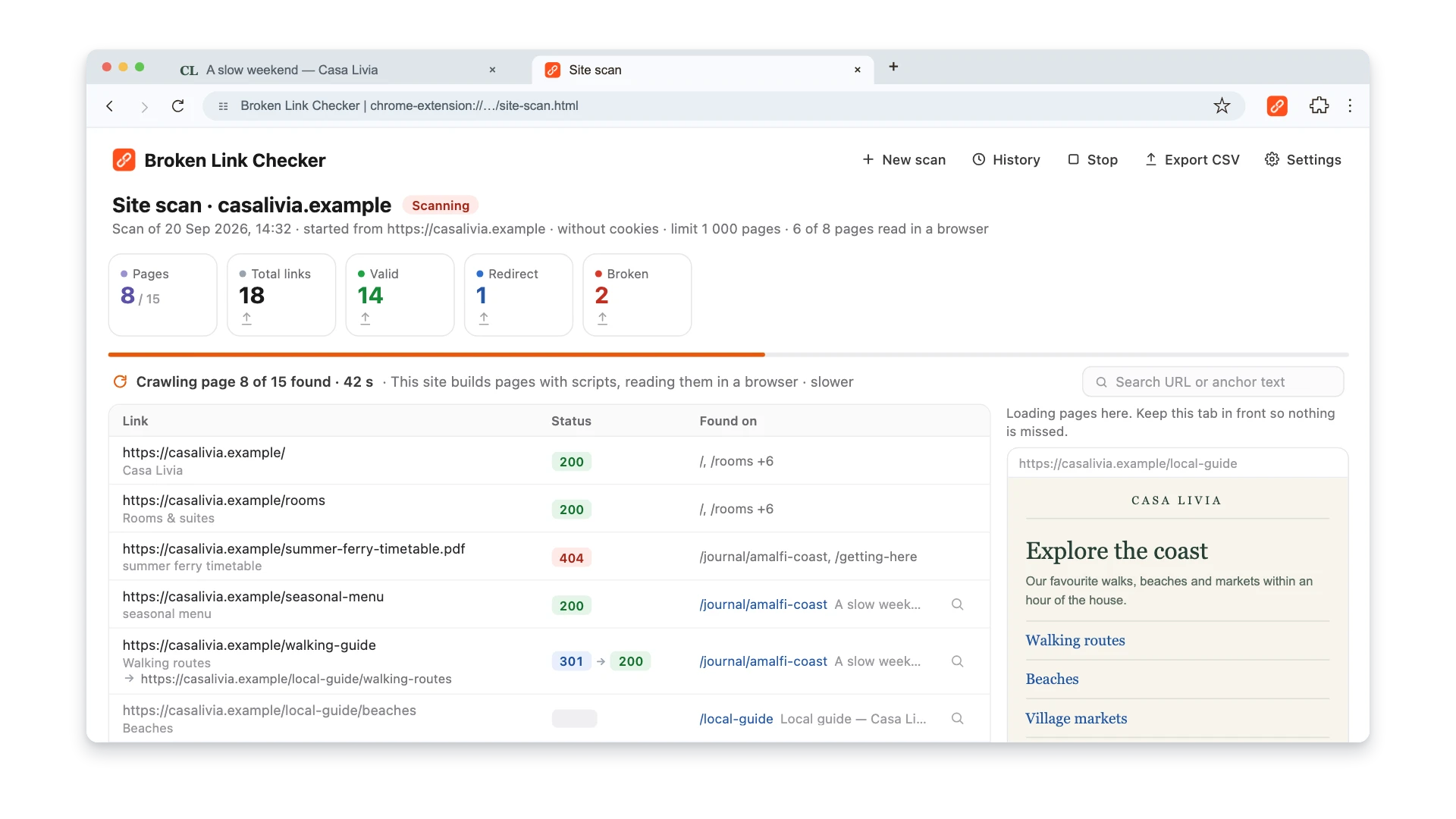
This rendering is still observation, not full user simulation. The scanner does not click menus, accept consent dialogs, submit forms, log in, or automatically classify a 200 OK error view as a soft 404. Links revealed only by interaction may be missed, and route correctness still requires server-status checks plus manual or scripted interaction tests. You can stop a site scan and resume the saved run later.
Method 2: Write a Playwright Script
For the most thorough check, write a custom crawler using Playwright or Puppeteer. These tools control a real browser and can navigate your SPA exactly like a user would.
Here's a practical Playwright script that crawls an SPA and checks for broken links:
const { chromium } = require('playwright');

async function checkSPALinks(startUrl) {
  const browser = await chromium.launch();
  const page = await browser.newPage();

  const visited = new Set();
  const broken = [];
  const queue = [startUrl];
  const baseUrl = new URL(startUrl).origin;

  while (queue.length > 0) {
    const url = queue.shift();
    if (visited.has(url)) continue;
    visited.add(url);

    try {
      const response = await page.goto(url, {
        waitUntil: 'networkidle',
        timeout: 15000
      });

      const status = response?.status() || 0;

      // Check for soft 404 indicators
      const pageText = await page.textContent('body');
      const isSoft404 = /page not found|404|not found/i.test(pageText)
        && pageText.length < 2000;

      if (status >= 400 || isSoft404) {
        broken.push({ url, status, isSoft404 });
        continue;
      }

      // Extract all links from the rendered page
      const links = await page.$$eval('a[href]', anchors =>
        anchors
          .map(a => a.href)
          .filter(href => href.startsWith('http'))
      );

      for (const link of links) {
        if (link.startsWith(baseUrl) && !visited.has(link)) {
          queue.push(link);
        }
      }

    } catch (error) {
      broken.push({ url, status: 0, error: error.message });
    }
  }

  await browser.close();
  return broken;
}

checkSPALinks('https://your-spa-site.com').then(results => {
  console.log(`Found ${results.length} broken links:`);
  results.forEach(r => console.log(`  ${r.url} — ${r.status}${r.isSoft404 ? ' (soft 404)' : ''}`));
});
This script does several things traditional crawlers can't:
- Waits for network idle — ensuring JavaScript has finished rendering and API calls have completed
- Reads the rendered DOM — finding links that only exist after client-side rendering
- Detects soft 404s — checking page content for "not found" patterns even when the status code is 200
- Follows internal links recursively — building a complete map of your SPA's link structure
You can extend this to check external links, capture screenshots of broken pages, or integrate it into your CI/CD pipeline.
Method 3: Google Search Console
Google's own rendering tells you what Google actually sees. Check two reports:
-
Page Indexing report: Look for soft 404s, "Crawled — currently not indexed," and "Discovered — currently not indexed." These often point to SPA routes where rendering failed.
-
URL Inspection tool: Enter specific URLs and click "Test Live URL" to see Google's rendered version. Compare the rendered screenshot to what you see in a browser. If they don't match, your SPA has a rendering problem that could hide broken links from Google.
Method 4: Intercept Network Requests
For SPAs that fetch data from APIs, broken "links" often manifest as failed API calls rather than broken <a> tags. A link to /products/123 might render correctly as an <a> tag, but when a user clicks it, the component fetches /api/products/123 — which returns a 404.
You can catch these by monitoring network requests in your browser's DevTools:
- Open the Network tab
- Navigate through your SPA
- Filter by 4xx and 5xx status codes
- Look for failed API calls that indicate missing data behind a "working" link
Playwright can automate this too:
page.on('response', response => {
  if (response.status() >= 400) {
    console.log(`Failed request: ${response.url()} — ${response.status()}`);
  }
});
Fixing Broken Links in SPAs
Finding broken links is half the problem. Fixing them in SPAs requires addressing both the visible symptoms and the underlying architecture.
Fix 1: Implement Proper 404 Status Codes
The most critical fix: make your server return actual 404 status codes for routes that don't exist. In a pure SPA, this requires server-side rendering or a pre-rendering step.
Next.js (React):
// app/products/[id]/page.tsx
export default async function ProductPage({ params }) {
  const product = await getProduct(params.id);

  if (!product) {
    notFound(); // Returns a real 404 status code
  }

  return <ProductDetails product={product} />;
}
Nuxt (Vue):
<script setup>
const product = await $fetch(`/api/products/${route.params.id}`)
  .catch(() => null);

if (!product) {
  throw createError({ statusCode: 404, message: 'Product not found' });
}
</script>
Angular Universal:
@Component({ /* ... */ })
export class ProductComponent implements OnInit {
  constructor(
    private route: ActivatedRoute,
    @Optional() @Inject(RESPONSE) private response: Response
  ) {}

  ngOnInit() {
    const product = this.route.snapshot.data['product'];
    if (!product && this.response) {
      this.response.status(404);
    }
  }
}
Fix 2: Add SSR or Pre-Rendering
If your SPA is a pure client-side application, the most impactful change you can make is adding server-side rendering. SSR solves most SPA link problems at once:
- Search engines get fully rendered HTML with real links
- Proper HTTP status codes (404, 301, etc.) are returned for each route
- No rendering delay — content is immediately available
- Links in the initial HTML are discoverable without JavaScript execution
Framework options:
| SPA Framework | SSR Solution | Migration Effort |
|---|---|---|
| React | Next.js | Moderate — restructure routing and data fetching |
| Vue | Nuxt | Moderate — similar restructuring required |
| Angular | Angular Universal / Angular SSR | Lower — Angular's DI system makes it more modular |
If a full SSR migration isn't feasible, pre-rendering is a lighter alternative. Tools like Prerender.io serve cached, rendered HTML to crawlers while users still get the SPA experience.
Fix 3: Validate Dynamic Routes
SPAs with dynamic routes (/products/:id, /users/:slug) are prone to "invisible" broken links. The route pattern matches, so no 404 is thrown — but the data behind the route is missing.
Add validation at the data-fetching layer:
// Instead of this:
function ProductPage({ id }) {
  const { data } = useFetch(`/api/products/${id}`);
  return <div>{data?.name}</div>; // Silently renders empty
}

// Do this:
function ProductPage({ id }) {
  const { data, error } = useFetch(`/api/products/${id}`);

  if (error?.status === 404) {
    return <NotFound />; // Or trigger a real 404 via SSR
  }

  return <div>{data.name}</div>;
}
Fix 4: Handle Lazy Loading Failures
Code-split SPA bundles can create a unique type of broken link. When you deploy a new version, the old chunk files are replaced. Users with the old version cached in their browser click a link, the router tries to load the new chunk, and fails with a ChunkLoadError.
Handle this gracefully:
// React lazy loading with error boundary
const ProductPage = lazy(() =>
  import('./ProductPage').catch(() => {
    // Chunk failed to load — force a full page reload
    window.location.reload();
    return { default: () => null };
  })
);
Preventing Broken Links in SPAs
Prevention matters more for SPAs than traditional sites because broken links are harder to detect after the fact.
Use TypeScript for Route Definitions
Define your routes as typed constants and reference them everywhere instead of hardcoding strings:
// routes.ts
export const ROUTES = {
  home: '/',
  products: '/products',
  product: (id: string) => `/products/${id}`,
  about: '/about',
} as const;

// Usage — typos become compile-time errors
<Link to={ROUTES.product(item.id)}>View Product</Link>
A typo like ROUTES.prodcut fails at compile time. A typo in a hardcoded string like "/prodcuts/123" silently creates a broken link.
Add Link Checking to CI/CD
Run a Playwright-based link checker as part of your deployment pipeline. If it finds broken links, the build fails before reaching production.
# GitHub Actions example
- name: Check for broken links
  run: |
    npx playwright install chromium
    node scripts/check-links.js https://staging.your-site.com
Monitor After Deployment
New deployments are the most common time for SPA links to break — route changes, removed pages, updated navigation. Set up automated checks that run after every deployment:
- Crawl the production site with JavaScript rendering enabled
- Compare the discovered routes against the previous crawl
- Alert on any new 404s or soft 404s
Keep Your Sitemap Accurate
Your XML sitemap should only contain URLs that return proper 200 status codes with rendered content. For SPAs, generate the sitemap from your route definitions — not by crawling — to ensure it stays in sync with your actual routes. Remove any routes that are behind authentication, return empty content, or no longer exist in your router configuration.
For more on maintaining clean sitemaps and how they interact with broken links, see our guide on XML sitemaps and broken links.
FAQ
Can Google index a pure client-side SPA without SSR?
Yes, but with significant limitations. Google's Web Rendering Service can execute JavaScript and render SPAs, but rendering happens in a queue after the initial crawl rather than inline. Under load, that queue can stretch from seconds to hours, and if your JavaScript fails for any reason — timeout, blocked resources, API errors — the page won't be indexed. For any site where search visibility matters, SSR or pre-rendering is strongly recommended.
Do I need to switch from hash routing to History API routing?
If you want search engines to index your individual pages, yes. Google strips everything after the # in URLs, meaning all hash-based routes resolve to a single URL in Google's index. History API routing creates clean, crawlable URLs that search engines treat as separate pages. Every major framework supports it — React Router's BrowserRouter, Vue Router's createWebHistory(), and Angular's default PathLocationStrategy.
Will a CDN or static hosting break my SPA's deep links?
It can if not configured correctly. When a user directly accesses or refreshes a deep link like /products/widget-pro, the server needs to return your index.html instead of a 404. On Netlify, add a _redirects file with /* /index.html 200. On Vercel, add rewrites in vercel.json. On Nginx, use try_files $uri $uri/ /index.html. Without this configuration, direct navigation and refreshes return server-level 404s.
How do I check if Google is rendering my SPA correctly?
Use the URL Inspection tool in Google Search Console. Enter any URL from your SPA, click "Test Live URL," then view the rendered HTML and screenshot. Compare what Google sees with what you see in your browser. Pay attention to missing content, empty sections, or JavaScript errors in the rendered output. If the rendered version is missing content that appears in your browser, you have a rendering problem.
What's the difference between a broken link and a soft 404 in an SPA?
A broken link is a hyperlink pointing to a URL that returns an error status code (4xx or 5xx). A soft 404 is a page that returns a 200 status code but contains content that looks like an error page — empty content, "not found" messages, or minimal text. In SPAs, soft 404s are far more common than traditional broken links because the server returns 200 for every URL regardless of whether the client-side route exists. Both problems hurt SEO, but they require different fixes: broken links need the link itself updated, while soft 404s need the page to return a proper status code.

Pavel Molyanov
Creator of Broken Link Checker
Content marketer with 10+ years of experience. Founder of a content marketing agency. Writing about SEO, content workflows, and website maintenance.

Check Your Links in One Click
Broken Link Checker finds broken links and redirects on any page or across your whole website, and works in Google Docs and Sheets. Try 3 checks free, with no signup or card required.