301 vs 302 Redirects: What's the Difference and Which to Use
· Updated
A 301 redirect says a URL has moved permanently, so browsers and search engines should use the new address from now on. A 302 redirect says the move is temporary: the original URL is still the real address and should keep being used.
For SEO, the practical difference is which URL Google keeps. Google treats a 301 as a signal that the destination should become the canonical URL, meaning the version shown in search results. It does not treat a 302 that way, so the old URL usually stays indexed. Neither code loses PageRank in itself. Use a 301 (or 308) for any change you don't plan to undo, and a 302 (or 307) only when the original URL is coming back.
301 vs 302 at a Glance
| 301 Moved Permanently | 302 Found | |
|---|---|---|
| Meaning in HTTP (RFC 9110) | The resource has a new permanent URL; future references should use it | The resource is temporarily at another URL; keep using the original |
| Browser caching | Cacheable by default, even without Cache-Control | Cached only if the response explicitly allows it |
| Which URL Google keeps | The destination: the redirect is a signal that it should become canonical | The original (source) URL: not used as a canonical signal for the target |
| PageRank | No loss from the redirect itself | No loss from the redirect itself; signals tend to stay with the source URL while it remains canonical |
| POST requests | May be changed to GET | May be changed to GET |
| Method-preserving version | 308 Permanent Redirect | 307 Temporary Redirect |
| Typical uses | Changed slug, merged pages, HTTPS, domain move | Rotating campaign URL, A/B test, login redirect |
Google's redirects documentation groups the codes the same way: 301 and 308 are permanent; 302, 303, and 307 are temporary.
What the Status Codes Actually Say
Both responses carry a Location header with the destination URL, and every browser follows both the same way. A visitor can't tell them apart. The difference is the instruction to whoever remembers URLs: browsers, caches, crawlers, and feed readers.
301 Moved Permanently. RFC 9110 defines it as a new permanent URI for the resource, and future references should use the new URL. A 301 is also heuristically cacheable: a browser may store it and skip the request to your server next time.
302 Found. The resource "resides temporarily under a different URI," and the client should continue to use the original URL for future requests. A 302 is not cached unless you add explicit caching headers.
Both codes carry the same historical quirk: a browser may turn a POST into a GET when following the redirect. That rarely matters for ordinary pages, but it breaks forms and APIs. 307 and 308 exist to prevent it.
How Google Treats 301 and 302 Redirects
Canonical URL: The Real SEO Difference
Google's documentation describes the behavior directly. With a permanent redirect, Googlebot follows the redirect and the indexing pipeline uses it as a signal that the target should be canonical. With a temporary redirect, Googlebot still follows it, but the indexing pipeline doesn't use it as that signal.
In practice:
- 301: Google generally replaces the old URL with the new one in search results, and signals such as links consolidate on the destination.
- 302: Google generally keeps the original URL in results, even though visitors land on the destination.
It is a signal, not a command. Google weighs redirects together with rel="canonical", internal links, and sitemaps. Its canonicalization guide calls redirects a strong signal and sitemaps a weak one. Keep all of them pointing at the same preferred URL.
Does a 302 Redirect Pass PageRank?
Short answer: according to Google, the redirect itself doesn't cost PageRank, whether it's a 301 or a 302.
- Google's site move documentation says that 301 and other permanent redirects don't cause a loss in PageRank.
- In 2016, Google's Gary Illyes said that 30x redirects, 302 included, no longer lose PageRank (Search Engine Land coverage).
The old "302s leak link equity" advice is outdated. What still matters is which URL receives the credit. Google groups the redirecting URLs and picks one canonical, and the canonical is the URL that ranks. A 302 tells Google to prefer the source, so the link signals you wanted on the new page may stay with the old one. MDN's 302 reference describes the same outcome: search engines won't attribute links to the new URL. For a permanent move, use a permanent redirect.
When Google Treats a Long-Lived 302 Like a 301
Google's documentation doesn't set a deadline after which a 302 counts as permanent. The clearest statement comes from Google's John Mueller in April 2021: a temporary redirect suggests the source URL is preferred and a permanent one the destination, but if all internal and external links point to the destination, Google will probably pick it anyway. That's why a long-lived 302 can end up treated like a 301.
The takeaway is to fix the status code yourself rather than wait. Canonicalization can eventually override a wrong 302, but you control the redirect, and a correct 301 removes the ambiguity immediately.
Browser Caching: Why a Mistaken 301 Is Hard to Undo
Because a 301 is cacheable by default, a browser that has seen it may redirect on its own next time without asking your server. If you publish a wrong 301 and fix the rule an hour later, returning visitors can still be sent to the old destination until their cache expires or is cleared.
Three habits avoid this:
- Test new rules with a private window or DevTools Disable cache turned on.
- When you want to limit how long browsers keep a 301, add explicit freshness to the redirect response, such as
Cache-Control: max-age=3600. Explicit headers override heuristic caching. - Use a 302 (or 307) only when the move really is temporary. Don't use it as a permanent substitute just to avoid caching. That trades a browser problem for an SEO one.
When to Use 301 vs 302
| Situation | Use | Why |
|---|---|---|
| URL slug or folder structure changed | 301 | The old URL won't come back |
| Two pages merged into one | 301 to the merged page | The merged page replaces both |
| HTTP to HTTPS, non-www to www (or reverse) | 301 or 308 | A permanent preference for one host and protocol |
| Domain migration | 301, page to equivalent page | Signals move to each new URL; see the domain migration guide |
/sale always points to the current campaign page | 302 | /sale is the lasting address; the target changes each season |
| A/B test that redirects to a variant URL | 302 | Google's testing guidance says so explicitly |
Signed-out visitor opens /account and is sent to /login?next=/account | 302, 303, or 307 | /account remains the real URL |
| Product briefly out of stock | Usually no redirect | Keep the page live (200) with an availability note |
| Site down for a day or two | No redirect; return 503 | Google's downtime guidance uses 503, not a redirect |
| Page deleted with no real replacement | 404 or 410 | A redirect to something unrelated helps no one; see soft 404 errors |
| Form handler or API endpoint moved | 308 (permanent) or 307 (temporary) | Keeps POST as POST |
If you can't decide, ask whether you'll ever want the old URL to show in search results again. If not, it's a 301.
307 and 308: The Method-Preserving Versions
| Code | Permanent? | Can POST become GET? | Google treats it as |
|---|---|---|---|
| 301 Moved Permanently | Yes | Yes (historically allowed) | Permanent |
| 308 Permanent Redirect | Yes | No | Permanent |
| 302 Found | No | Yes (historically allowed) | Temporary |
| 307 Temporary Redirect | No | No | Temporary |
| 303 See Other | No | Yes, by design | Temporary |
For normal page links, which are GET requests, 301 and 308 behave the same, and so do 302 and 307. The newer codes matter when a form submission or API call is redirected. 303 is the "go look at this other page" response, used after a POST so that a reload doesn't resubmit the form.
Google treats 308 like 301 and 307 like 302, so frameworks that default to the newer codes, such as Next.js, are fine for SEO.
How to Set Up a 301 or 302 Redirect
Several common tools produce a 302 unless you ask for 301: Apache's Redirect without a status, RewriteRule with plain [R], nginx return with a URL but no code, PHP's Location header, and WordPress wp_redirect(). Always state the code explicitly, then check the live response.
Apache: Redirect 301 vs RewriteRule
Apache has two ways to send a redirect. They produce the same HTTP response when configured correctly.
Redirect / RedirectMatch (mod_alias) is for simple URL-to-URL moves:
# Permanent: /old-page → /new-page
Redirect 301 /old-page https://example.com/new-page

# Temporary: /sale → the current campaign page
Redirect 302 /sale https://example.com/collections/autumn-sale

# Exact match only (Redirect is a prefix match)
RedirectMatch 301 ^/old-page$ https://example.com/new-page
RewriteRule with the R flag (mod_rewrite) is for redirects that depend on conditions such as hostname, HTTPS, or query string:
RewriteEngine On

# Whole domain move, path preserved
RewriteCond %{HTTP_HOST} ^old-domain\.com$ [NC]
RewriteRule ^(.*)$ https://new-domain.com/$1 [R=301,L]

# Single path (.htaccess syntax, no leading slash); [R] alone would send a 302
RewriteRule ^old-page$ /new-page [R=301,L]
Redirect 301 | RewriteRule ... [R=301,L] | |
|---|---|---|
| Module | mod_alias | mod_rewrite |
| Default status if omitted | 302 | 302 |
| Matching | Path prefix; the rest of the path is appended | Regular expression; conditions via RewriteCond |
| Best for | Page moves, folder moves | Host/HTTPS rules, query strings, complex logic |
Apache's own guidance, When not to use mod_rewrite, recommends Redirect and RedirectMatch for simple redirection. Two details cause most surprises:
Redirect 301 /blog https://example.com/articlesalso redirects/blog/any-postto/articles/any-post, because the remaining path is appended. UseRedirectMatchwith^...$for a single exact URL.- Don't mix both modules for the same URLs. In
.htaccess, mod_alias runs first; in server or virtual host configuration, mod_rewrite runs first. A rule can win or lose depending on where it lives.
Add L to R. Without it, Apache keeps processing later rewrite rules after building the redirect.
Nginx
# Exact path, permanent
location = /old-page {
    return 301 https://example.com/new-page;
}

# Exact path, temporary
location = /sale {
    return 302 https://example.com/collections/autumn-sale;
}

# Pattern-based: "permanent" = 301, "redirect" = 302
rewrite ^/guides/(.*)$ /learn/$1 permanent;

# Separate server block for an old hostname
server {
    listen 80;
    server_name old-domain.com;
    return 301 https://new-domain.com$request_uri;
}
return is the clearer choice for a fixed destination. return with a URL and no code produces a 302. An old HTTPS hostname also needs a valid certificate and its own listen 443 ssl block before it can redirect. See the nginx rewrite module docs.
Next.js
// next.config.js
module.exports = {
  async redirects() {
    return [
      { source: '/old-page', destination: '/new-page', permanent: true },  // 308
      { source: '/sale', destination: '/collections/autumn-sale', permanent: false }, // 307
    ]
  },
}
permanent: true sends 308, not 301, and permanent: false sends 307, not 302. The Next.js docs explain that this keeps the request method intact. Google treats 308 as permanent, so there's no SEO reason to force a 301. If an old client really needs one, the config accepts statusCode: 301 in place of permanent. In the App Router, permanentRedirect() also uses 308, and redirect() uses 307 in most contexts.
WordPress
Redirect plugins (Redirection, Rank Math's redirection module, Yoast SEO Premium) let you choose the type for each rule. Check the type after saving; don't assume the default is the one you want.
In code, wp_redirect() defaults to 302 (wp_safe_redirect() has the same default and also limits redirects to allowed hosts). Pass the code and stop execution:
add_action('template_redirect', function () {
    if (is_page('old-page')) {
        wp_safe_redirect(home_url('/new-page/'), 301);
        exit;
    }
});
For hosted platforms, follow the redirect settings for Shopify, Webflow, Wix, or Squarespace, plus the WordPress guide.
PHP
header('Location: https://example.com/new-page', true, 301);
exit;
The PHP manual notes that a Location header sends a 302 unless a 3xx status is already set. A bare header('Location: ...') is temporary.
Cloudflare
Cloudflare Single Redirects run at the edge, before a request reaches your server. In the dashboard, open Rules > Overview, choose Create rule > Redirect Rule, set the match, target URL, and status code, then deploy. The available codes are 301 (the default), 302, 307, and 308. Preserve query string is off by default. For large lists of individual URLs, use Bulk Redirects instead of hundreds of single rules. Details are in Cloudflare's settings reference.
If Cloudflare and your origin both redirect, the same request can take two hops. Decide which layer owns each rule.
Meta Refresh and JavaScript Are Not Equivalents
A <meta http-equiv="refresh"> tag or window.location change happens after the page loads with a 200 status. Google says it interprets an instant meta refresh as permanent and a delayed one as temporary. It recommends JavaScript redirects only when neither server-side nor meta refresh redirects are possible, because rendering can fail. Other clients (link checkers, feed readers, many bots) see only the 200 page. Use these only on hosts that give you no server-side option.
How to Check Whether a Redirect Is 301 or 302
Dashboards show what you configured. Check what the server actually returns.
curl
# One request: status code and destination
curl -s -o /dev/null -w '%{http_code} %{redirect_url}\n' https://example.com/old-page
301 https://example.com/new-page
Add -L with a header dump to see every hop in a chain:
curl -sS -L -D - -o /dev/null --max-redirs 10 https://example.com/old-page \
  | grep -Ei '^(HTTP/|location:)'
curl -I is a quick shortcut, but it sends a HEAD request, and some servers answer HEAD differently from GET. If -I disagrees with the browser, trust the GET commands above.
Chrome DevTools
- Open DevTools and select Network.
- Turn on Preserve log so the redirect stays in the list after the page changes, and Disable cache so a stored 301 doesn't hide the real response.
- Load the old URL and select the first document request.
- Under Headers, read Status Code in the General section and location in Response Headers.
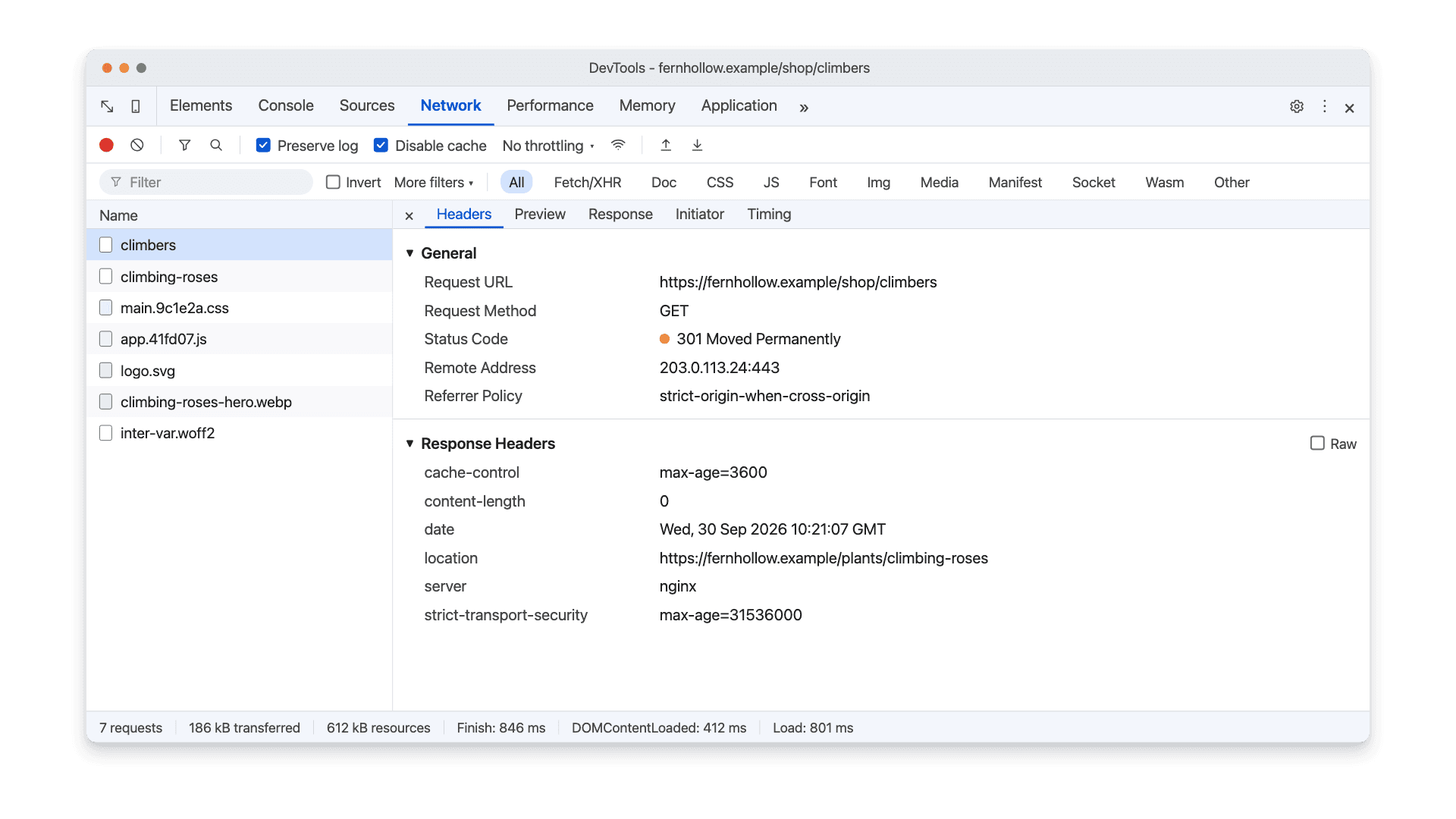
If the status line says "from disk cache," the browser reused a stored redirect without contacting your server. Reload with the cache disabled before drawing conclusions. A 307 Internal Redirect on an http:// URL is usually Chrome upgrading to HTTPS on its own because of HSTS, not a response from your server; test the HTTP redirect with curl instead.
Check Every Redirected Link on a Site
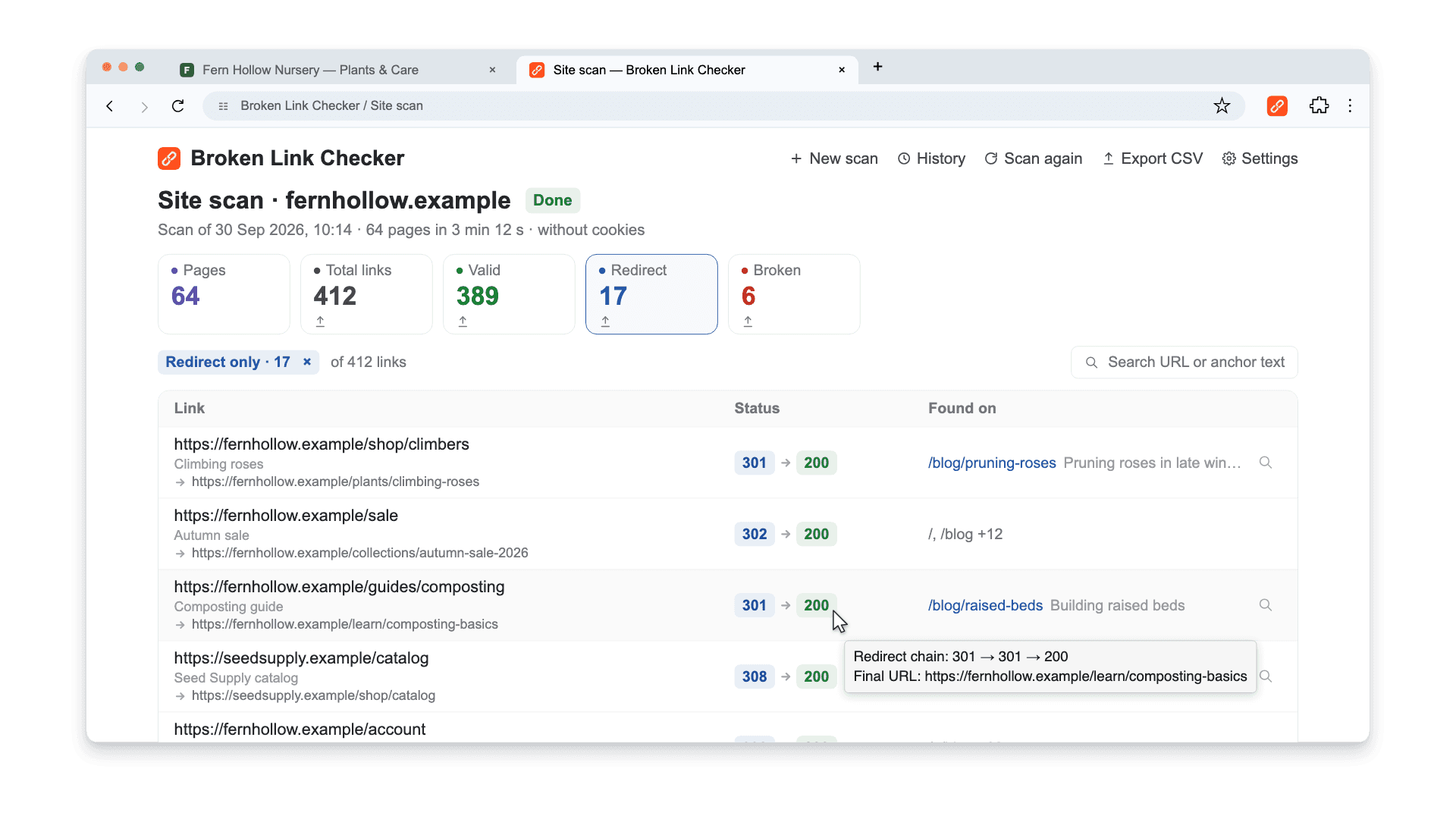
curl and DevTools check one URL at a time. To see which links across your pages go through a 301, 302, 307, or 308, run a scan with Broken Link Checker and click the Redirect card.
Each redirected link shows:
- The status of the first hop and the final status, such as
302 → 200 - The final URL under the link, so you can see where the redirect actually lands
- The full chain when you hover the status, such as
301 → 301 → 200for a two-hop chain - Found on: the page containing the link, with a locator that opens it and highlights the link
The CSV export includes Status Code, Redirect Chain, and Final URL columns for each source page. Sort by status code to review every 302 and ask whether the move is really temporary. Then update internal links so they point straight to the final URL. Links whose chain ends in a 404, a server error, or a loop are listed under Broken, not Redirect.
Use a page scan for the page you're editing, or the whole-site scan for up to 10,000 pages of a public site. The first three checks are free. The scan finds redirects on links that appear on your pages. Old URLs that nothing links to anymore, such as a list of pre-migration addresses, won't show up. Test those from a list with curl or a crawler in list mode.
Common 301/302 Mistakes
1. Getting a 302 by Default
The most common problem isn't a wrong decision but a missing one: the defaults listed under How to Set Up all send 302. The page works, so nobody notices until the old URL stays in search results for months.
2. Chains and Loops
/a → 301 → /b → 302 → /c still loads, but every hop adds a request and another point of failure. Googlebot follows up to 10 hops, then gives up. A loop never loads at all. Point every old URL directly at its final destination. The full procedure is in how to find and fix redirect chains.
3. Redirecting Deleted Pages to the Homepage
Sending dozens of removed pages to / looks tidy, but Google may treat irrelevant redirects as soft 404s. Redirect to a genuinely equivalent page, or return 404 or 410.
4. Mixing 301 and 302 in a Migration
Migrations often combine rules from several places: a CDN rule sends 301, a CMS plugin sends 302, and a leftover .htaccess line adds another hop. The result is mixed signals for URLs that all moved permanently. Before launch, export the redirect map, test every old URL, and confirm each returns a single 301 or 308 to the right page. The domain migration guide covers URL mapping and post-launch checks.
5. Leaving Internal Links on Redirected URLs
A redirect protects old bookmarks and backlinks. It isn't a reason to keep linking to the old address. Update navigation, content, canonicals, and sitemaps to the final URL so the redirect handles only outside traffic.
6. Removing Redirects Too Soon
Old URLs keep receiving visits from backlinks, emails, and bookmarks for years. Google recommends keeping redirects for generally at least a year; for URLs with valuable backlinks, keep them indefinitely. See reclaiming broken backlinks for what happens when they disappear.
Frequently asked questions
- Is a 301 or 302 redirect better for SEO?
- Neither is better in general; they mean different things. Use a 301 (or 308) when the move is permanent, because Google treats it as a signal that the new URL should be canonical and shown in search. Use a 302 (or 307) only when the original URL will return, because Google keeps treating the original as the preferred URL.
- What is the difference between 301 and 308?
- Both are permanent redirects, and Google treats them the same. A 301 allows a client to change a POST request to GET when following it; a 308 requires the same method. For ordinary page links there is no practical difference.
- How do I change a 302 redirect to a 301?
- Change the status in the rule that creates it: Redirect 302 to Redirect 301 in Apache, [R] to [R=301,L] in mod_rewrite, return 302 to return 301 in nginx, permanent: false to true in Next.js, or the redirect type in your CMS or CDN. Then verify the live response with curl or DevTools. Google needs to recrawl the URL before search results change.
- Should HTTP to HTTPS use a 301 or 302 redirect?
- Use a permanent redirect, 301 or 308. HTTPS is a lasting choice of preferred URL, just like choosing www or non-www. Redirect each HTTP URL to the same path on HTTPS in one hop, and keep internal links, canonicals, and sitemaps on the HTTPS version.
- Can I use a 302 for a URL I might change later?
- If the old URL is not coming back, use a 301 even if the destination might change later. You can update a 301 rule to point to a newer page at any time. A 302 is for cases where the original URL itself should stay the preferred one, such as a rotating campaign URL or an A/B test.

Pavel Molyanov
Creator of Broken Link Checker
Content marketer with 10+ years of experience. Founder of a content marketing agency. Writing about SEO, content workflows, and website maintenance.

Check Your Links in One Click
Broken Link Checker finds broken links and redirects on any page or across your whole website, and works in Google Docs and Sheets. Try 3 checks free, with no signup or card required.