How to Find and Fix Redirect Chains
A URL redirects once, the destination redirects again, and the browser eventually reaches the right page. Nothing looks broken, so the setup is easy to ignore.
That is a redirect chain. It still works, but every hop adds another request, another rule that can fail, and another place for search engines and users to receive the wrong destination. Chains commonly accumulate after redesigns, domain migrations, CMS changes, and years of editing URLs without updating older redirect rules.
The clean fix is simple in principle: identify the final valid URL, point every legacy redirect directly to it, and update links you control so they no longer trigger a redirect at all. This guide shows how to do that without deleting redirects that still protect valuable backlinks and old bookmarks.
What Is a Redirect Chain?
A redirect chain occurs when one URL redirects to another URL that also redirects before the request reaches its final response.
https://example.com/old-guide
  → 301 https://example.com/seo-guide
  → 301 https://example.com/guides/technical-seo/
  → 200 https://example.com/guides/technical-seo/
This example contains two redirects, or two hops, before the final 200 OK page. A direct redirect would remove the intermediate request:
https://example.com/old-guide
  → 301 https://example.com/guides/technical-seo/
A single redirect is not a chain. The chain starts when the first redirect target returns another redirect.
Redirect chains can contain different response codes:
301or308for permanent redirects302or307for temporary redirects- A mixture of permanent and temporary redirects
- A final
200,404,410,5xx, or network error
If you need to choose the correct redirect type, use our separate guide to 301 vs 302 redirects. The problem here is not merely which code appears. It is that the request must pass through multiple destinations before it finishes.
Redirect Chain vs Redirect Loop
A redirect chain eventually ends. A redirect loop sends the request back to a URL it has already visited, so it never reaches a final page.
| Pattern | Example | User result |
|---|---|---|
| Direct redirect | A → C | Page C loads after one redirect |
| Redirect chain | A → B → C | Page C loads after multiple redirects |
| Broken chain | A → B → 404 | The request ends on an error |
| Redirect loop | A → B → A | Browser stops with “too many redirects” |
A loop is an outright failure and should be fixed immediately. A chain is usually a maintenance and performance problem rather than a broken page, but it becomes urgent when it ends on the wrong URL, an error, or another domain you no longer control.
Are Redirect Chains Bad for SEO?
Redirect chains are not an automatic ranking penalty. Google can follow them. Google's current site migration documentation says Googlebot can follow up to 10 hops, while recommending redirects that point directly to the final destination. If a direct redirect is impossible, Google advises keeping the chain low—ideally no more than three redirects and fewer than five.
The practical costs still matter.
Every Hop Adds Latency
The browser cannot request the next URL until it receives the current redirect and reads its Location header. That extra round trip happens before the final document can load. Google's web performance guidance recommends minimizing redirects because each one requires another HTTP request.
The impact varies with network distance, connection reuse, CDN placement, and server response time. One fast same-origin redirect may be barely noticeable. Several cross-origin redirects on a slow mobile connection are not.
Chains Create More Failure Points
A three-hop chain depends on every redirect rule and every domain in the path continuing to work. A deleted intermediate rule, expired domain, invalid TLS certificate, or accidental redirect to a login page can break the entire journey.
This matters most for old URLs that still have backlinks. The first URL may be correct, but a failure two hops later still sends referral visitors to an error. For recovery strategies, see our guide to finding and reclaiming broken backlinks.
Crawlers Must Process More URLs
Search engines need to fetch and interpret every step before reaching the final content. Long chains make URL migrations slower to understand and create unnecessary requests. They also make technical audits harder because the linked URL, intermediate URLs, declared canonical, and final indexable page may all differ.
Internal Signals Can Become Inconsistent
A site may link internally to URL A, list URL B in its sitemap, declare URL C as canonical, and finally redirect to URL D. Even if every individual rule works, the combined signals are unnecessarily difficult to maintain.
The preferred state is consistent:
- Internal links point to the final
200 OKURL - XML sitemaps contain the final URL
- Canonical tags reference the final URL
- Hreflang annotations use final URLs
- Historical URLs redirect directly to the final URL
How Many Redirects Are Too Many?
For links and redirect rules you control, the target is one redirect or none.
- Zero hops: Best for current internal links, navigation, canonicals, hreflang, and sitemap URLs.
- One hop: Normal for an old URL, backlink, bookmark, or domain that permanently moved.
- Two or three hops: Usually works, but should be shortened when you control the path.
- Four or more hops: High-priority cleanup, especially for important landing pages.
- A loop or a chain ending in an error: Broken and urgent, regardless of length.
Google's 10-hop capability is a crawler limit, not an optimization target. “Google can follow it” does not mean the chain is the best version to keep.
Why Redirect Chains Happen
Most chains are not created deliberately. They grow one reasonable change at a time.
Repeated URL Changes
An article moves from /blog/post to /resources/post, then to /guides/post. Instead of updating the original redirect, each migration adds a new rule:
/blog/post → /resources/post → /guides/post
The same pattern appears during domain migrations when an old domain redirects to a temporary domain that later redirects to the current one.
Protocol, Host, and Path Normalization
A single click can trigger several site-wide rules:
http://example.com/page
  → https://example.com/page
  → https://www.example.com/page
  → https://www.example.com/page/
HTTP-to-HTTPS, non-www-to-www, lowercase, and trailing-slash rules are individually valid. The problem is applying them sequentially instead of normalizing the request in one redirect.
CMS and Plugin Rules
WordPress redirect plugins, SEO plugins, e-commerce platforms, and hosting dashboards can all create redirects. A manually added server rule may send a URL to a destination that the CMS redirects again.
CDN and Origin Rules Overlap
A CDN can enforce HTTPS or rewrite a hostname before the origin server applies its own redirect. Because the rules live in different dashboards or configuration files, neither layer looks wrong in isolation.
Old Internal Links Survive a Migration
The server redirect is correct, but navigation, templates, or older articles still link to the previous URL. This may create only one hop, not a chain, yet it is the usual starting point for future chains. Our pre-redesign link audit covers how to catch these links before launch.
How to Find Redirect Chains
Use a current-page check for a quick answer, a site scan for links across a public site, and a separate URL list for historical addresses that are no longer linked.
Method 1: Scan a Page or Site With a Browser Extension
Open the page you want to audit and run Broken Link Checker, or start a whole-site scan from the site's address. Filter the results to Redirect and inspect the status sequence and final URL for each redirected link. Also filter Broken: a link whose redirect chain ends at 404, 5xx, or a network failure belongs there rather than in the successful redirect group. The CSV export includes the source URL, status codes, redirect chain, and final destination.
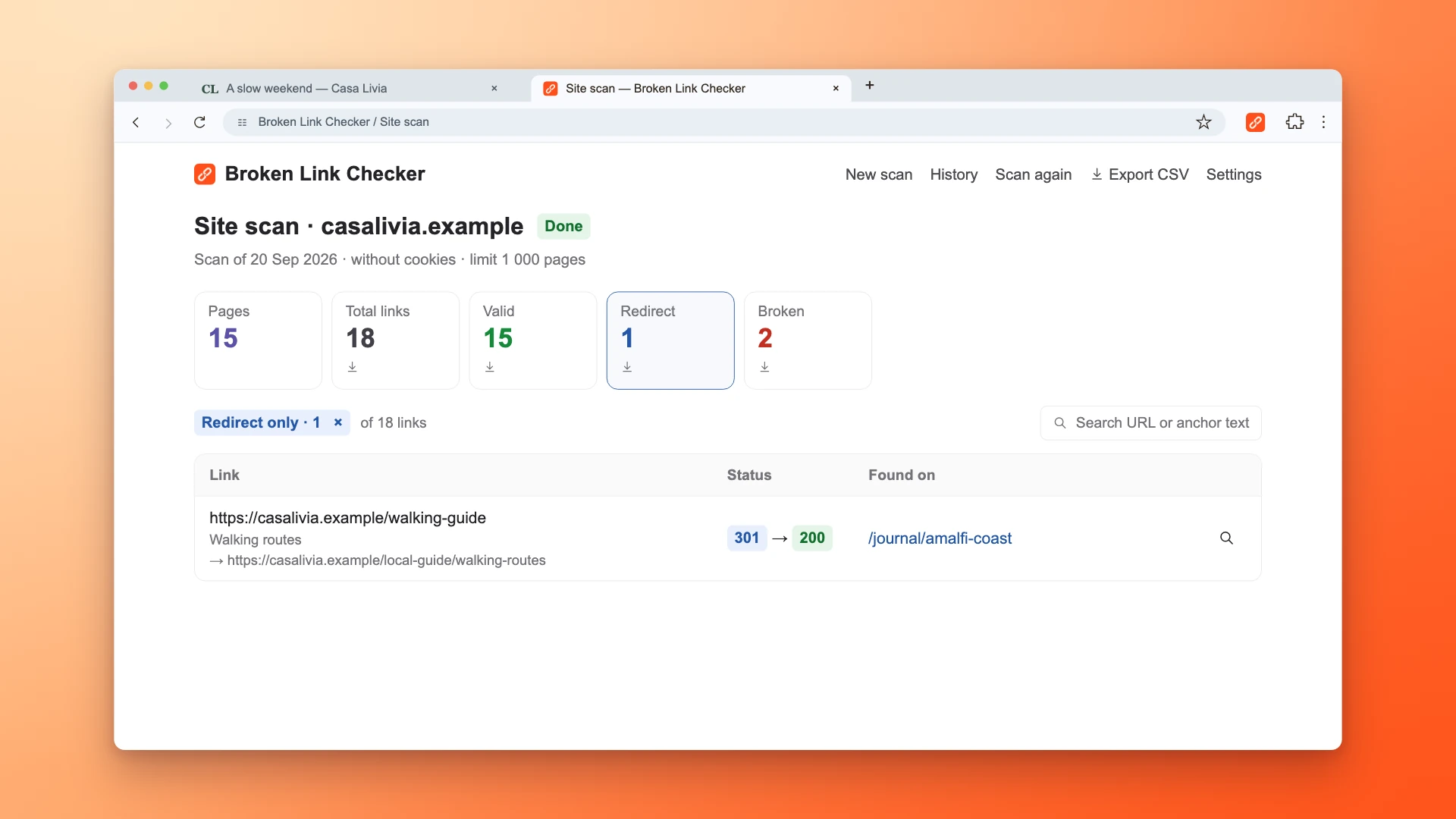
This method is well suited to:
- Checking a newly published or edited page
- Reviewing navigation and footer links
- Validating a landing page before a campaign starts
- Testing a current staging page that a cloud crawler cannot access
- Confirming fixes immediately in the browser
The whole-site mode is manually started, accepts a limit from 1 to 10,000 pages, and stays within the same normalized host (www and non-www are treated as the same host). It uses links and sitemap URLs for discovery, but it does not crawl every subdomain or guarantee that every page is reachable. Keep the scanner tab open; for JavaScript-heavy sites, keep it in the foreground while pages render.
Method 2: Use Chrome DevTools
Chrome records each network request and its status code.
- Open the starting URL in Chrome.
- Open DevTools and select Network.
- Enable Preserve log so requests remain visible across navigation.
- Reload or navigate to the starting URL.
- Filter to Doc and inspect the status codes in order.
- Select each redirect and check the
Locationresponse header.
Chrome's official Network panel reference confirms that Preserve log retains requests across page loads. DevTools is particularly helpful when cookies, JavaScript, or browser-specific behavior changes the path.
Method 3: Trace the Chain With curl
Use a normal GET request, follow redirects, discard the response body, and print the response headers:
curl -sS -L -D - -o /dev/null --max-redirs 10 \
  https://example.com/old-page \
  | grep -Ei '^(HTTP/|location:)'
Typical output:
HTTP/2 301
location: https://example.com/intermediate-page
HTTP/2 302
location: https://www.example.com/final-page
HTTP/2 200
Do not rely only on curl -I. It sends a HEAD request, and some servers handle HEAD differently from the GET request used for a normal page visit. If the results disagree with Chrome, repeat the test with GET and compare the request context.
Method 4: Crawl the Entire Site
For a site-wide audit, use Screaming Frog, Ahrefs Site Audit, Sitebulb, or another crawler that exports every hop and the linking source.
In Screaming Frog:
- Crawl the site or upload a migration URL list in List mode.
- Open Reports → Redirects → Redirect Chains.
- Export the report.
- Review the starting URL, number of redirects, loop flag, final URL, and final status.
Screaming Frog's official bulk redirect guide explains that this report maps the source, every hop, the final destination, and redirect loops.
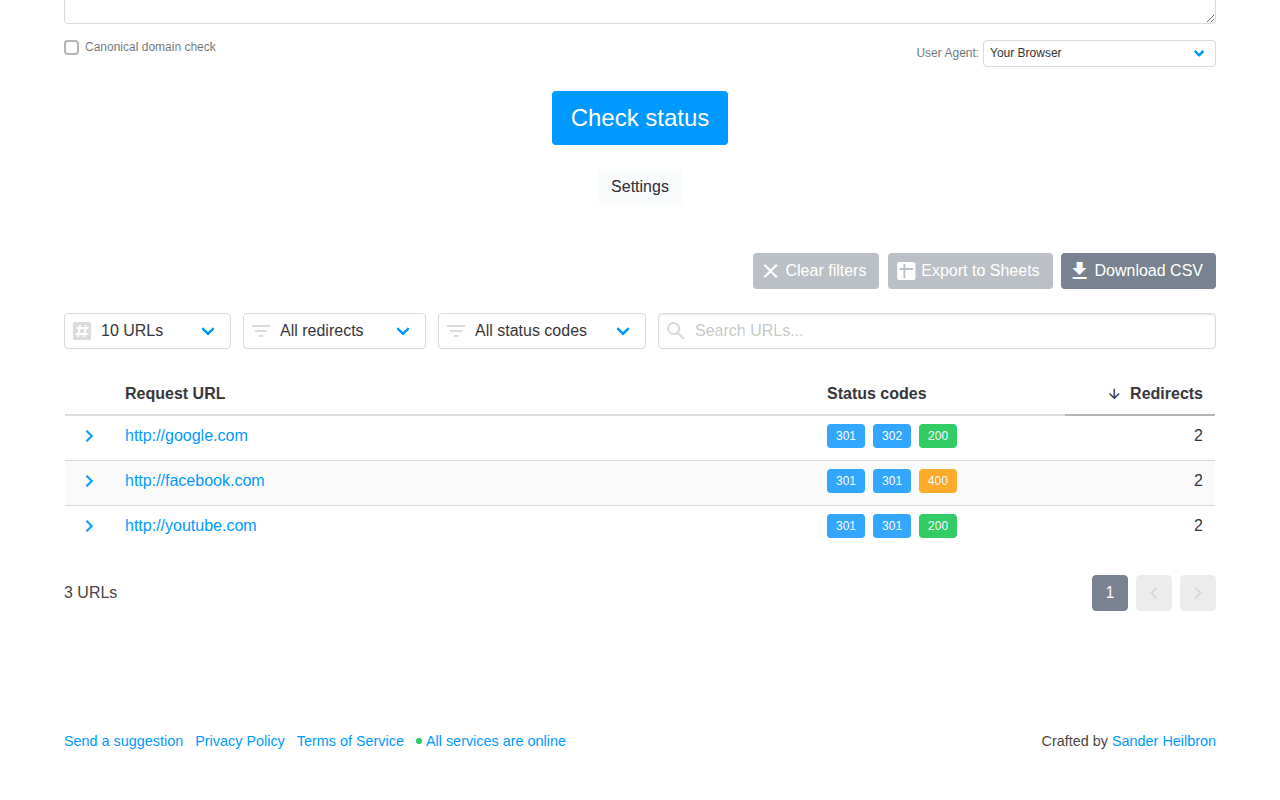
For a migration, test the complete list of historical URLs—not only URLs discovered by crawling the new site. An old URL with backlinks may have no internal links and therefore never appear in a normal crawl.
How to Prioritize Redirect Chains
Do not process a large export alphabetically. Prioritize by user impact and the value of the starting URL.
| Priority | Fix first when the chain… | Why |
|---|---|---|
| Critical | Loops or ends in 4xx, 5xx, timeout, or the wrong destination | Users and crawlers cannot reach the intended content |
| High | Starts from a high-traffic page, revenue page, campaign URL, or valuable backlink | The extra risk affects important visits and signals |
| High | Contains four or more redirects | It is long enough to create meaningful fragility and latency |
| Medium | Is triggered by your navigation, templates, canonical, hreflang, or sitemap | You fully control the source and can remove the unnecessary request |
| Medium | Mixes permanent and temporary redirects without a real temporary use case | The intended canonical destination is unclear |
| Low | Is a short chain on an external domain you do not control | You may only be able to update or replace your outbound link |
Add traffic, backlinks, conversion role, chain length, final status, and owner columns to the crawl export. That turns a raw error list into a workable cleanup plan.
How to Fix a Redirect Chain
A complete fix usually has two parts: flatten the redirect rules and update the links that trigger them.
Step 1: Confirm the Correct Final URL
Do not shorten a chain until you know where it should end. The final URL should:
- Return
200 OK - Contain the content users expect from the starting URL
- Be indexable when it is intended for search
- Use the preferred protocol, hostname, case, and trailing-slash format
- Declare itself as canonical, unless there is a deliberate alternative
If no relevant replacement exists, a truthful 404 or 410 can be better than redirecting users to an unrelated homepage. Google's migration guidance warns that irrelevant mass redirects may be treated as soft 404s.
Step 2: Point Every Legacy URL Directly to the Final URL
Suppose the current rules are:
/old-page → /middle-page → /new-page
Keep both historical source URLs working, but make them direct:
/old-page → /new-page
/middle-page → /new-page
Do not delete /old-page merely because you updated your internal links. It may still receive visitors from backlinks, bookmarks, emails, PDFs, and old campaign assets.
For Nginx, the simplified change looks like this:
# Before
location = /old-page { return 301 /middle-page; }
location = /middle-page { return 301 /new-page; }

# After
location = /old-page { return 301 /new-page; }
location = /middle-page { return 301 /new-page; }
The same principle applies to Apache, a CMS redirect manager, a hosting dashboard, or CDN redirect rules. Change the destination; do not stack another redirect on the end.
Step 3: Update Links You Control
Replace internal links to /old-page or /middle-page with /new-page. Start with:
- Navigation, footer, breadcrumbs, and reusable templates
- High-traffic pages and campaign landing pages
- Canonical and hreflang annotations
- XML sitemap entries
- Structured data URLs
- Email templates, paid ads, and public profiles
Updating the redirect rule protects old entry points. Updating the source links removes the redirect for future visits. You usually need both.
Step 4: Resolve Conflicting Layers
If the chain crosses Cloudflare, Nginx, and WordPress, list which layer owns each hop. Then consolidate the behavior at the earliest appropriate layer or make the layers agree on one final destination.
Common conflicts include:
- CDN enforces HTTPS, while the origin also redirects HTTP
- CDN changes the hostname, while WordPress changes it again
- Server adds a trailing slash, while the application removes it
- A redirect plugin sends traffic to a URL changed by another plugin
- Old wildcard rules run before specific page rules
Test from the public URL after every change. A configuration file can look correct while another layer still adds a hop.
Step 5: Retest Every Starting URL
Retest the original source URLs, not only the final page. Confirm that:
- Each legacy source reaches the intended destination
- The chain contains no unnecessary intermediate URL
- The final response is
200 OK - No redirect loop appears with query strings or trailing-slash variants
- Internal links now point directly to the final URL
- The fix works without relying on your logged-in cookies or browser cache
For a large migration, rerun the same URL list and compare the before-and-after exports. A normal site crawl is not enough if the historical sources are no longer linked internally.
Redirect Chain Cleanup Checklist
- Export all redirect chains and loops
- Include historical URLs from migrations, backlinks, and old sitemaps
- Confirm the intended final URL for each group
- Fix loops and chains ending in errors first
- Point every legacy source directly to the final destination
- Preserve redirects for old URLs that may still receive visits
- Update internal links to bypass redirects
- Replace redirecting URLs in canonical, hreflang, and sitemap data
- Check CDN, server, CMS, and plugin rules for overlap
- Retest with a browser and a crawler
- Monitor logs and future crawls for chains returning after URL changes
The Bottom Line
A working redirect chain is still unfinished maintenance. The best setup is not “the browser eventually gets there.” It is a direct link to the final page for URLs you control, plus a single permanent redirect for every historical URL that still needs to work.
Trace the full path, prioritize chains by impact, update the original redirect rules, and fix the source links. That reduces latency, removes failure points, and makes migrations, audits, and future URL changes much easier to manage.
Frequently asked questions
- What is a redirect chain?
- A redirect chain occurs when one URL redirects to another URL that also redirects before the request reaches its final response. For example, URL A redirects to B, B redirects to C, and C finally returns 200 OK.
- How many redirects are too many?
- For URLs you control, aim for one redirect or none. Googlebot can follow up to 10 hops, but Google recommends redirecting directly to the final destination and keeping unavoidable chains ideally to no more than three redirects and fewer than five.
- Do redirect chains hurt SEO?
- A redirect chain is not an automatic ranking penalty, and search engines can follow short chains. However, every hop adds latency, consumes another crawl request, creates another failure point, and can make canonical and migration signals harder to maintain. Chains that end in errors or irrelevant destinations are more serious.
- What is the difference between a redirect chain and a redirect loop?
- A redirect chain eventually reaches a final response. A redirect loop sends the request back to a URL it already visited, such as A to B to A, so the browser stops with a too many redirects error.
- How can I find redirect chains on a website?
- Use Broken Link Checker or Chrome DevTools for a single page, Broken Link Checker's manually started site scan for links across a public site, curl for an individual URL, and a dedicated crawler or old-URL list when you need broader inventory coverage. A useful report should show the source URL, every hop, the final URL, and the final status code.
- Should I remove old redirects after updating internal links?
- Usually no. Update internal links so current visitors go directly to the final URL, but keep a direct redirect from historical URLs that may still receive backlinks, bookmarks, referral traffic, or visits from old documents and campaigns.
- Can a redirect chain mix 301 and 302 responses?
- It can, but the mixture should reflect a real temporary step. If the final move is permanent, collapse the chain and use a direct permanent redirect. An unexplained mix of permanent and temporary signals makes the setup harder to interpret and maintain.

Pavel Molyanov
Creator of Broken Link Checker
Content marketer with 10+ years of experience. Founder of a content marketing agency. Writing about SEO, content workflows, and website maintenance.

Check Your Links in One Click
Broken Link Checker finds broken links and redirects on any page or across your whole website, and works in Google Docs and Sheets. Try 3 checks free, with no signup or card required.