A Screaming Frog Alternative for Checking Broken Links in Chrome
If you need to find broken links and hand someone a list of pages to fix, Broken Link Checker is a browser-based alternative to Screaming Frog for that task. Open a site in Chrome, start a whole-site scan, and review failed destinations alongside the pages that link to them.
Screaming Frog remains a better fit when the job includes a broader technical SEO audit. The decision is about the work you need to finish: checking links, or investigating many aspects of a website in one crawler.
Which Tool Fits Your Task?
| Task | Starting point |
|---|---|
| Check links after editing a page in Chrome | Broken Link Checker page scan |
| Find broken links across a public website and export source pages | Either tool; choose the workflow you prefer |
| Check references inside a Google Doc or Sheet | Broken Link Checker's document workflow |
| Audit titles, metadata, canonicals, and other technical SEO signals | Screaming Frog |
| Run configurable, scheduled desktop crawls | Screaming Frog's paid features |
| Check a small site repeatedly without paying | Consider Screaming Frog's free tier and its 500-URL limit |
An SEO specialist can still benefit from a quick browser check between larger audits. A website owner can also use Screaming Frog successfully: its basic broken-link workflow does not require configuring every advanced setting.
What You Get with Broken Link Checker
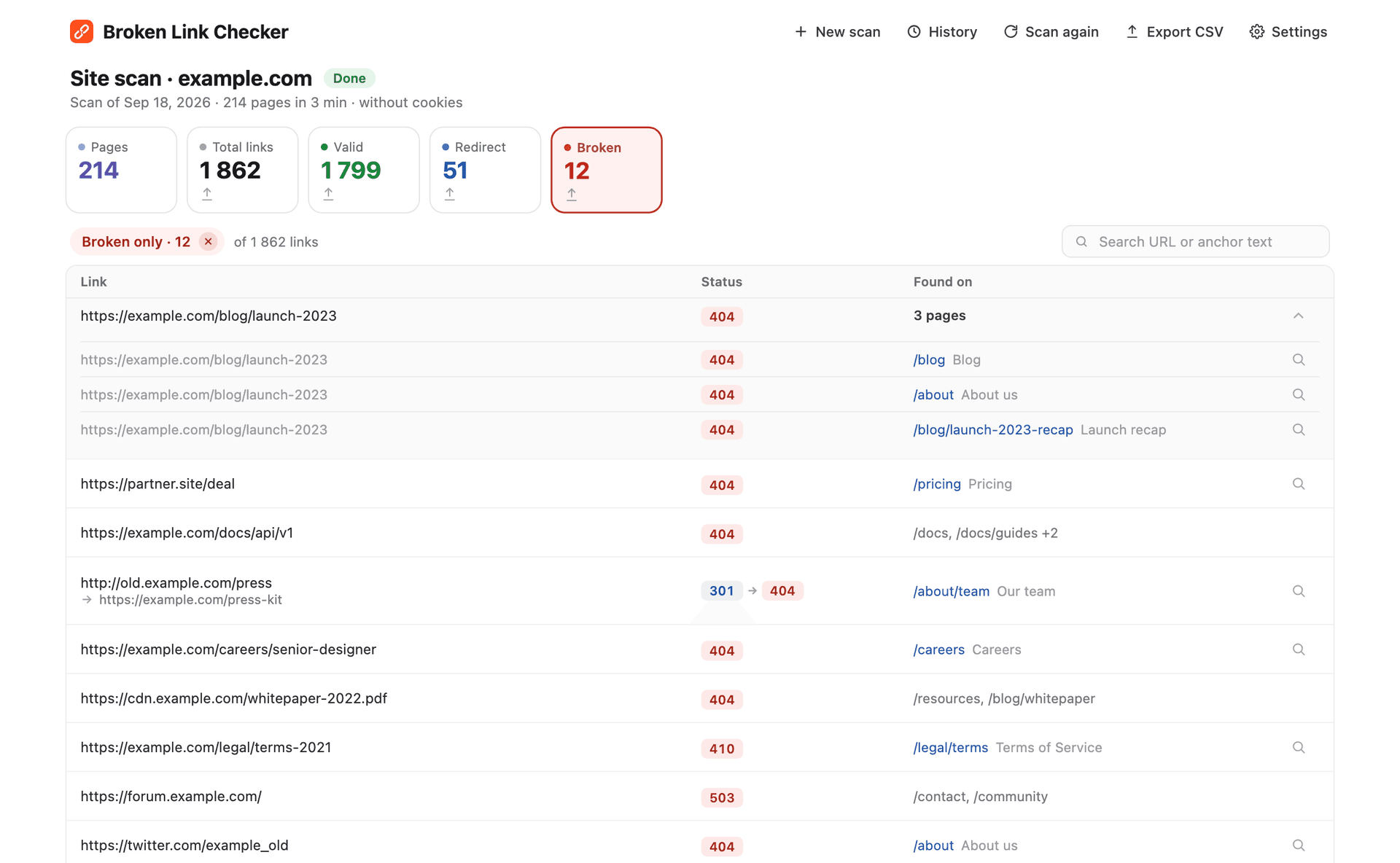
The extension has two website modes. A page scan checks links on the page you have open. Whole site discovers pages across the website and tests the links it finds, including links to other domains. It checks external destinations without recursively crawling those other websites.
The useful part of the report is the connection between a broken URL and its source pages. A missing destination alone is not enough: the editor needs to know where to change the link. Expand the source list, open the page, and use the locator to find the affected link. You can export all links or only broken ones to CSV.
Run a Whole-Site Check in Chrome
- Install Broken Link Checker and open a page on the public website you want to check.
- Click the extension icon, then Whole site.
- Confirm the site address and page limit, then click Start scan.
- Keep the scan tab open. When pages load in the right-hand panel, keep that tab active so their links can be discovered.
- Filter to Broken, inspect the source pages, verify the failures, and export the report if someone else will make the edits.
The default limit is 1,000 pages, adjustable up to 10,000 pages per scan. These are page limits, not a promise to discover every possible URL. Unlinked pages and content outside the discovery path may be absent. Closing the scan tab stops the running scan. This is a manually started browser workflow, not unattended monitoring.
See the whole-site scan feature page for the current workflow and limits.
Documents and Spreadsheets Are Another Use Case
The same extension also checks links in Google Docs and Sheets, without first turning the file into a website crawl. This is useful for editorial drafts, onboarding resources, partner lists, and campaign spreadsheets. Results stay separate from the source file; the extension does not edit your document.
Follow the guides for Google Sheets or Google Docs for those workflows and their access limitations.
How Screaming Frog Handles the Same Link-Checking Task
Screaming Frog's documented workflow starts with a website crawl. Afterward, filter the Response Codes tab to Client Error (4xx), select a failed URL, and inspect Inlinks to find the pages linking to it. A bulk export can include broken destinations and their incoming links. Server errors should be reviewed separately from 4xx responses. See the official broken-link tutorial.
Both tools show which pages contain a broken link. Broken Link Checker offers this workflow in Chrome, with a focused report and a locator that highlights the link on its source page.
For a broader range of checking methods, including Search Console and online checkers, see how to find broken links on a website.
Features and Pricing Side by Side
| Dimension | Broken Link Checker | Screaming Frog SEO Spider |
|---|---|---|
| Where you work | Chrome extension | Desktop application |
| Website link checking | Current page or whole-site scan | Website crawl with response-code reports |
| Find source pages | Source list and page link locator | Inlinks and incoming-link exports |
| Export | CSV reports | Crawl and bulk report exports |
| Free access | First 3 checks, then a paid plan | Free tier with a 500-URL crawl limit |
| Paid price | $2.90/month, $19/year, or $29 lifetime | £199/year for an individual licence; see vendor page for currencies and current pricing |
| Scan scope | Up to 10,000 pages per whole-site scan | Paid tier removes the 500-URL cap; resources still constrain crawl size |
| Broader technical SEO | Focused on link checks | Extensive audit features; availability varies by tier |
| Scheduling | Website scans start manually | Available with a paid licence |
Product pricing was checked on September 20, 2026. Broken Link Checker's paid plans have the same feature set; a higher-priced plan is not needed to unlock whole-site scanning. Screaming Frog's free version already includes broken-link checking, and its paid tier adds capabilities including scheduling and JavaScript rendering. Confirm current terms on its official pricing page.
The limits are expressed differently: pages in our whole-site mode and URLs in Screaming Frog's tier description. Treating those numbers as identical measures would overstate the comparison.
When Screaming Frog Is the Better Choice
Choose a full SEO crawler when broken links are one part of a larger investigation. For example, a migration audit can require checking metadata, indexability, canonical signals, and crawl behavior as well as failed destinations. Splitting all of that into unrelated tools can create more work than using one crawler.
Screaming Frog's product overview describes its broader auditing capabilities. If those are your actual requirements, our extension is not a replacement for the full suite. Likewise, if you already have an established Screaming Frog workflow and only need a report from the current crawl, there may be no reason to switch.
For small public sites, the free 500-URL tier is also a legitimate option. Broken Link Checker is not an unlimited free alternative: its free access is a three-check trial.
When the Extension Is Enough
Start with Broken Link Checker when your brief is concrete: “Find failed links, show me where they appear, and give me a report I can use.” Examples include checking a business website, reviewing a changed page, or verifying references before sending a document.
You can stay in Chrome, use the default scan settings, and focus on the results. The extension does have settings and limits; the benefit is that a routine check does not require designing a technical SEO audit first.
After either tool reports errors, verify them before making changes. A 403 can be an automated-request block, a 429 can be a rate limit, and a temporary 5xx does not prove a page is permanently gone. Redirects also need context: a redirect to a useful replacement is different from one ending in a 404.
Frequently Asked Questions
Is Broken Link Checker a Complete Screaming Frog Replacement?
No. It is an alternative for link checking in Chrome, including whole-site scans and document checks. Use a broader crawler when the work includes other technical SEO analysis.
Can I Use It Without Installing a Desktop Crawler?
Yes. You install the Chrome extension and run checks from the browser. It is not a no-install online service, and browser scans still need an open scan tab.
Which One Finds More Broken Links?
This comparison does not establish that. Coverage depends on discovery, rendering, access, crawl limits, and request handling. A count from one configuration is not a universal accuracy score. For important audits, inspect scope and verify representative results.
Can I Check My Website for Free?
Broken Link Checker offers three free checks, and one whole-site scan counts as one check. Screaming Frog offers a recurring free tier limited to 500 URLs per crawl. Choose according to your site's scope and how often you need to check it.

Pavel Molyanov
Creator of Broken Link Checker
Content marketer with 10+ years of experience. Founder of a content marketing agency. Writing about SEO, content workflows, and website maintenance.
Check Your Links in One Click
Broken Link Checker finds broken links and redirects on any page or across your whole website, and works in Google Docs and Sheets. Try 3 checks free, with no signup or card required.