Link Rot in 2026: New Research Shows How Fast Your Citations Are Dying
Link rot makes evidence harder to verify: a source moves, disappears, or stops containing the material an article cited. Research can help explain the scale of that problem, but there is no single annual failure rate that predicts what will happen to every website.
This guide compares a 2026 academic study with older research from Pew and Ahrefs. They examine different things: scholarly citations, webpage availability, and lost backlinks. Keep those distinctions when quoting the numbers or planning a maintenance budget. For the basic repair workflow, start with our link rot prevention guide.
Link Rot Statistics: Sources, Samples, and Limits
| Source and publication date | Sample and observation scope | Reported result | What the number does not mean |
|---|---|---|---|
| Sadatmoosavi, Khasseh and Tajedini, January 2026 | 2,886 web citations from 608 articles in four LIS journals; study covers 2005–2025 | Accessibility: 87% for citations aged 0–5 years; 38% for those over 10 years | A forecast for every blog's reference list |
| Pew Research Center, May 2024 | Just under 1 million pages sampled from Common Crawl, 2013–2023; checked in October 2023 | 25% inaccessible overall; 38% of the 2013 sample | The percentage of outbound links broken on a typical page |
| Ahrefs, article updated February 2024 | Links to 2,062,173 websites; historical data beginning January 2013 | 66.5% classified as rotted; 74.5% lost including temporary errors and other issues | A count consisting entirely of destination 404s |
The publication year is not necessarily the measurement year. The Pew and Ahrefs figures above are historical findings discussed here in 2026, not new crawls conducted for this article.
What the 2026 Citation Study Found
The publisher's abstract reports permanent link rot increasing from 5% in 2012 to 15% in 2025. It also reports differences between destination types: 93% accessibility for .edu versus 42% for .com, and 92% for PDFs versus 41% for database-driven content.
These are results for the sampled library and information science literature. This summary uses the public abstract; the full paper is access-restricted. It does not establish that a particular commercial source will disappear or that a PDF will remain available indefinitely.
When applying the findings, distinguish an age group from an exact age. The 0–5-year group is not a measurement of every five-year-old article. Choose sources for authority and relevance, and preserve the version supporting your claim.
Pew: Missing Pages and Broken References Are Different Metrics
Pew's webpage analysis measures whether sampled pages remained accessible. Its separate link analysis reports at least one broken link on 23% of sampled news pages, 21% of government pages, and 54% of Wikipedia pages' reference sections.
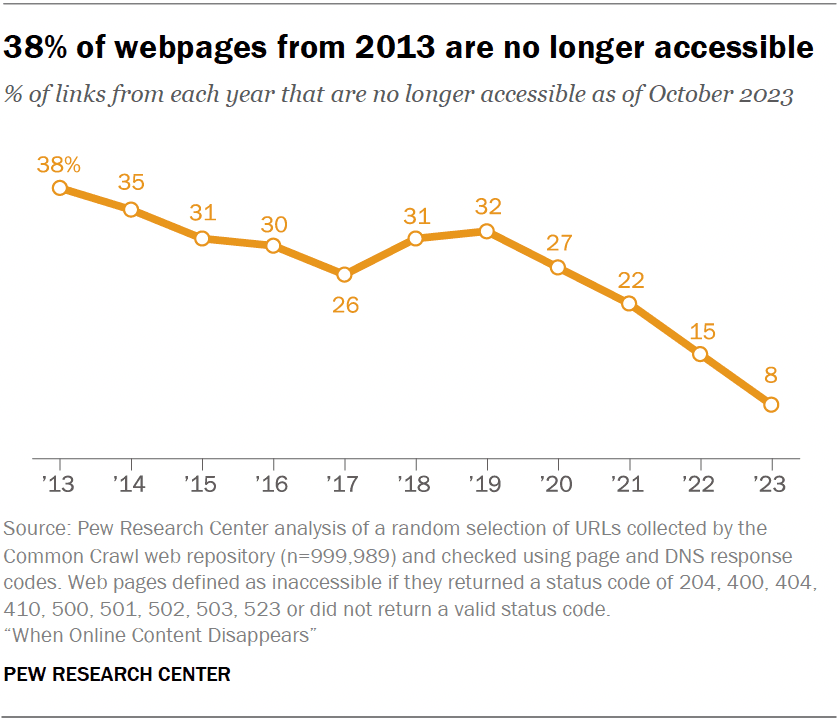
A page with one broken reference and a page with many broken references both count toward a measure of pages containing at least one broken link. That is different from the proportion of individual links that fail.
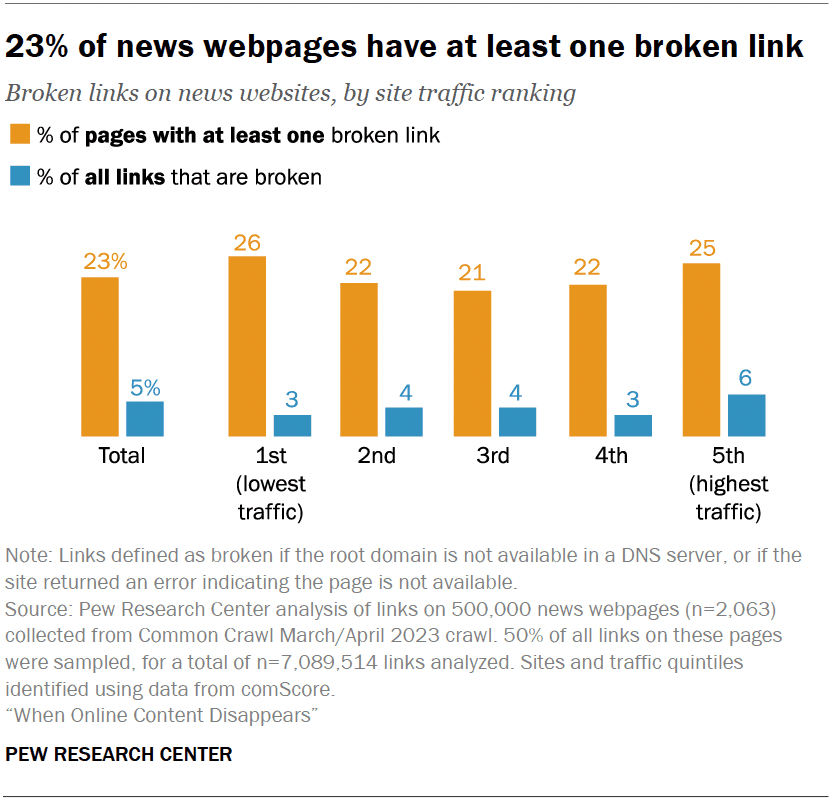
For your own reporting, track both affected source pages and failed destination URLs. Otherwise, a single dead source cited throughout a site can look like many independent failures.
Ahrefs: A Lost Backlink Is Not Always a Broken Destination
Ahrefs includes several loss categories, such as removal of a link from a surviving page and disappearance of the linking page from its index. Its 74.5% total combines 66.5% classified as rotted, 6.45% with temporary errors, and 1.55% with other issues.
That distinction changes the repair. If another publisher removes a link, adding a redirect on your own site cannot restore it. If your destination moved, a relevant redirect may recover the visitor's path. If the crawler encountered a temporary failure, verify the live response before editing anything.
Use the broken backlink recovery guide to separate those cases. Recovery is not a guarantee of an immediate ranking increase.
What These Studies Do Not Establish
The studies support treating links as something that needs maintenance. Combining their headline percentages does not produce a universal decay curve or prove that every type of website is deteriorating at the same rate.
They also do not establish a broken-link percentage at which Google lowers rankings. There is no basis here for saying that 2% is harmless but 5% causes measurable traffic loss, or that analytics metrics such as bounce rate directly determine a site's helpfulness assessment.
Prioritize concrete consequences instead: a visitor cannot reach a product, an important page has disappeared, or a citation no longer supports a claim. Our guide to whether broken links affect SEO separates those problems from ordinary not-found responses.
The same applies to AI citations. A dead destination prevents readers from checking the evidence. That alone is a reason to fix it; these studies do not establish an AI ranking penalty or a universal outbound-link score. See broken links and AI search visibility for that separate discussion.
A New Tool: Internet Archive Link Fixer
On February 4, 2026, Automattic and the Internet Archive announced the free Wayback Machine Link Fixer for WordPress.
According to the announcement, it checks outbound links, looks for archived versions, and creates snapshots when none exist. When an original page goes offline, it directs readers to an archive; when the original recovers, it stops that redirection. It also archives your own posts when updated.
Treat archiving as a fallback to verify. Open the saved version and check that the relevant text, images, or downloadable material are actually present. A snapshot is not a guarantee that an interactive page will work, and an archive service cannot promise every capture will remain accessible forever.
The plugin is for WordPress. On other platforms, add an archive check to your editorial process. Neither approach replaces repairing your own missing pages and internal links.
Turn the Research into a Maintenance Workflow
1. Establish Your Own Baseline
Crawl your site and record the source page, destination, response, and check date. Separate internal links, external citations, images, and downloadable files. Retry timeouts and bot blocks before classifying them as broken.
Count unique failed destinations as well as affected pages. Note which failures interrupt navigation, installation, purchase, or verification of a key claim. Those consequences are a better starting point than applying another study's percentage to your site.
2. Repair the Destination or the Reference
| What you find | Useful action | Verification |
|---|---|---|
| Your page moved to an equivalent URL | Add a permanent redirect and update internal links | Old URL reaches the intended replacement; internal links go directly there |
| Your page was removed without a replacement | Keep a real 404 or 410 and remove stale references | Sitemap and internal links no longer submit the dead URL |
| An external source moved | Update the citation | Replacement still supports the claim |
| The original source is gone but an archive exists | Link to a relevant dated snapshot and label it as archived | The cited passage is present and readable |
| No usable evidence remains | Find a replacement source or revise the claim | The revised statement has support |
A live page can also fail this check: 200 OK does not prove that it still contains the original evidence. For the broader audit process, see how to find broken links.
3. Preserve Important Sources When Publishing
For a statistic or quotation, record the source title, author, publication date, original URL, and the passage supporting your statement. Use an available persistent identifier, such as a paper's DOI, and keep the article URL when it helps readers reach the source.
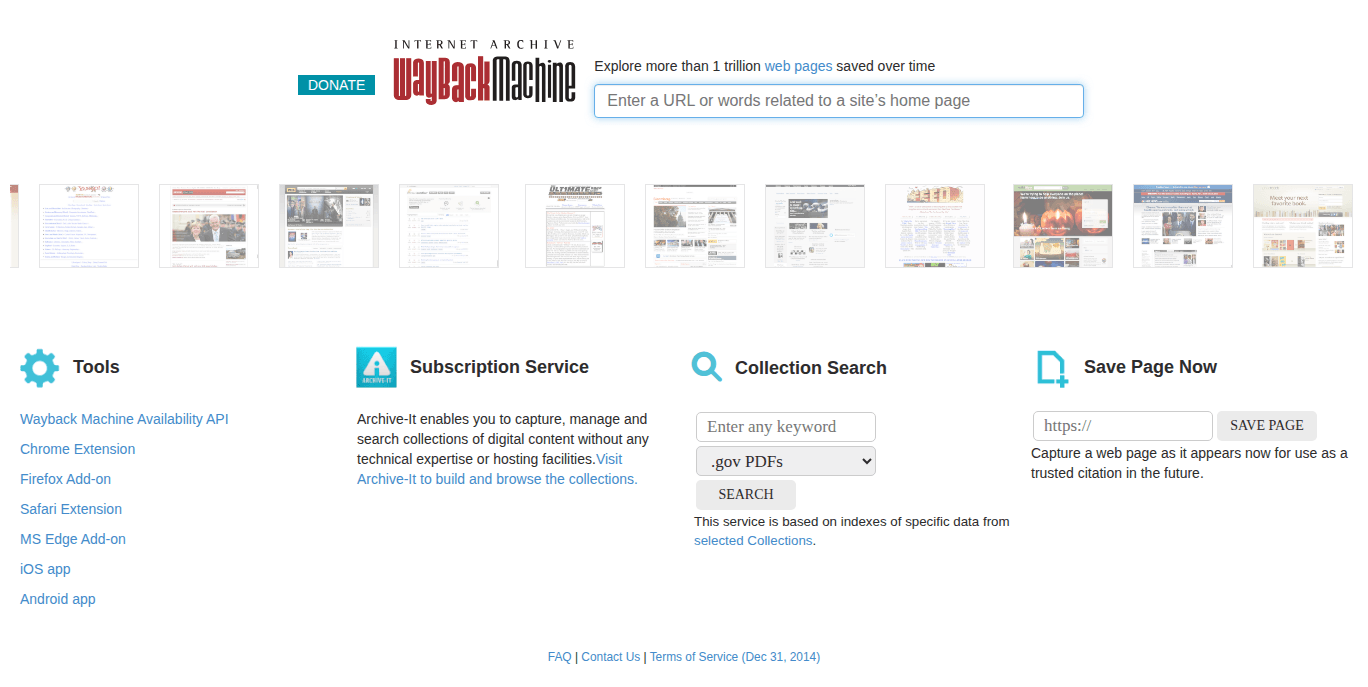
Request an archive copy for important public sources, then open the result. Record the actual snapshot URL and capture date rather than assuming a save request succeeded. Recheck the evidence when updating your article: an old snapshot preserves an old statement, not necessarily today's facts.
For your own pages, keep published URLs stable. A date, identifier, or query parameter is not inherently a broken link; changing a published address without preserving access is the problem.
4. Schedule Checks and Verify Repairs
Use the rate of change and the cost of failure to choose a schedule. A weekly crawl is a practical starting point for an active blog; check important pages after edits and migrations as well. See how often to check links and automatic monitoring for the setup.
After an alert, fix the source link or destination, check the affected page, and rerun the check. Record the resolution so an old failure does not keep returning as unexplained noise.
For an individual article, the Broken Link Checker extension provides an on-demand page scan. For a manual site-wide baseline, Whole site crawls discovered pages on the same host, lets you search by URL or anchor, and exports one CSV row per link and source page. A scheduled crawler covers recurring checks; reading the destination verifies that a citation still supports the text.
FAQ
How much link rot should I expect on a five-year-old article?
Measure the article's references. A study's age-group average is context, not a forecast for your content. Source selection, URL changes, and maintenance can make your results very different.
Is link rot getting worse?
The 2026 academic study reports worsening preservation within its sample. The studies compared here use different populations and definitions, so their percentages should not be combined into a single claim about acceleration across the entire web.
Are academic domains and PDFs always safer?
No. Neither a domain suffix nor a file format guarantees preservation. Cite the most authoritative relevant source, prefer its persistent URL when available, and verify an archive copy for important evidence.
Should I use the live source or an archived snapshot?
Use the live source for current information. When discussing a historical version or replacing an unavailable source, use a snapshot that contains the relevant evidence and identify its date. Readers should be able to tell which version supports the claim.
Does an archived link fix SEO automatically?
An archive can help readers recover evidence. It does not restore a missing page on your domain, repair your internal links, or guarantee better search rankings. Match the repair to the actual failure.

Pavel Molyanov
Creator of Broken Link Checker
Content marketer with 10+ years of experience. Founder of a content marketing agency. Writing about SEO, content workflows, and website maintenance.

Check Your Links in One Click
Broken Link Checker finds broken links and redirects on any page or across your whole website, and works in Google Docs and Sheets. Try 3 checks free, with no signup or card required.